AVAYA DOCUMENTATION CENTER
Find answers to your technical questions and learn how to use our products
Avaya Aura Presence Services Snap-in Reference
Configuring Presence Services attributes
- On the System Manager web console, navigate to .
- Click Attributes.
- On the Service Clusters tab, in the Cluster field, click the Presence Services cluster.
- In the Service field, click the Presence Services service.
- On the Attributes Configuration page, navigate to the Microsoft Federation group.
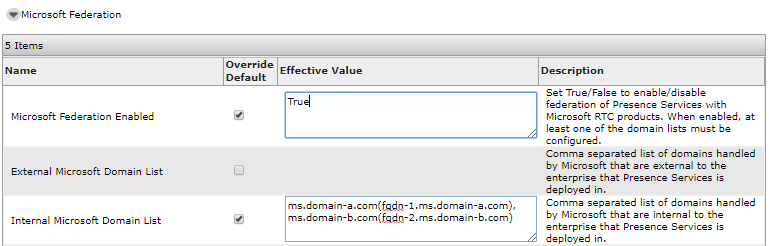
- In the Internal Microsoft Domain List field, in Effective Value, the domain name appears:
ADDITIONAL INFORMATION:If the extended hostname validation is enabled, the format is: domain-name followed by Front-End Server FQDN with parentheses enclosed.For example, for a Microsoft domain name (Microsoft Front-End Server FQDN).If Presence Services is federated with more than one Microsoft domains, use a comma to separate each domain and FQDN pair.
- To override the default value, select the Override Default check box.
- Click Commit.
STEP RESULT:The following screenshot shows Microsoft Federation Attribute configuration for federating with two Microsoft domains: ms.domain-a.com and ms.domain-b.com, with Front-End FQDNs for domain-1 and domain-2.