AVAYA DOCUMENTATION CENTER
Find answers to your technical questions and learn how to use our products
Avaya Aura Presence Services Snap-in Reference
Verifying the second virtual hard disk
- On the Virtual Machine Inventory page, select the Avaya Breeze® platform cluster node on which the new virtual hard disk is added.
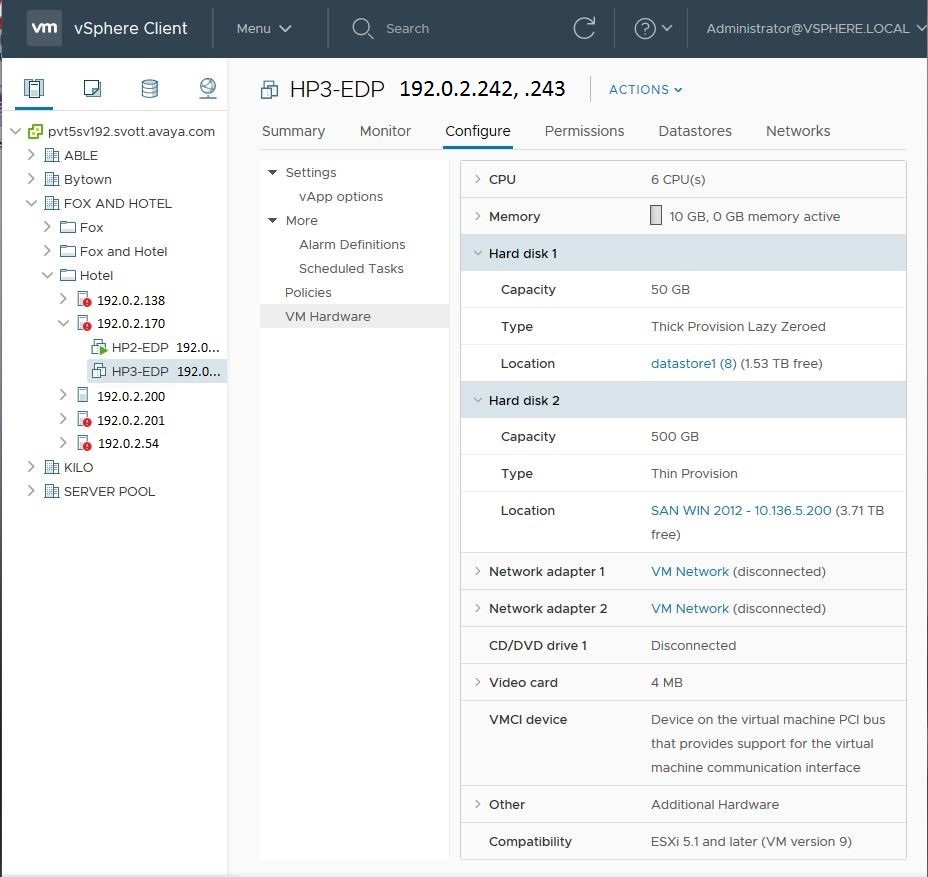
- Click the Configure tab, and then click VM Hardware to view the current list of hardware in the virtual machine.
- Verify that the virtual machine has two hard disks.
ADDITIONAL INFORMATION:The following example shows the original hard disk 1 is hosted on the local datastore, and the new second larger hard disk is hosted by the Win2012 SAN.