

AVAYA DOCUMENTATION CENTER
Find answers to your technical questions and learn how to use our products
Avaya Aura Presence Services Snap-in Reference
Providing reader access to an Aura user for Domino Collector to authenticate
An Aura user must have reader access to emails of those users whose calendar or out-of-office information must be collected.
- Log in to the Domino Administrator client.
- Click the Files tab and navigate to the folder.
ADDITIONAL INFORMATION:
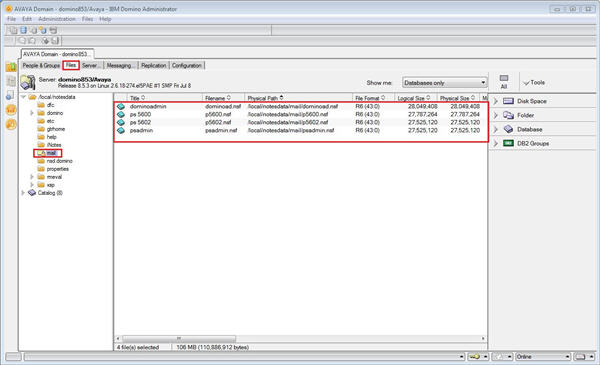
- Select the mail entries for the user whose calendar and out-of-office information you need to collect.
ADDITIONAL INFORMATION:For example, select the mail file of the user psadmin.Note:To collect calendar and out-of-office information for a new user, the administrator must navigate to this page and select the new mail file.
- Right-click the selected file, and click .
ADDITIONAL INFORMATION:The Manage Multiple ACLs dialog box displays.
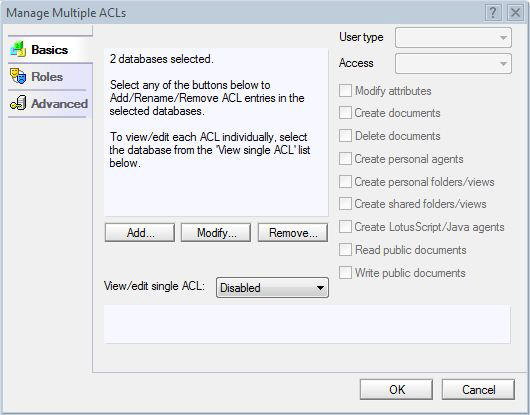
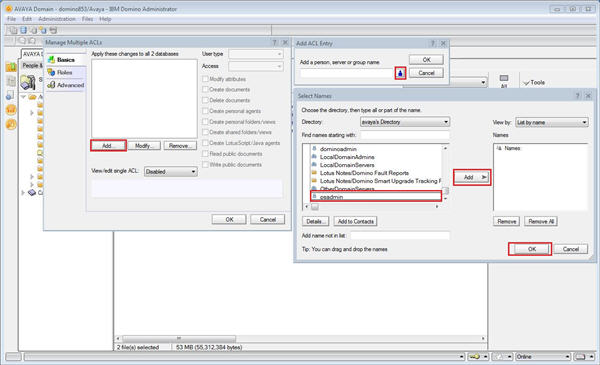
- Click Add....
ADDITIONAL INFORMATION:The Add ACL Entry dialog box displays.
- Click the person icon, and select the Aura user using the Select Names dialog box.
ADDITIONAL INFORMATION:For example, select the Aura user psadmin.
- Click Add to add the user to the Names pane.
- Click OK.
ADDITIONAL INFORMATION:
- In the User type field, select Person.
- In the Access field, select Reader.
ADDITIONAL INFORMATION:
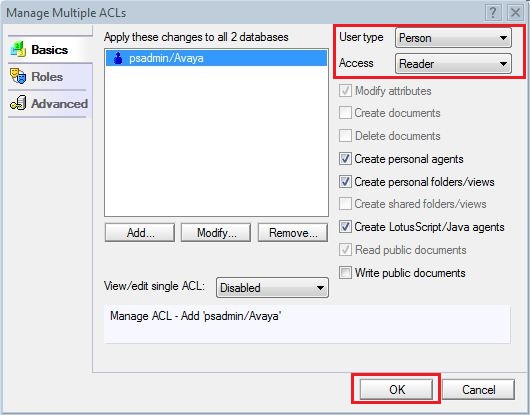
- Click OK.
- Click OK.