AVAYA DOCUMENTATION CENTER
Find answers to your technical questions and learn how to use our products
Avaya Aura Presence Services Snap-in Reference
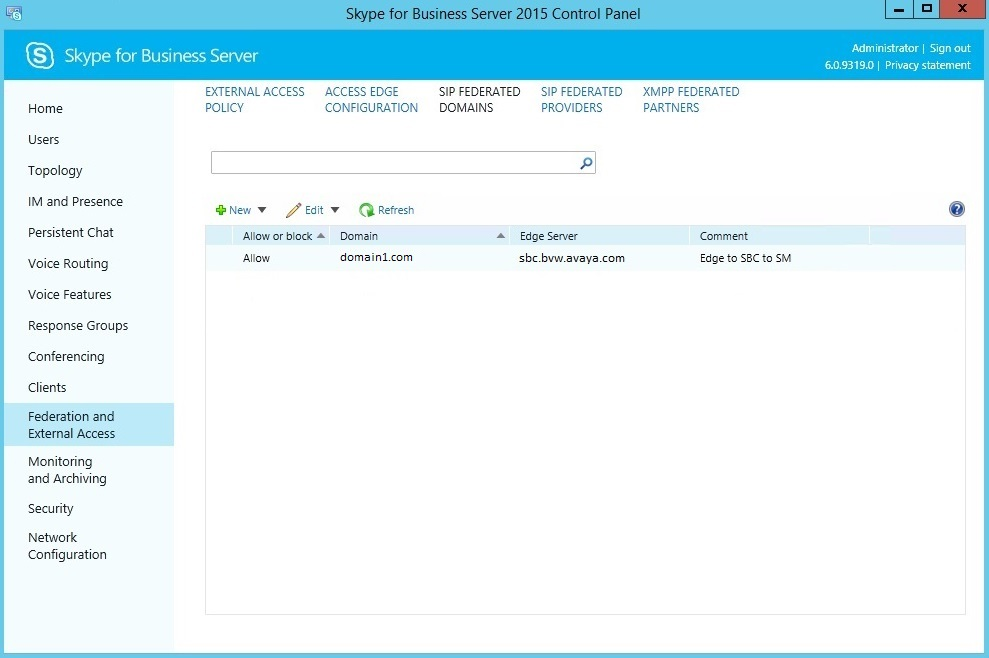
Configuring the SIP federated domain
- Log in to the Microsoft Front End server as the administrator.
ADDITIONAL INFORMATION:Note:This administrator user must be part of the CSAdministrator group.
- Start the Microsoft S4B Server Control Panel or the Skype for Business Server Control Panel application.
- In the Federation and External Access section, select the SIP Federated Domains tab.
- Select Allowed domain to add a new domain.
- In the Domain name field, add the Presence or the IM handle domain used by the federated Avaya Aura® users.
ADDITIONAL INFORMATION:For example, if a Microsoft user
ms-user@domain2.com
is federating with an Avaya Aura® user with a presence handle:aura-user@domain1.com
, then the domain field should contain:domain1.com
. - In the Access Edge service (FQDN) field, enter the FQDN of the Avaya Session Border Controller for Enterprise.
- In the Comment field, add an appropriate comment.
- Click Commit.
- After the commit, ensure that the domain is set to