

AVAYA DOCUMENTATION CENTER
Find answers to your technical questions and learn how to use our products
Avaya Aura Presence Services Snap-in Reference
Exporting certificates from Microsoft Exchange server
The following procedure describes how to extract the required certificate from an Exchange 2010 server. For newer versions of Microsoft Exchange, refer to Microsoft Exchange documentation.
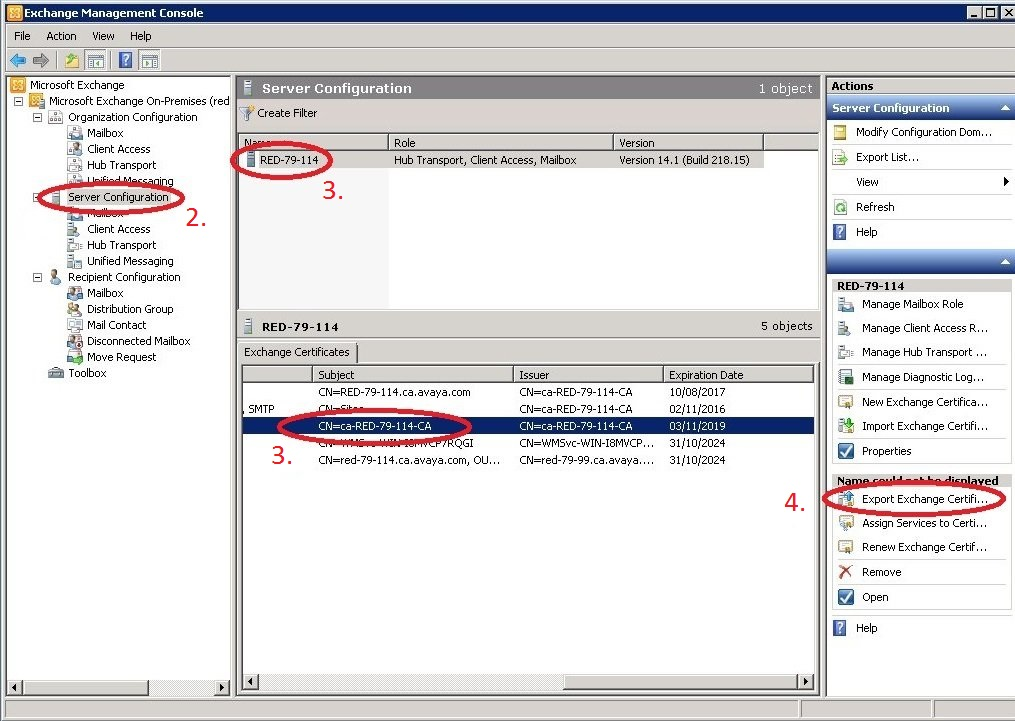
- Start the Exchange Management Console.
- Select Server Configuration.
- Select the Exchange server from the list of servers in the top middle window.
- Select Export Exchange Certificate from the Action list.
ADDITIONAL INFORMATION:
 Repeat this procedure for each Microsoft Exchange server in the Exchange cluster. Alternatively, the CA certificate that was used to sign the certificate for each individual Exchange Server can be imported into the Avaya Breeze® platform cluster. This approach reduces the number of certificates that need to be exported from Exchange and imported to the Avaya Breeze® platform cluster.