

AVAYA DOCUMENTATION CENTER
Find answers to your technical questions and learn how to use our products
Avaya Aura Presence Services Snap-in Reference
Configuring DNS A Records
- For every Avaya Breeze® platform server in the Presence Services cluster, a DNS A Record is required to resolve the Avaya Breeze® platform Security Module FQDN. The Avaya Breeze® platform Security Module FQDN is constructed from the Avaya Breeze® platform Management Module FQDN short host name plus suffix of -sm100. The IP address is the Avaya Breeze® platform Security Module IP address.
ADDITIONAL INFORMATION:For example: The Avaya Breeze® platform Management Module FQDN is sc-8205.avaya.com, the FQDN short host name in this example is sc-8205. The A Record is created as:
-
Host is sc-8205-sm100
-
The FQDN is sc-8205-sm100.avaya.com
-
The IP address is 192.0.2.25 which is the Avaya Breeze® platform Security Module IP address
There is one A Record per Breeze node. For n-nodes cluster, there are n DNS A Records. -
- Create DNS A Record(s) to resolve Presence Services Cluster FQDN. The IP address is the Avaya Breeze® platform Security Module IP address. We need to create multiple A Records to resolve the same Presence Services Cluster FQDN to each Avaya Breeze® platform Security Module IP address.
ADDITIONAL INFORMATION:For example:In a three-node cluster, the cluster FQDN must resolve to three Security Module IP addresses. Combining 1 and 2, the screen shot shows the example of 3 nodes cluster A Record(s) under Forward Lookup Zones > domain avaya.com. The example has:
Presence Services Cluster FQDN        sc-8209-cl-03.avaya.com
 Breeze server management FQDN(s) and Security Module IP address(es)
 sc-8205.avaya.com    192.0.2.25
 sc-8215.avaya.com    192.0.2.45
 sc-8282.avaya.com    192.0.2.93
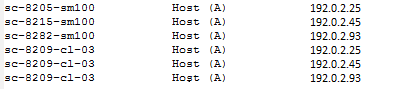 Note:When you add New Host (A Record) in DNS, you can select the Create associated pointer (PTR) record check box. This step might eliminate the need to add the machine name to Reverse Lookup Zone if the zone already exists.