AVAYA DOCUMENTATION CENTER
Find answers to your technical questions and learn how to use our products
Deploying Avaya Oceana®
Configuring Communication Manager settings to transfer web and mobile voice calls
Use this procedure to configure Communication Manager settings to web and mobile voice calls.
- Using an SSH client, connect to the Communication Manager System Access Terminal (SAT) interface.
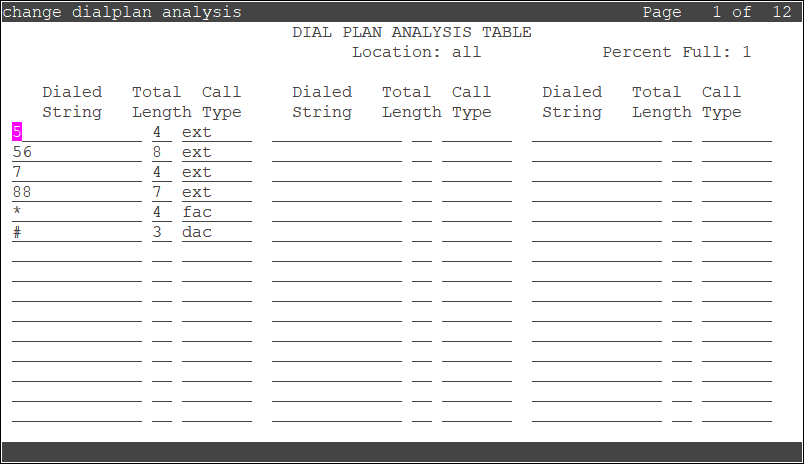
- Run the change uniform-dialplan <dialplan number> command.
- Add the dial pattern to use as the dial pattern for implicit user:
ADDITIONAL INFORMATION:
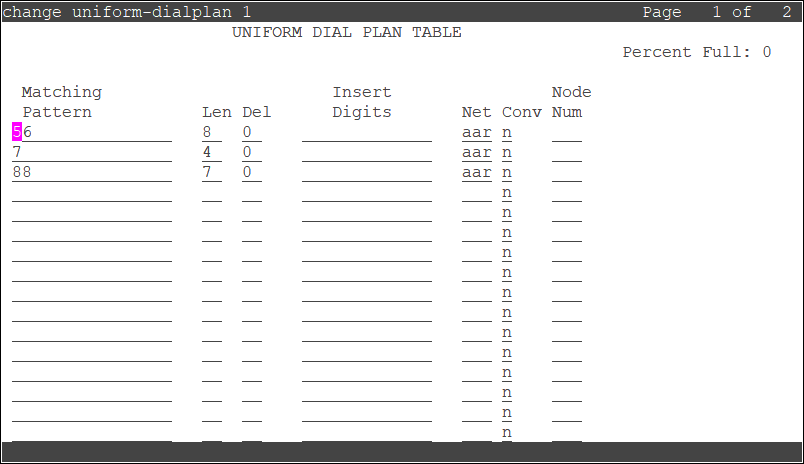
- Run the change aar analysis <number> command.
- Add the dialed string in the aar analysis table:
ADDITIONAL INFORMATION:
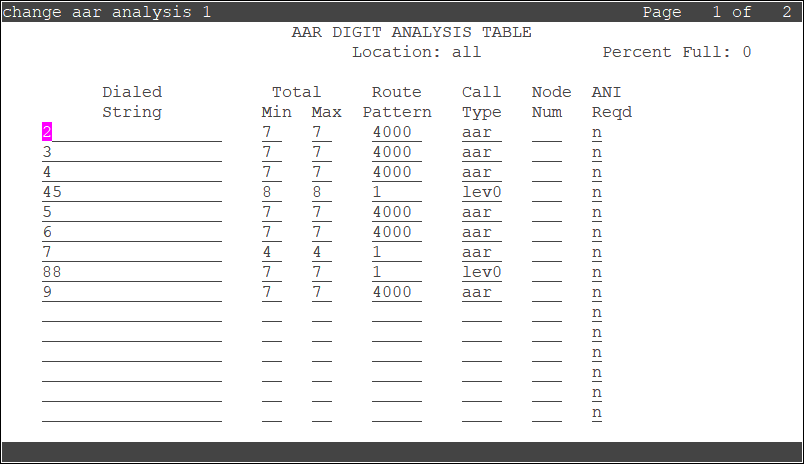
- Run the change dialplan analysis command.
- Add the dialed string in the dialplan analysis table:
ADDITIONAL INFORMATION: