

AVAYA DOCUMENTATION CENTER
Find answers to your technical questions and learn how to use our products
Deploying Avaya Oceana®
Overview
The core applications of the solution must be secured at the core level, followed by the clients and applications, which connect securely to the inner core, and then the security at the entire enterprise level in the internet zone and beyond.
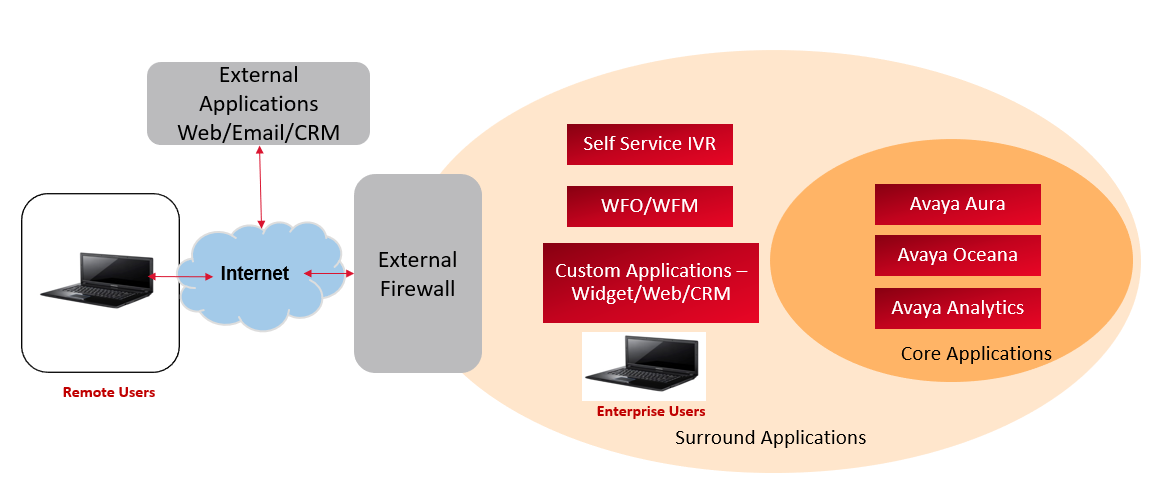
The inner layer of the solution contains the core applications, Avaya Aura® Core, Avaya Oceana® and the Avaya Analytics™ applications. The solution is secured by enabling the security between all the core applications. The applications outside of the core interact with the core applications. Security must be enabled for all communications and data exchange between these two layers. The applications and clients on the internet must access the contact center functionality in a secure and reliable manner.
This chapter describes the types of configurations, settings, and the techniques that the customer can use to secure all the areas, starting at the core, to the internet zone at the edge of company networks.
Core Applications Security
The operations require the three core applications to communicate with each other. Avaya Oceana® uses the Avaya Aura® Suite of applications comprising Avaya Aura® System Manager, Avaya Aura® Session Manager, Avaya Aura® Communication Manager, Application Enablement Services, and Avaya Aura® Media Server to provide the voice platform for PSTN voice contacts. Avaya Oceana® is deployed with Avaya Analytics™ as it provides the reporting platform for real time and historical data.
You can secure communications and data transfer for the core applications using:
-
Secure Communications with https and wss (web socket secure)
-
Token Based Authorization
-
TLS 1.2
-
FQDNs
-
A root CA certificate in conjunction with Identity Certificates to deliver a Server Authentication Model
Avaya Oceana® core applications are primarily Avaya Breeze® platform-based software applications called snap-ins or services. The software applications take the configuration data from configurable parameters called Attributes.
The following are examples of snap-in attributes related to security, which can be set on the Oceana Configuration Service, and automatically applied to all other Avaya Oceana® services:
-
Secure Connections to Database - Default Value = True
-
Toggle Secure Mode - Default Value = False ( https on by default)
-
Enable Tokenless Access - Default Value= False (Token required by default). All REST requests for these interfaces must contain a valid token within the request header or they are rejected.
-
TLS version - Default Value = 1.2
-
Enable Secure Communications - Default Value = True
-
Authorization Required to Contact Service - Default Value = True
-
Authorization Required for Service - Default Value = True
For all these attributes except the Enable Tokenless Access attribute, a value of True specifies that the web communications into these snap-ins are secure and also use token-based authorization. However, for enhanced security, Avaya recommends that all customers use the combination of Fully Qualified Domain Name (FQDN) and Domain Name Server (DNS) in conjunction with security certificates for all interfaces accessible in the solution. Avaya Oceana® Breeze Clusters must use an FQDN. After you configure all applications in the solution for security, all clients and applications can securely communicate with Avaya Oceana® and Avaya Analytics™.