

AVAYA DOCUMENTATION CENTER
Find answers to your technical questions and learn how to use our products
Deploying Avaya Oceana®
Configuring a vector for the Survey VDN
Use this procedure to configure a vector for the Survey VDN.
- Using SSH client, connect to the Communication Manager System Access Terminal (SAT) interface.
- Run change vector n.
ADDITIONAL INFORMATION:n is the number that you entered in the Destination field of the VECTOR DIRECTORY NUMBER screen while creating the Survey VDN. In this example, the vector number is 4.
- On page 1 of the CALL VECTOR screen, perform the following steps:
- In the Name field, enter the name of the vector as Survey Vector.
ADDITIONAL INFORMATION:This standard name makes maintenance and troubleshooting easier.
- Enter the details required from line 01 to line 10 as shown below:
ADDITIONAL INFORMATION:
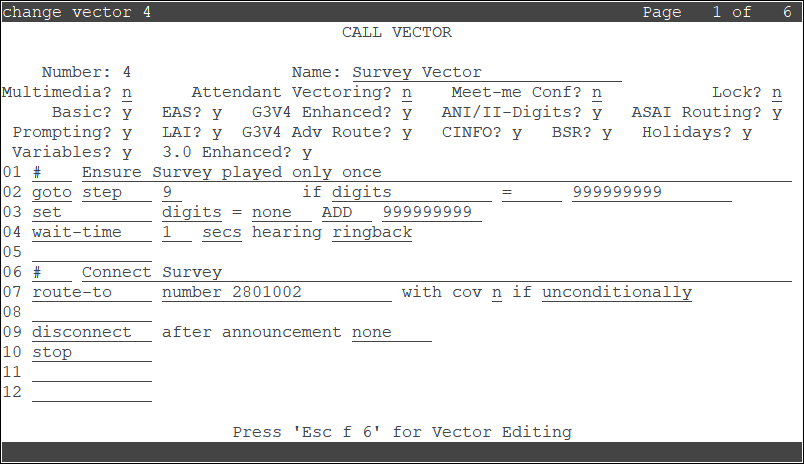 In this example, 2801002 is the number that you previously configured in the OceanaSurvey application in Experience Portal.
- In the Name field, enter the name of the vector as Survey Vector.
- Save the settings.