

AVAYA DOCUMENTATION CENTER
Find answers to your technical questions and learn how to use our products
Avaya Aura® Communication Manager Screen Reference
Duplicate Vector
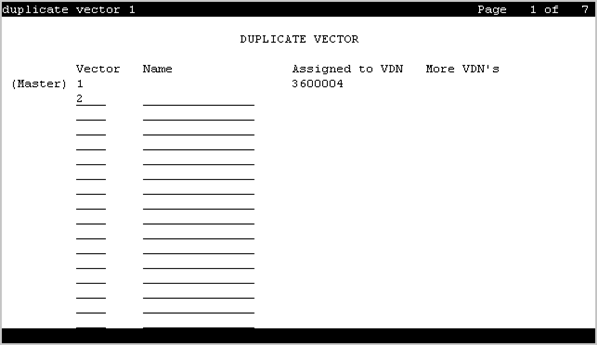
Duplicate vectors from an existing vector and edit the duplicate vectors to create vectors that are similar to the existing vector. You can use this functionality to configure one vector as a template that can be reused when creating similar vectors.
Example command: duplicate vector n, where n is the master vector.
Assigned VDN
The first assigned VDN if a VDN was assigned to the master vector.
More VDN’s
Displays * if there is more than one VDN assigned to the same vector. For example, if 5555 displays in VDN Assigned and * displays in More?, this means that the master vector selected is already assigned to VDN 5555 as well as to other VDNs.
Name
The first row displays the vector name for the master vector if assigned. The following lines define the vector names for the duplications. The use of vector names is optional.
Vector
The first row displays the vector number for the master vector. The following lines define the vector numbers for the duplications. Any unassigned vector number is valid.