

AVAYA DOCUMENTATION CENTER
Find answers to your technical questions and learn how to use our products
Avaya Aura® Communication Manager Screen Reference
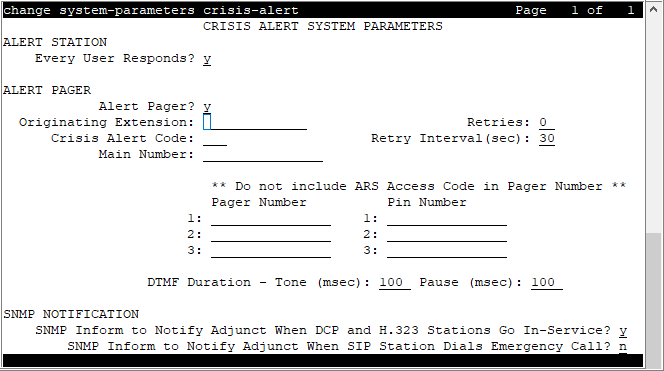
Crisis Alert System Parameters
Defines the system parameters associated with sending crisis alert messages.
Example command: change system-parameters crisis-alert
Note:
From Release 10.1.0.2 onwards, if the Notification using Crisis Alert field on the Feature-Related System Parameters screen, page 5 is enabled, you cannot edit Every User Responds? and Alert Pager fields, and the Crisis Alert System Parameter screen displays the following text:
Crisis Alert is disabled for Emergency calls. To enable it, disable "Notification using Crisis Alert" on page 5 of the Feature-Related System Parameters screen.
ALERT STATION
Every User Responds
Controls who needs to respond to a crisis alert.
Valid Entries |
Usage |
|---|---|
y |
All users who have a crisis alert button are notified and must clear the alert for every emergency alert. Crisis alert buttons should be assigned only to attendant consoles and stations that must be notified of an emergency call. |
n |
All users are notified, but only one user needs to acknowledge an alert. This user might be the attendant or any other digital telephone with a crisis alert button. When the alert is acknowledged by one user, the alert is cleared at all stations except the one that acknowledged the alert. |
ALERT PAGER
Alert Pager
Supports or restricts use of the Crisis Alert to a Digital Pager.
Crisis Alert Code
The first three digits in the crisis alert pager message. This should be the numbers used to call the local emergency service or any digits used for an emergency situation (for example, 911).
Required when Crisis Alert to a Digital Pager is enabled.
DTMF Duration - Tone (msec)
Available only when Crisis Alert to a Digital Pager is enabled.
Valid Entry |
Usage |
|---|---|
20 to 2550 (in increments of 10) |
The length of time the Dual-Tone Multi-Frequency (DTMF) tone is heard for each digit. |
Main Number
Identifies the location where the crisis alert call originated. It can be the main number to the location or a numerical identification. Any dashes are for display purposes only and excluded from the message sent to the pager. This entry is the last group of digits displayed in the pager message. Accepts up to 15 digits. Available only when Crisis Alert to a Digital Pager is enabled.
Originating Extension
Required when Crisis Alert to a Digital Pager is enabled.
Valid Entry |
Usage |
|---|---|
1 to 16 |
Requires a valid unassigned extension according to the dial plan |
Pager Number
The number which Communication Manager dials to make the call to the pager. The ARS access code is automatically pre-pended to the Pager Number before Communication Manager dials the call.
Pause (msec)
Available when Crisis Alert to a Digital Pager is enabled.
Valid Entry |
Usage |
|---|---|
20 to 2550 (in increments of 10) |
The length of time between DTMF tones for each digit. |
Pin Number
If the pager service requires you to submit a PIN number, type the number in this field. The PIN number can be up to 15 digits. You can also enter the p (pause), # and * characters. A pause of up to 2 seconds can be used for the timing of the message. For instance, a pause might be necessary to allow time for the pager service to set up the correct pager message box.
The system displays this field only if Crisis Alert to a Digital Pager is enabled.
Retries
Available when Crisis Alert to A Digital Pager is enabled.
Valid Entry |
Usage |
|---|---|
0 to 10 |
The number of times the system tries to send out the alert message in case of an unsuccessful attempt. This increases the chances that the pager receives a crisis alert message. |
Retry Interval (sec)
Available when the Crisis Alert to a Digital Pager is enabled and Retries is set to a value from 1 to 10.
Valid Entry |
Usage |
|---|---|
30 to 60 |
The time in seconds between retries. If an attempt to call the pager fails, the retry call attempts after the retry interval period. |
SNMP Inform to Notify Adjunct When DCP and H.323 Stations Go In-Service
Enables or disables sending SNMP informs to a trap receiver when a DCP station comes into service, or an H.323 station is registered.
Valid Entries |
Usage |
|---|---|
y |
Communication Manager sends SNMP informs to a trap receiver when a DCP station comes into service, or an H.323 station is registered. |
n |
Communication Manager does not send SNMP informs to a trap receiver when a DCP station comes into service, or an H.323 station is registered. This is the default value. |
SNMP Inform to Notify Adjunct When SIP Station Dials Emergency Call
Controls sending inform traps to SNMP receiver when a SIP station places an emergency call.
Note:
Ensure that, in the FP Traps screen of the Communication Manager System Management Interface (SMI), you set the Notification field to Inform for SNMP v3
Valid Entries |
Usage |
|---|---|
y |
Communication Manager sends inform traps to SNMP receiver when a SIP station places an emergency call. |
n |
Communication Manager does not send inform traps to SNMP receiver when a SIP station places an emergency call. This is the default value. |