

AVAYA DOCUMENTATION CENTER
Find answers to your technical questions and learn how to use our products
Avaya Aura® Communication Manager Screen Reference
Coverage Path
Implements Call Coverage Paths by providing the means to specify the call coverage criteria, the points in the coverage path used to redirect calls, and the number of times a principal’s telephone rings before the call redirects to coverage.
Example command: change coverage path n, where n is the assigned coverage path number.
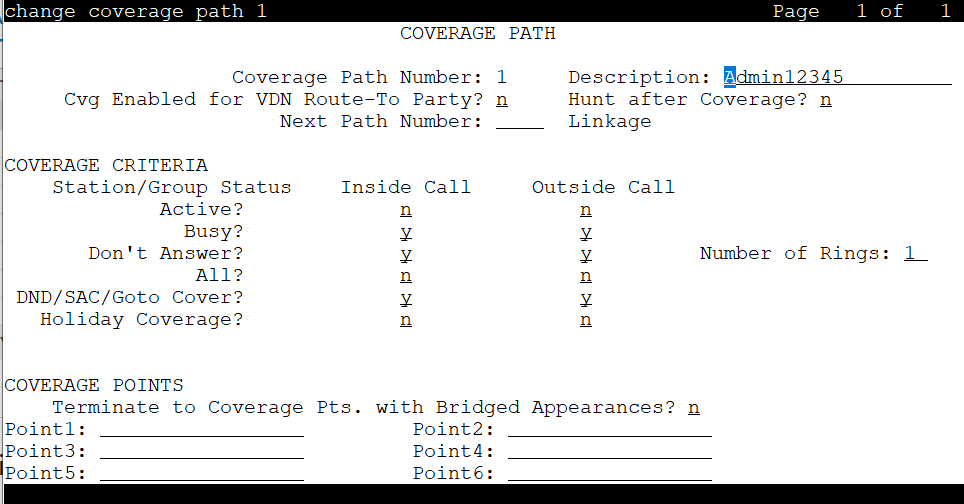
Coverage Path Number
The coverage path being administered.
Coverage path description
The name for the coverage path. Accepts alphanumeric characters and must contain at least one alphabetical and one numeric character.
Cvg Enabled for VDN Route-To Party
Enables or disables the route-to party coverage path after a covered call hits a VDN vector route-to step. By default, the value is n.
Holiday Coverage
Use the Holiday Coverage field to redirect all calls during a holiday to a coverage path. For Holiday Coverage to function, set the Don’t Answer field to y.
You must set the Holiday Coverage field separately for internal and external calls.
Valid Entry |
Usage |
|---|---|
y |
Communication Manager checks the Holiday Table screen for a specific holiday entry. If an entry on the Holiday Table screen matches with the current date and time, Communication Manager forwards the call to the first point that is defined in the coverage path. If there is no entry that matches with the current date and time, Communication Manager forwards the call to the subsequent point that is defined in the coverage path. |
n |
Communication Manager forwards the call to the subsequent point in the coverage path. |
Holiday Table
Available only when Holiday Coverage is set to y for inside or outside calls.
The number of the holiday table used for holiday coverage.
Hunt After Coverage
Valid Entry |
Usage |
|---|---|
y |
Coverage treatment continues by searching for an available station in a hunt chain that begins with the hunt-to-station assigned to the station of the last coverage point. |
n |
Coverage treatment is terminated. The call is left at the last available location, the principal or coverage point. |
Linkage
One or two additional coverage paths in the coverage path chain.
Next Path Number
Valid Entry |
Usage |
|---|---|
1 to 9999 |
The number of the next coverage path in a coverage path chain. If the coverage criteria of the current coverage path is dissatisfied, the system checks in this chain until it finds a coverage path with redirection criteria that matches the call status. If the chain is exhausted before the system finds a match, the call stays out of coverage. |
blank |
The only path for the principal. |
Active
Use this field to assign a coverage criteria. When the coverage criteria is met, the system redirects the call to coverage.
Valid Entry |
Usage |
|---|---|
y |
The system redirects the call if at least one call appearance is busy. |
n |
The system does not redirect the call. |
Busy
Use this field to assign a coverage criteria. When the coverage criteria is met, the system redirects the call to coverage.
Valid Entry |
Usage |
|---|---|
y |
The system redirects the call if all call appearances that accept incoming calls are busy. |
n |
The system does not redirect the call. |
Don’t Answer
Use this field to assign a coverage criteria. When the coverage criteria is met, the system redirects the call to coverage.
Valid Entry |
Usage |
|---|---|
y |
The system redirects the call when the specified number of rings have been exceeded. |
n |
The system does not redirect the call. |
All
Use this field to assign a coverage criteria. When the coverage criteria is met, the system redirects the call to coverage.
Valid Entry |
Usage |
|---|---|
y |
The system redirects all calls to coverage. This option overrides any other criteria. Calls redirect immediately to coverage. Overrides any other criteria administered for this field. |
n |
The system does not redirect the call. |
DND/SAC/Go to Cover
Use this field to assign a coverage criteria. When the coverage criteria is met, the system redirects the call to coverage.
Valid entry |
Usage |
|---|---|
y |
With this option, a calling user, when calling to another internal extension, can redirect a call immediately to coverage by pressing the Go to Cover button. A principal user can temporarily direct all incoming calls to coverage, regardless of the other assigned coverage criteria by pressing the Send All Calls or Do Not Disturb button. With the Send All Calls button, covering users can temporarily remove their telephones from the coverage path.
Note:
You must assign this criteria before a user can activate Do Not Disturb (Hospitality Services), Send All Calls (SAC), or Go to Cover features. |
n |
The system does not redirect the call. |
Logged off/PSA/TTI
Use this field to assign a coverage criteria. When the coverage criteria is met, the system redirects the call to coverage.
The system displays this field only when you set the Criteria for Logged Off/PSA/TTI Stations field to y.
Valid Entry |
Usage |
|---|---|
y |
The system redirects the call after the number of rings exceeds the value specified in the Number of Rings field. The system displays the associated Number of Rings field only when the Logged off/PSA/TTI field is set to y. |
n |
The system does not redirect the call. |
Number of Rings
Valid Entry |
Usage |
|---|---|
1 to 99 |
The number of times a telephone rings before the system redirects the call to the first point in the coverage path. By default, the value is 2. |
Point1, Point2, Point3, Point4, Point5, Point6
The alternate destinations that comprise a coverage path. Coverage points must be assigned sequentially without steps beginning with Point 1. Each path can have up to six coverage points.
Subsequent coverage points should be unlisted if calls are redirected to:
Message Center, a special Uniform Call Distribution hunt group
Voice messaging
The attendant
These calls normally queue and never redirect to another coverage point. Calls to hunt group queue if possible. Calls redirect from a hunt group only if all hunt group members are busy and either the queue is full, or is nonexistent.
If the Coverage of Calls Redirected Off-Net feature is not supported, a remote coverage point functions as the last point in the coverage path because the system can no longer control calls once they redirect off-net. However, if the Coverage of Calls Redirected Off-Net feature is enabled, calls redirected off-net can be monitored by the system and brought back for call coverage processing.
Valid Entry |
Usage |
|---|---|
extension |
Redirects the call to an internal extension or announcement.
Note:
If you enter a shortened extension of the multilocation dial plan, the system does not perform certain administration and validation tasks. Therefore, the system might not display the resultant warnings or submittal denials. |
attd |
Redirects the call to the attendant or attendant group. If the system has Centralized Attendant Service (CAS), the call goes to the CAS attendant. |
h1 to h8000 |
Redirects the call to the corresponding hunt-group, for example, h32 routes to hunt group 32. |
c1 to c1500 |
Redirects the call to the corresponding coverage answer group, for example, c20 routes to call coverage answer group 20. |
r1 to r10000 |
Redirects the call to the corresponding remote coverage point number, for example, r27 routes to remote coverage point 27. |
v + extension |
Redirects the call to the corresponding Vector Directory Number (VDN) extension, for example, v12345 routes to the VDN associated with extension 12345.
Note:
A VDN can be used only as the last administered point in a coverage plan. |
y + extension |
Redirects the call to an internal extension, announcement, or the corresponding Vector Directory Number (VDN) extension as per the current date and time set in Holiday Table. |
Rng
Valid Entry |
Usage |
|---|---|
1 to 99 blank |
The number of rings at this coverage point before the system redirects the call to the next point in the coverage path. |
Terminate to Coverage Pts. with Bridged Appearances
Valid Entry |
Usage |
|---|---|
y |
If activated, a call can alert as both a bridged call and a redirected call. |
n |
The call skips the coverage point if it has already alerted as a bridged call. |