

AVAYA DOCUMENTATION CENTER
Find answers to your technical questions and learn how to use our products
Avaya Aura® Communication Manager Screen Reference
Configuration Set
Use the Configuration Set screen to define call treatment options for Extension to Cellular calls. With the Extension to Cellular feature, you can use up to 99 configuration sets that are already defined in the system with default values.
Note:
In the One-X mobile environment, you can edit the values of only the Cellular voice mail detection field and the Call log notify field. All other fields are read-only.
To modify the values of the fields on the Configuration Set screen, type the following command:
change off-pbx-telephone configuration-set n, where n is the Configuration Set number.
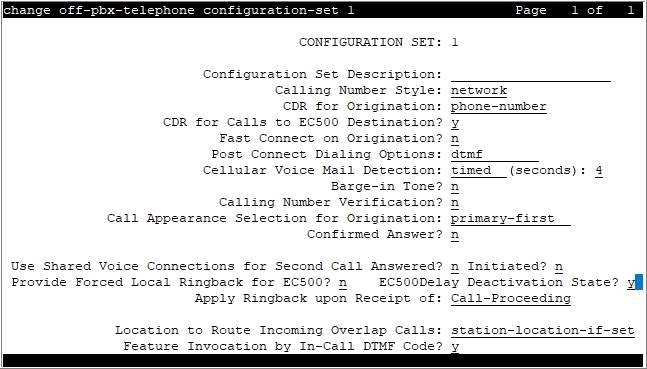
Apply Ringback upon Receipt of
Use the Apply ringback Upon Receipt of field to configure when Communication Manager must send the ringback tone to the caller.
Valid entry |
Usage |
|---|---|
Call-Proceeding |
Communication Manager sends the ringback tone to the caller after receiving the Call-Proceeding message from the EC500 network. Call-Proceeding is the default value. |
Alert |
Communication Manager sends the ringback tone to the caller after receiving the Alert message from the EC500 network. |
Barge-In Tone
Enables or disables a barge-in tone used to add security to Extension to Cellular calls. If a user is on an active Extension to Cellular call and another person joins the call from an Extension to Cellular enabled office telephone, all parties on the call hear the barge-in tone.
Call Appearance Selection for Origination
Specifies how the system selects a Call Appearance for call origination. To use this feature, bridged calls must be enabled for the system.
Valid Entry |
Usage |
|---|---|
first-available |
The system searches for the first available regular or bridged Call Appearance. |
primary-first |
The system first searches for a regular Call Appearance for call origination.
This is the default. |
Call Log Notify
Use this field to update the Avaya one-X® Client Enablement Services logs with actual outpulsed digits and not the digits that the user dials.
Valid entry |
Usage |
|---|---|
dialed-digits |
When you enter dialed-digits, the endpoint displays the dialed digits. |
outpulsed-digits |
When you enter outpulsed-digits, Communication Manager analyzes the dialed digits and sends the digits to Client Enablement Services for call logging. |
Calling Number Style
Determines the format of the caller ID for calls from a local Communication Manager extension to an Extension to Cellular telephone.
Valid Entry |
Usage |
|---|---|
network |
Provides a display of only 10-digit numbers. For internal calls, the ISDN numbering tables are used to create the calling number and DCS calls use the ISDN calling number if provided. The externally provided calling number is used when available for externally originated calls. |
pbx |
Provides a display of less than 10-digits. Extensions sent as the calling number for all internally- and DCS network-originated calls. |
Calling Number Verification
Use this field to impose restrictions on calls originating from an Extension to Cellular-enabled cell phone to some other extension.
Valid entry |
Usage |
|---|---|
y |
If you set the field to y and the network service provider has not marked the screening indicator as network provided or user provided verified and passed, Communication Manager treats the incoming call as an ordinary incoming trunk call and not as a call from an extension. |
n |
If you set the field to n, Communication Manager treats the incoming call as a call from the corresponding desk phone. |
CDR for Calls to EC500 Destination
Determines whether a Call Detail Record (CDR) is generated for any call to the cell telephone. This field is available only if CDR reports are enabled for the trunk group.
Valid Entry |
Usage |
|---|---|
y |
Treats call to the XMOBILE station as trunk call and generates a CDR. |
n |
Treats call to the XMOBILE station as internal call, without generating a CDR. |
CDR for Origination
Determines the CDR report format when CDR records are generated for a call originating from an Extension to Cellular phone. To generate this CDR, you must enable the Incoming Trunk CDR. The CDR report excludes dialed Feature Name Extensions (FNEs).
Valid Entry |
Usage |
|---|---|
phone-number |
The calling party on the CDR report is the 10-digit cell phone number. This is the default. |
extension |
The calling party on the CDR report is the internal office telephone extension associated with the Extension to Cellular cell phone. |
none |
The system does not generate an originating CDR report. |
Cellular Voice Mail Detection
You can use this field if you do not want an Extension to Cellular call to cover the cellular voice mail. When the call server detects that the call is covered to the cellular voice mail, the call server brings the call back to the server.
Valid entry |
Usage |
|---|---|
None |
The call covers to the cellular voice mail. This entry is the default value. |
Timed |
The system displays the Seconds field. You can enter any value from 1 to 9. If the user answers the call on the cellular phone within the configured number of seconds, Communication Manager disconnects the cellular leg of the call. The call continues to ring at the desk phone. You can use this configuration for GSM, CDMA, and ISDN networks. |
Message |
The message option works with carriers who use non-ISDN voice mail systems. You must not use this option with ISDN-based voice mail systems. |
Configuration Set Description
A description of the purpose of the configuration set. Accepts up to 20 alphanumeric characters.
Extension to Cellular handsets
Confirmed Answer
Enables or disables Confirmed Answer on Extension to Cellular calls for this station. If enabled, requires the user to input a digit to confirm receipt of a call sent to a cellular telephone by the Extension to Cellular feature. Upon answering the incoming call on the cellular telephone, the user hears a dial tone. The user must then press any one of the digits on the telephone keypad. Until the system receives a digit, the system treats the call as unanswered. The length of time to wait for the digit can be administered from 5 to 20 seconds, with a default of 10 seconds. The system plays a recall dial-tone to indicate that input is expected. During the response interval, the original call continues to alert at the desk set and any stations bridged to the call. If the user does not enter a digit before the time-out interval expires, the call is pulled back from the cell telephone.
EC500Delay Deactivation State
Use this field to control sharing of the current EC500Delay state to IX Clients.
IX clients use the EC500Delay feature to delay the EC500 termination on the same device on which it has registered the Avaya Aura® application in VoIP mode.
Valid entry |
Usage |
|---|---|
y |
Enables sharing the current EC500Delay state, if EC500Delay feature is deactivated due to any feature interaction. This is the default value. |
n |
Disables sharing the current EC500Delay state. |
Fast Connect on Origination
Use this field to specify whether Communication Manager must perform additional processing before connecting an H.323 or a SIP call.
Valid entry |
Usage |
|---|---|
y |
Communication Manager sends a CONNECT or 200 OK message immediately in response to the SETUP or the INVITE message. The call is connected immediately to the destination. |
n |
Communication Manager does not send the CONNECT or 200 OK message immediately in response to the SETUP or the INVITE message. The call is connected only when the digits in the SETUP or the INVITE message resolve to an extension or a feature access code. |
Feature Invocation by In-Call DTMF Code
Use this field to enable EC500 users to use the in-call features, such as Hold and consult, Transfer, and Conference.
Valid entry |
Usage |
|---|---|
y |
Enables EC500 in-call feature invocation. |
n |
Disables EC500 in-call feature invocation. |
Location for routing incoming overlap calls
With the Location for routing incoming overlap calls feature, the administrator can configure the location to route incoming calls that are mapped to EC500, CSP, and Avaya one-X applications over ISDN-PRI, ISDN-BRI, and H.323 overlap trunks.
The overlap trunk refers to an ISDN trunk group configured for overlap receiving. The Digit Handling (in/out) field on the ISDN Trunk Group screen is set to overlap/overlap or overlap/enbloc.
Valid entry |
Usage |
|---|---|
Station-location-if-set |
Communication Manager uses the station location to process all calls coming from an EC500-mapped phone. Communication Manager uses the station location only if the location is configured on the EC500-mapped station screen. This entry is the default value. |
Trunk |
Communication Manager uses the incoming trunk location to process all calls coming from an EC500-mapped phone. |
Post Connect Dialing Options
Determines whether additional capabilities, beyond standard ISDN dialing, are available for those incoming ISDN trunk calls that are mapped into XMOBILE stations. These options come into effect after the call has entered the active state (Communication Manager has sent a CONNECT message back to the network).
Valid Entry |
Usage |
|---|---|
dtmf |
Expect digits from either in-band or out-of-band, but not simultaneously. The server allocates a DTMF receiver whenever it needs to collect digits. This option normally would be used for Extension to Cellular XMOBILE station calls. |
out-of-band |
Expect all digits delivered by out-of-band signaling only. Communication Manager collects digits that it needs from the out-of-band channel (no touch-tone receiver). In addition, any digits received when the server is not collecting digits are converted to DTMF and broadcast to all parties on the call. This option is in force for DECT XMOBILE station calls. |
both |
Expect all subsequent digits delivered by simultaneous in-band and out-of-band signaling. Out-of-band signaling consists of digits embedded in ISDN INFO messages while the in-band signaling consists of DTMF in the voice path. Communication Manager collects all digits that it needs from the out-of-band channel. No touch tone receive is allocated to prevent collecting double digits. End-to-end signaling occurs transparently to the server via in-band transmission of DTMF. This option is in force for PHS XMOBILE station calls. |
Provide Forced Local Ringback for EC500
When a caller calls an enterprise user, the caller expects a standard ringback tone. If the EC500 feature is activated on the telephone of the enterprise user and if the user uses custom ringback tones on the cell phone, the caller hears the custom ringback tone. If you set the Provide Forced Local Ringback for EC500 field to y, Communication Manager provides the local ringback tone and ignores the custom ringback tone of the cell phone.