

AVAYA DOCUMENTATION CENTER
Find answers to your technical questions and learn how to use our products
Avaya Aura® Communication Manager Screen Reference
Date and Time
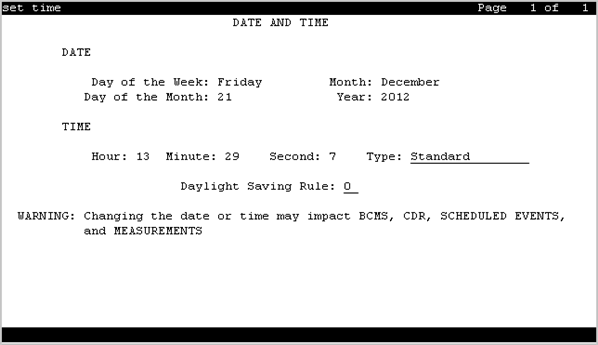
Displays the system date and time, selects the daylight saving plan number, if any, and shows whether the current time is standard time or daylight saving. Settings on this screen affect the internal clock and timestamp of the server running Communication Manager. Update the date and time for a leap year or a system restart after a power failure. The correct date and time assure that CDR records are correct. CDR does not work until you enter the date and time.
Example command: set time
Day of the Month
Valid entry |
Usage |
|---|---|
1 to 31 |
The current day of the month. The system clock uses this as the current date. |
Day of the Week
Valid Entry |
Usage |
|---|---|
Sunday through Saturday |
The current day of the week. The system clock uses this as the current day. |
Daylight Saving Rule
Valid Entry |
Usage |
|---|---|
0 to 15 |
The daylight saving rule in use for the system. The system clock uses this as the current daylight saving rule. |
Hour
Valid Entry |
Usage |
|---|---|
0 to 23 |
The current hour to be used by the system clock. The system uses a 24-hour clock. For example, 14:00 is the same as 2:00 p.m. |
Minute
Valid Entry |
Usage |
|---|---|
0 to 59 |
The current minute. The system clock uses this as the current minute. |
Month
Valid Entry |
Usage |
|---|---|
January to December |
The current month. The system clock uses this as the current month. |
Second
Displays the seconds and cannot be modified. Resets to zero when saved.
Type
Valid Entry |
Usage |
|---|---|
daylight-savings |
Indicates daylight saving time is in effect. |
standard |
Indicates standard time is in effect. |
Year
The current year in 20XX format. The system clock uses this as the current year.