

AVAYA DOCUMENTATION CENTER
Find answers to your technical questions and learn how to use our products
Avaya Aura® Communication Manager Screen Reference
Trunk Group: Protocol Variations
Available only for sip trunk groups.
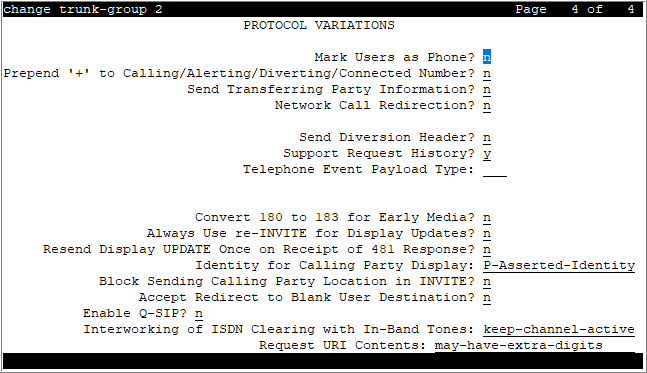
Accept Redirect to Blank User Destination
The following table represents the way in which this field works.
Valid entry |
User destination in the Refer-To domain of the SIP request |
Result |
|---|---|---|
y |
present |
Communication Manager places the call to the user destination. |
y |
missing |
Communication Manager places the call over the signaling group specified in the Proxy Sel Rte Pat field of the Locations screen. |
n |
present |
Communication Manager places the call to the user destination. |
n |
missing |
Communication Manager rejects the SIP request. |
Always Use re-INVITE for Display Updates
The system displays this field when the Group Type field is SIP.
Valid entry |
Usage |
|---|---|
y |
In SIP messages, Communication Manager sends the re-invite message to display update. |
n |
In SIP messages, Communication Manager sends the update message to display update. The default value is n. |
Resend Display UPDATE Once on Receipt of 481 Response
The value in the Resend Display UPDATE Once on Receipt of 481 Response field determines whether Communication Manager should resend display update message on receiving 481 response to Session Manager, instead of dropping the call immediately.
When Communication Manager receives 481 as a response for display update message from Session Manager (only when the display update message is sent after the first non 100 response), then Communication Manager resends display update message to Session Manager.
Note:
The display update message must be after the first 18x response. If not, the display update message is not resent.
If Session Manager responds with 481 again, then Communication Manager drops the call. This field does not apply to all other update messages except display update message.
Valid Entry |
Usage |
y |
If Communication Manager gets a 481 response for a display update message from Session Manager, Communication Manager resends the display update message once. |
n |
The Communication Manager does not re-send any update message (even if it is 481 response). By default, the value is n. |
Block Sending Calling Party Location in INVITE
Based on the , Communication field value, Manager selects the IP address that must be included in the Via header in an outgoing call. The system displays this field if the value of the Group Type field in the trunk group screen is SIP.
Valid Entry |
Usage |
|---|---|
y |
Communication Manager does not send the IP address of the caller in the INVITE. |
n |
Communication Manager sends an IP address that identifies the location of the caller. This IP address is included in the lower-most Via header in the INVITE. Based on the type of endpoint of the caller, Communication Manager determines the IP address to be sent.
|
Build Refer-To URI of REFER From Contact For NCR
The system displays this field only for SIP trunk groups for which Network Call Redirection is enabled. Communication Manager uses the REFER message during a call transfer.
Valid entry |
Usage |
|---|---|
y |
Communication Manager uses the address in the Contact header to create the URI of the Refer-To header in a REFER message. |
n |
Communication Manager uses the address in the From header to create the URI of the Refer-To header in a REFER message. |
Convert 180 to 183 for Early Media
It is used for early media and direct media cut-through. When SDP answer is returned by Communication Manager in 18x messages, some entities have a problem receiving the SDP in a 180 Ringing message. If the Convert 180 to 183 for Early Media field is set to y, Communication Manager puts the SDP into a 183 Session Progress message. The default value is n.
Enable Q-SIP
The system displays Enable Q-SIP, only when the Group Type field is sip.
Valid Entry |
Usage |
|---|---|
y |
Enables the QSIG over SIP (Q-SIP) feature for the trunk group. If trunk members are already assigned to this trunk group, you must not change the value of Enable Q-SIP field. If you change the value of Enable Q-SIP field, the system displays an error message and prompts you to remove all assigned members before enabling Q-SIP. |
n |
The QSIG over SIP feature for the trunk group is disabled. By default, the value is n. |
Identity for Calling Party Display
The system displays this field, when the Group Type field is sip.
This field determines which header to retrieve display information for the calling party when both the From and P-Asserted-Identity headers are available.
Valid Entry |
Usage |
|---|---|
P-Asserted-Identity |
If a call is terminating at SIP, H.323, or DCP stations, or at outgoing H.323 or SIP trunk, Communication Manager displays the name and Calling Party number from the PAI header instead of the FROM header. This is the default value. |
From |
If a call is terminating at SIP, H.323, or DCP stations, or at outgoing H.323 or SIP trunk, Communication Manager displays the name and Calling Party number from the FROM header instead of the PAI header. |
Interworking of ISDN Clearing with In-Band Tones
The setting of this field is for call-clearing of the tandem calls in which the incoming trunk to Communication Manager is a SIP trunk and the outgoing trunk from Communication Manager is an ISDN trunk. The far end at the ISDN PRI trunk ends the call.
If you select the keep-channel-active option, Communication Manager keeps the call active so that the caller can hear an in-band tone or announcement played over the ISDN trunk.
If you select the drop-with-sip-error option, Communication Manager detects the cause of call clearing, maps ISDN Cause Value to a SIP error response message, and sends the response message to the caller. With the drop-with-sip-error option, an adjunct placing outgoing calls is informed that the call has ended and the user can disconnect the call immediately instead of waiting for the ISDN network to end the call after the tone or announcement is complete.
Note:
An in-band tone is an announcement or a tone that provides call-clearing information.
Valid entry |
Usage |
|---|---|
keep-channel-active |
Communication Manager sends a SIP 183 Progress message to the caller. The ISDN network plays an in-band tone that the caller hears. The default value is keep-channel-active. |
drop-with-sip-error |
Communication Manager sends a SIP error response message, which specifies the cause of call-clearing to the caller. The called party plays an in-band tone. The caller does not hear the in-band tone or announcement. |
Mark Users as Phone
Enables or disables the encoding of URIs in call control signaling messages originated at the gateway with the user=phone
parameter. No subscription messages are encoded with the user=phone
parameter, even when the field is set to y. Default is n.
Note:
Do not change the default of n for this field unless you are sure that every recipient of SIP calls using this trunk can accept and properly interpret the optional user=phone
parameter. Enterprise users without support for user=phone
in their SIP endpoints will experience adverse effects, including rejected calls.
Network Call Redirection
If enabled, Network Call Redirection (NCR) service is signaled over this trunk group. NCR only works on trunk groups connected to Service Providers that support NCR.
Prepend '+' to Calling/Alerting/Diverting/Connected Number
The system displays this field only for SIP trunk groups.
If you set this field to y, when a call is routed over a trunk group, Communication Manager inserts a leading plus (+) sign, if absent, in outgoing calling, alerting, diverting, or connected numbers. The default value is n.
To prevent Communication Manager from inserting a leading plus (+) sign in the calling number when a call is routed from Communication Manager to Session Manager, set the Numbering Format field to private and the Prepend '+' to Calling/Alerting/Diverting/Connected Number field to n.
QSIG Reference Trunk Group
The system displays this when the Group Type field is sip, and the Enable Q-SIP is set to y.
Valid Entry |
Usage |
|---|---|
1 to 2000 |
Assigns a number for the QSIG trunk group. If trunk members are already assigned to this trunk group, do not change the value of the QSIG Reference Trunk Group field. If you change the value of this field, the system displays an error message and prompts you to remove all assigned members before enabling Q-SIP. Applicable for Avaya supported servers. For the Avaya supported servers, see Avaya Aura® Communication Manager Hardware Description and Reference. |
1 to 99 |
(For Avaya Solutions Platform S8300 Server) Assigns a number for the QSIG trunk group. If trunk members are already assigned to this trunk group, do not change the value of the QSIG Reference Trunk Group field. If you change the value of this field, the system displays an error message and prompts you to remove all assigned members before enabling Q-SIP. |
blank |
No QSIG trunk group is assigned. By default, the value is blank. |
Request URI Contents
Use this field to configure Communication Manager to allow or restrict the called-party digits in the Request URI of the SIP INVITE message, REFER message, or 3xx redirect response for INVITE message.
Valid entry |
Usage |
|---|---|
may-have-extra-digits |
Communication Manager routes an incoming Request URI without considering the total number of digits. To route the call, Communication Manager might use an entry that matches fewer digits than the total number in the Request URI. |
called number-only |
Communication Manager considers the total number of digits when routing an incoming Request URI. The routing fails if a match that incorporates all digits is unavailable. |
Send Diversion Header
This field is available only when the Service Type field is set to public-ntwrk. If you enable the Send Diversion Header field, the SIP diversion header is sent on the public SIP trunks. This header allows service providers to use the ten-digit number of the forwarding party for functions such as billing. Customers can administratively enable or disable the use of the SIP diversion header on any public SIP trunk. The default value is n.
Send Transferring Party Information
Enables or disables sending the transferring party information on a transferred call. Default is disabled.
Support Request History
You can activate the Support Request History field for a SIP trunk to capture the request location that was sent to a proxy. This information is used to send diversion information and notify the origin of the call to the far end equipment. If this field is disabled, History-Info header is not included in any requests.
Note:
This feature does not apply to Off PBX SIP station trunk groups for which the Communication Manager never suppresses the History-Info header.
Telephone Event Payload Type
Valid Entry |
Usage |
|---|---|
96 to 127 blank |
The default payload type offered by Communication Manager for SIP trunks. The payload type number encoding for originating (offering) the RFC 2833 RTP Default is 127. |