

AVAYA DOCUMENTATION CENTER
Find answers to your technical questions and learn how to use our products
Avaya Aura® Communication Manager Screen Reference
Feature-related system parameters: page 10
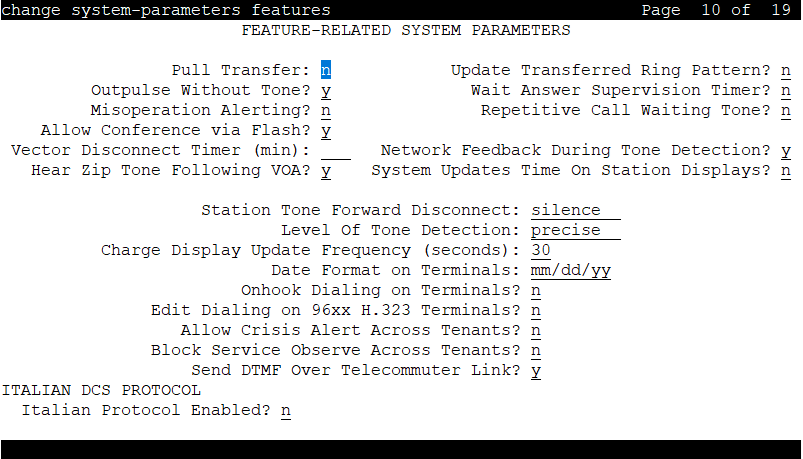
Allow Conference via Flash
If enabled, an analog station can use flash to conference calls.
Allow Crisis Alert Across Tenants
If enabled, allows crisis alert across different tenant partitions. Disabled by default.
Block Service Observe Across Tenants
If enabled, the service observer cannot monitor the agent if the service observer and agent are in different tenant partition groups. By default, this field is disabled.
Charge Display Update Frequency (seconds)
Available only if Advice of Charge or Periodic Pulse Metering with display functions is used.
Valid Entry |
Usage |
|---|---|
10 to 60 blank |
The amount of time in seconds between charge-display updates. Frequent display updates might have considerable performance impact. If the duration of a call is less than the Charge Display Update Frequency, the display does not automatically show charge information. |
Date Format on Terminals
The system displays the Date Format on Terminals field if the Multinational Locations field on the System Parameters Customer Options screen is set to n. This field affects the 607/2400/4600/6400 terminals. The date is in mm/dd/yy, dd/mm/yy, and yy/mm/dd formats.
Edit Dialing on 96xx H.323 Terminals
If enabled, an end-user can dial a number when the telephone is on-hook. Disabled by default.
Hear Zip Tone Following VOA?
Enables or disables zip tone alerts to a telephone user when the announcement has completed and a caller is now connected. CallMaster set and attendant console users hear double zip tone following the announcement. All other telephone users hear single zip tone.
Note:
This field does not effect auto-answer zip tone heard prior to the VDN of Origin Announcement (VOA).
Intercept Treatment on Failed Trunk Transfers
Valid Entry |
Usage |
|---|---|
y |
Provides intercept treatment to calls failing trunk transfers. |
n |
Drops calls failing trunk transfers. |
Level of Tone Detection
Used only when users are having difficulty placing outgoing calls due to inaccurate detection of network dial tone.
Valid Entry |
Usage |
|---|---|
broadband |
This is the least exact of the levels of tone detection. If Avaya Communication Manager detects any tone at all, it interprets this as dial tone. |
medium |
The server running Avaya Communication Manager interprets any tone which has a continuous |
precise |
Communication Manager accepts whatever the tone detector circuit pack reports. |
Misoperation Alerting
Valid Entry |
Usage |
|---|---|
y |
Enables misoperation recall alerting on multi-appearance stations, analog stations, and attendant consoles. |
n |
Uses standard misoperation handling without recall alerting. |
Network Feedback During Tone Detection
If enabled, provides audible feedback to the user while the system attempts to detect dial tone.
On-hook Dialing on 607/2400/4600/6400/8400 Terminals
If enabled, users can dial without lifting the handset. Users hear dial tone when they press the Speaker button, even if the handset is on-hook.
For 6400/8400, 607, 2420, 2410, and 4600 telephone users with speakerphones.
Outpulse Without Tone
Valid Entry |
Usage |
|---|---|
y |
The server outpulses digits even when a dial tone has not been received. |
n |
The calling party receives intercept tone if no dial tone is detected. |
Pull Transfer
Enables or disables the Pull Transfer feature on a system-wide basis. With this, the transferring or transferred-to party can press the Transfer button to complete the transfer operation.
Repetitive Call Waiting Interval (sec)
Available only if the Repetitive Call Waiting Tone is enabled.
Valid Entry |
Usage |
|---|---|
1 to 99 |
The number of seconds between call waiting tones. |
Repetitive Call Waiting Tone
If enabled, a repetitive call waiting tone is provided to the called party for all types of call waiting access.
Send DTMF Over Telecommuter Link
In the telecommuter mode, when a user is on a call and presses any digits from a deskphone or a softphone, the user hears loud DTMF tones over the telecommuter link. Use the Send DTMF Over Telecommuter Link field to send or prevent DTMF tones over the telecommuter link.
Valid entry |
Usage |
|---|---|
y |
Communication Manager sends DTMF tones over the telecommuter link. The default value is y. |
n |
Communication Manager does not send DTMF tones over the telecommuter link. |
Station Tone Forward Disconnect
Applies to any station other than one administered as a data endpoint, an attendant console, a BRI telephone, an auto answer, or as an Outgoing Call Management (OCM) agent.
Valid Entry |
Usage |
|---|---|
busy intercept silence |
The treatment given to a station that is the last party remaining off-hook on a call, until that station is placed on-hook, or until the tone has played for 45 seconds and is followed by silence. |
System Updates Time On Station Displays
If enabled, automatically updates the system time on two-line display telephones when you run background maintenance, for example, when you plug in the telephone set. The system sends the time update periodically to the telephones. This parameter does not apply to telephones such as the BRI telephones, where the user sets the time.
Update Transferred Ring Pattern
If enabled, changes the ringing pattern from internal to external when an internal station transfers an external call. Use this feature if most calls go through an attendant, so that users are able to distinguish an external call.
Vector Disconnect Timer (min)
Valid Entry |
Usage |
|---|---|
1 to 240 |
Determines when the trunk gets disconnected if incoming or outgoing disconnect supervision is disabled for the trunk group. |
blank |
Avaya Communication Manager does not initiate a disconnect. |
Wait Answer Supervision Timer
Valid Entry |
Usage |
|---|---|
y |
Calls to stations unanswered after 50 seconds are dropped. |
n |
Unanswered calls drop only when the calling party goes on-hook. |
ITALIAN DCS PROTOCOL
The next three fields control the Italian DCS Protocol feature.
Apply Intercept Locally
If enabled, DID/CO intercept treatment is applied locally instead of on the originating server or switch. Available only if Italian Protocol is enabled.
Enforce PNT-to-PNT Restrictions
If enabled, restrictions and denial of PNT-to-PNT connections are enforced when the EDCS message is unavailable. Available only if Italian Protocol is enabled.
Italian Protocol Enabled
Enables or disables the Italian DCS feature on a system-wide basis.