

AVAYA DOCUMENTATION CENTER
Find answers to your technical questions and learn how to use our products
Avaya Aura® Communication Manager Screen Reference
Trunk Group: Group Member Assignments
For SIP trunks, the group member-assignment pages are not individually administered. The system automatically populates and displays these fields based on the number of members of SIP trunk groups previously specified.
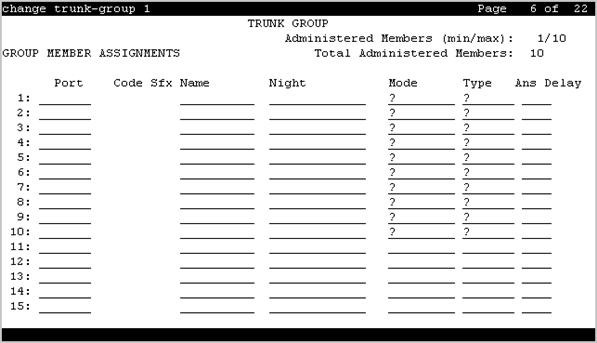
Administered Members (min/max)
The minimum and maximum member numbers that have been administered for this trunk group.
Ans Delay
Caution:
Customers should not attempt to administer this field. Go to the Avaya Support website at http://support.avaya.com for current documentation, product notices, knowledge articles on administering this field.
Valid Entry |
Usage |
|---|---|
20 to 5100 in increments of 20 |
The length of time the server running Communication Manager waits before it sends answer supervision for incoming calls on tie trunks. |
blank |
Same as setting the field to zero. |
Code
The type of media module physically installed or logically administered at the location to which this member is assigned. If no media module is installed or administered at the port address, the field is blank.
Name
The name of the trunk group member. The name should identify the trunk unambiguously. Accepts up to 10 characters.
The telephone number assigned to incoming trunks
The Trunk Circuit Identification number assigned by the service provider
Night
The night service destination for this trunk group member if different from the night service destination administered for the trunk group. Incoming calls are routed to this destination when the system is placed in night service mode.
Valid Entry |
Usage |
|---|---|
A valid extension |
The extension of the night destination for the trunk. |
attd |
Calls go to the attendant when night service is active. |
blank |
Not administered |
Port
Valid Entry |
Usage |
|---|---|
1 to 999 |
Gateway |
V1 to V9 |
Module |
01 to 31 |
Circuit |
Sfx
The model suffix for the type of media module physically installed at the location to which this member is assigned. If no media module is installed at the port address, the field is blank.
Total Administered Members
The total number of members administered in the trunk group.