

AVAYA DOCUMENTATION CENTER
Find answers to your technical questions and learn how to use our products
Avaya Aura® Communication Manager Screen Reference
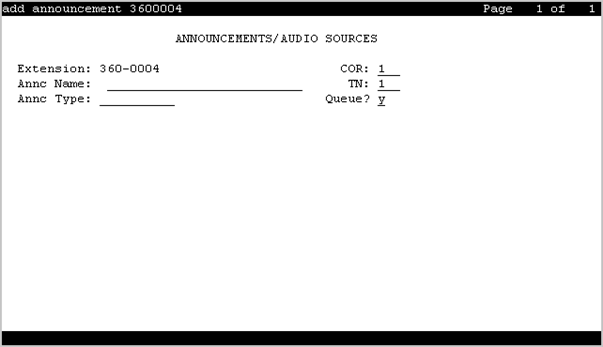
Announcements/Audio Sources
Use this screen to assign announcements to port locations.
To change the value of the fields on the Announcements/Audio Sources screen, use the following command:
add announcement n, where n is the extension number.
In Communication Manager 7.1.3, you can configure up to 9000 announcements for a single Avaya Aura Media Server instance.
Annc Name
Use this field to assign a name to the announcement. You can enter up to 27 characters. Announcement names on a single vVAL must be unique. You can enter alphabets, digits, and the following special characters: /, :, *, ?, <, >, \\, @, and space.
The system saves the value of this field as the filename of the announcement.
Note:
Avaya BRI deskphones support only ASCII characters because non-ASCII characters, such as Eurofont and Kanafont, show up incorrectly.
Annc Type
Use this field to specify the type of announcement.
Valid entry |
Usage |
|---|---|
analog |
To play the announcement from an external device for a specific period and then disconnect. The caller hears a click when the device is disconnected. |
analog-m |
To play the announcement continuously from an external announcement device. |
analog-fd |
To play the announcement from an external device for a specific period and then disconnect. The caller hears a click when the device is disconnected. |
aux-trunk |
To play the announcement from an external announcement device with a 4-wire aux interface. |
aux-trk-m |
To play the announcement from an external announcement device that does not indicate that the playback is active. |
ds1-fd |
To play the announcement from a DS1 port on the media module. The caller does not hear a click when the device is disconnected. The system sends a disconnect message to the port to stop the playback when the announcement is complete. |
ds1-ops |
To play the announcement from a DS1 port on the media module. The caller does not hear when the device is disconnected. |
ds1-sa |
To play the announcement from a DS1 port on the media module. The caller does not hear a click when the device is disconnected. The system sends a disconnect message to the port to stop the playback when the announcement is complete. |
integrated |
To play the announcement stored internally on a special integrated announcement board. Use this option for general and VDN announcements. |
integ-mus |
To play the announcement from an integrated music source, or to play music stream. |
integ-rep |
To play the announcement with integrated repeating. |
COR
Use this field to assign a class of restriction (COR) number to the announcement. You can enter a value from 0 to 995.
Extension
This field displays the extension number of the announcement.
Note:
If you enter a shortened extension from the multilocation dial plan while adding the announcement, then the system does not perform certain administration and validation tasks. Therefore, the system might not display the resultant warnings or submittal denials.
Group/Port/Media Server
Use this field to assign a board location or an audio group number to the announcement.
For an integrated announcement, integ-mus and integ-rep announcements type, the system displays the field name as Source.
You must enter the value by using one of the following formats:
Gnn, where nn is an audio group number.
gggv9, where ggg is a gateway number.
Mxx, where xx is a media server number.
Note:
To administer DID Intercept announcements in a multilocation system where each location requires a different announcement, you must enter an audio group number instead of a VAL port number.
Live Stream Source
With Live Stream source, you can source music from external sources. Live Stream Source is visible only when Annc-type is set to integ-rep or integ-mus.
Live Stream Source allows CM to use an Avaya Aura® Media Server (MS) stream source as an annc for music or as a repeating annc. Additional configuration is needed on AMS to define the stream source.
Valid Entry |
Usage |
|---|---|
y |
Music on hold is streamed live from an external source. Live Stream Source can be set to y, only if Queue is set to b and the Source is set to media-server or audio group having all the members as media-server only. If Live Stream Source is set to y then the Protected field becomes Y and non-editable. |
n |
Identifies that music on hold is not streamed live from external source. The default value is n. |
Note:
Avaya Aura® Media Server (MS) streams music from an external source, using the concept of a StreamSource. A StreamSource is designed to simulate a music source such as a CD for a natural music-on-hold experience. Live StreamSource provides a radio broadcast effect and enables multiple endpoints to listen same audio stream, that plays continuously in the background.
Protected
Use this field to set the protection mode for an integrated announcement.
Valid entry |
Usage |
|---|---|
y |
A user cannot change or delete the integrated announcement using a telephone session or an FTP session. When you record or transfer an announcement file by using FTP, the system sets the announcement file to read only. |
n |
A user can change or delete the integrated announcement using a telephone session or an FTP session. |
Queue
Valid Entry |
Usage |
|---|---|
y |
Queues calls for the announcement if the announcement type is integrated, integ-rep or aux-trunk. The caller is always connected to the beginning of the announcement. ACD, vectoring delay announcements and call centers should always use this option. This is the default. |
n |
No queue nor barge-in. The caller is always connected to the beginning of the announcement. The announcement does not play if a port is unavailable. |
b |
Sets up barge-in if the announcement type is integrated, integ-rep or aux-trunk. When the announcement type is integ-mus, this field defaults to b. Callers are connected to the announcement at any time while it is playing.
Note:
The same non-barge-in announcement can be played through more than one port (or all ports) of an integrated board. The initial request to play an announcement selects an available port on the board on which the announcement resides. If there are additional requests to play the announcement while it is playing on another port(s), another port is selected. If all ports are busy, new requests to play announcements go to the integrated announcement system queue. Otherwise, the request to play is denied, and processing continues without the caller hearing the announcement. When a port becomes available, all queued calls (up to the platform A barge-in announcement starts playing when first requested and continues playing through a port, repeating until there are no more requests. Call processing simultaneously connects calls to the playing barge-in announcement. Each call remains connected until the requesting feature operation removes the call (for example, wait step times out). Barge-in type announcements never select another port to play the same announcement once it is playing on a specific port. |
Queue Length
Use this field to specify the number of calls that can queue for the announcement. The maximum allowed entry depends on the system configuration.
Rate
The recording rate speed in 1000 bits/seconds for TN750 or ISSPA integrated announcements. A different recording speed can be used for each integrated announcement. With VAL type sources, the default is 64 and cannot be changed.
Valid Entry |
Usage |
|---|---|
16 |
16 kbps
This rate does not provide a high-quality recording. Do not use this rate for customer announcements, but it is adequate for VDN of Origin announcements. |
32 |
32 kbps
|
64 |
64 kbps
This is the default for vVAL |
TN
Use this field to specify a tenant number. You can enter a value from 1 to 250.