

AVAYA DOCUMENTATION CENTER
Find answers to your technical questions and learn how to use our products
Avaya Aura® Communication Manager Screen Reference
Class of Restriction
Establishes classes of restriction (COR). Classes of restriction restrict users from originating or terminating certain types of calls. A system might use only one COR or as many as necessary to control calling privileges.
Example command: change cor n, where n is the COR number.
Class of restriction: page 1
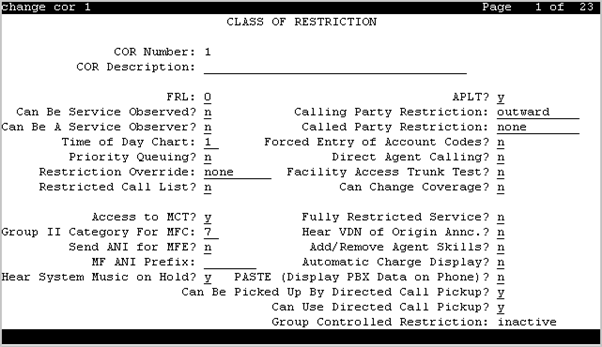
Access to MCT
Grants or denies access to the Malicious Call Trace feature.
Valid Entry |
Usage |
|---|---|
y |
With this, user can activate a request to trace a malicious call. |
n |
With this, user cannot request a malicious call trace. If this extension is the subject of a malicious call trace, the MCT History report does not display the extension. |
Add/Remove Agent Skills
User can add or remove skills.
APLT
Users can gain access to APLT trunk group Enhanced Private Switched Communications System (EPSCS) or Common Control Switched Arrangement (CCSA) off-net facilities.
Automatic Charge Display
Shows the cost of an active outgoing call using Periodic Pulse Metering (PPM) or ISDN Advice of Charge (AOC) on Digital Communications Protocol (DCP) or Avaya BRI stations. Unavailable in the U.S.
Valid Entry |
Usage |
|---|---|
y |
Call charges display during and at the end of the call. |
n |
Call charges display only when users press the disp-chrg button before the call drops. |
Called Party Restriction
Valid Entry |
Usage |
|---|---|
Inward |
Blocks the calling party from receiving incoming exchange network calls, attendant originated calls, and attendant completed calls. |
Manual |
Blocks the called party from receiving all calls except for those originated or extended by the attendant. |
Public |
Blocks the called party from receiving public network calls. Attendant calls can go through the called party and attendant-assisted calls if administered for this COR. |
Termination |
Blocks the called party from receiving any calls at any time. |
none |
No called party restrictions. |
Calling Party Restriction
Determines the level of calling restriction associated with this COR.
Important:
Limit calling permissions as much as possible.
Valid Entry |
Usage |
|---|---|
Origination |
Blocks the calling party from originating a call from the facility at any time. The party can only receive calls. A telephone with this COR can initiate Remote Access calls, if the COR of the barrier code supports it. |
Outward |
Blocks the calling party from calling outside the private network. Users can dial other users on the same server running Communication Manager or within a private network. To enhance security, you can use outward restrictions when practical. |
All-toll |
Blocks the calling party from making ARS and trunk access calls to certain toll areas as defined by the Dialed String on the ARS Toll Analysis table. The call completes if the facility COR is also associated with an Unrestricted Call List and whose Dialed String also matches the dialed number. |
Tac-toll |
Blocks the calling party from making trunk access calls to certain toll areas as defined by the Dialed String on the ARS Toll Analysis table. The call completes if the facility COR is also associated with an Unrestricted Call List and whose Dialed String also matches the dialed number. |
none |
No calling party restrictions. |
Can Be a Service Observer
A user with this CO permission can be a service observer.
Available only if Basic Service Observing is enabled for the system.
Caution:
Service Observing might be subject to federal, state, or local laws, rules, or regulations; or require the consent of one or both of the parties to the conversation. Customers should familiarize themselves with and comply with all applicable laws, rules, and regulations before using these features.
Can Be Picked Up By Directed Call Pickup
Calls for this station or EAS agent can be picked up using the Directed Call Pickup Up feature.
Available only if Directed Call Pickup is enabled for the system.
Can Be Service Observed
Service observing can be activated for physical extensions and logical agent IDs and VDNs.
Can Change Coverage
Station users can: Or Station users can have permission to:
Select one of two previously-administered coverage paths
Activate, change, or deactivate call forward all calls or call forward busy/don’t answer from any on-site or off-site location
Can Use Directed Call Pickup
The station, attendant, or EAS agent permission can pick up calls using the Directed Call Pickup feature.
Available only if Directed Call Pickup is enabled for the system.
COR Description
The description of the COR. Accepts up to 35 characters.
Tip:
A clear description makes it easier to remember which COR to assign when adding users.
Two examples of COR descriptions include Customer Service
and Legal Department
.
COR Number
The COR number.
Direct Agent Calling
Users can use the Direct Agent Calling feature. Using Direct Agent Calling, users can dial an ACD agent extension directly, rather than anyone in the agent pool. If the system is in Night Service, the call routes to the Night Service extension. If the extension with this COR belongs to an agent, the agent can receive calls directly.
Facility Access Trunk Test
Users can perform Facility Access Trunk Tests. When this feature is active, the trk-ac-alm feature button status lamp lights when a successful test attempt occurs.
Forced Entry of Account Codes
If enabled, the Forced Entry of Account Codes (FEAC) feature is active on this COR. Any telephone assigned the associated COR must dial an account code before making an outgoing call. If a call is being routed by ARS, the system prevents account code checking on the COR.
Available only when the FEAC feature is enabled for the system.
Important:
If a COR using the FEAC feature is assigned to a VDN, the route-to commands executed by the associated vector will be unsuccessful.
FRL
Security alert:
Assign the lowest possible FRL to enhance system security.
Valid Entry |
Usage |
|---|---|
0 to 7 |
Assigns a Facilities Restriction Level (FRL) to the COR to enhance system security. AAR or ARS features use this entry to determine call access to an outgoing trunk group. Outgoing call routing is determined by a comparison of the FRLs in the AAR/ARS Routing Pattern and the FRL associated with the COR of the call originator. The call originator is typically a telephone user. An originating FRL of 0 has the least calling privileges. |
Fully Restricted Service
Unavailable for Enhanced Private Switched Communications System (EPSCS) or Common Control Switched Arrangement (CCSA) off-net facilities.
Valid Entry |
Usage |
|---|---|
y |
Stations do not have access to the public network for either incoming or outgoing calls. |
n |
Stations have access to the public network for either incoming or outgoing calls. |
Group II Category For MFC
Valid Entry |
Usage |
|---|---|
1 to 10 |
Controls categories for Russian signaling trunks. Also controls categories for R2-MFC signaling trunks if administered system-wide. The server running Communication Manager sends this value as the Calling or Called Party Category for telephones or trunks that use this COR. This administered Calling Party Category digit is included as part of the ANI information sent to the local telephone company central office on request using R2-MFC signaling. |
Group Controlled Restriction
Valid Entry |
Usage |
|---|---|
active |
The current COR is under controlled restriction. |
inactive |
The current COR is beyond controlled restriction. |
Hear System Music on Hold
If you enable the Music on Hold feature on the telephone, callers that the user puts on hold will hear music.
Hear VDN of Origin Announcement
Agents can receive VDN of Origin Announcement (VOA) messages that provide agents with a short message about the caller's city of origin or requested service based on the VDN used to process the call.
MF ANI Prefix
The prefix applied to an extension number when ANI is sent to the local telephone company central office. Accepts up to seven digits. This COR-specific value overrides any ANI prefix administered system-wide for multifrequency signaling. The prefix is inapplicable when ANI is tandemed through the Communication Manager server on tandem calls. Also applies to the ANI for the server when the originating side is a trunk and there was no ANI.
Partitioned Group Number
Available only if AAR/ARS Partitioning is enabled for the system and partition groups are administered.
Valid Entry |
Usage |
|---|---|
1 to 8 |
The AAR/ARS partitioned group number associated with this COR. |
PASTE (Display PBX Data on telephone)
Use this field to enable the PASTE feature.
Valid entry |
Usage |
|---|---|
y |
Downloads all lists. |
n |
Disables the PASTE feature. |
Priority Queuing
If enabled, a telephone user’s calls are placed ahead of non-priority calls in a hunt group queue.
Restricted Call List
Use this field to allow or restrict access to the Restricted call list.
Valid entry |
Usage |
|---|---|
y |
Users cannot make calls to numbers on the Restricted call list from a facility assigned to this COR. |
n |
Users can make calls to numbers on the Restricted call list from a facility assigned to this COR. |
Restriction Override
Users assigned to this COR can override inward restriction during conference, transfer or call forwarding operation to a telephone that is inward restricted.
Valid Entry |
Usage |
|---|---|
attendant |
Attendants might override inward restrictions. A telephone with a COR that is inward restricted cannot receive public network, attendant-originated, or attendant-extended calls. |
all |
All users can override inward restrictions |
none |
No users can override inward restrictions |
Send ANI for MFE
Applicable only:
For Spain
For 2/6 signaling, but not 2/5 signaling
Valid Entry |
Usage |
|---|---|
y |
Enables Automatic Number Identification (ANI) to send the calling party’s number to the public or IBERCOM network so that charges are broken down by line. |
n |
Charges are not itemized by line. The company receives a single bill for the total number of calls made; also called block charging. |
Time of Day Chart
Available only if Time of Day Routing is enabled for the system.
Valid Entry |
Usage |
|---|---|
1 to 8 |
The AAR/ARS time-of-day-chart number associated with this COR. |
Unrestricted Call List
Valid Entry |
Usage |
|---|---|
1 to 10 blank |
Overrides specified toll call restrictions for a COR otherwise restricted from making ARS or trunk access calls. |
Class of Restriction: page 2
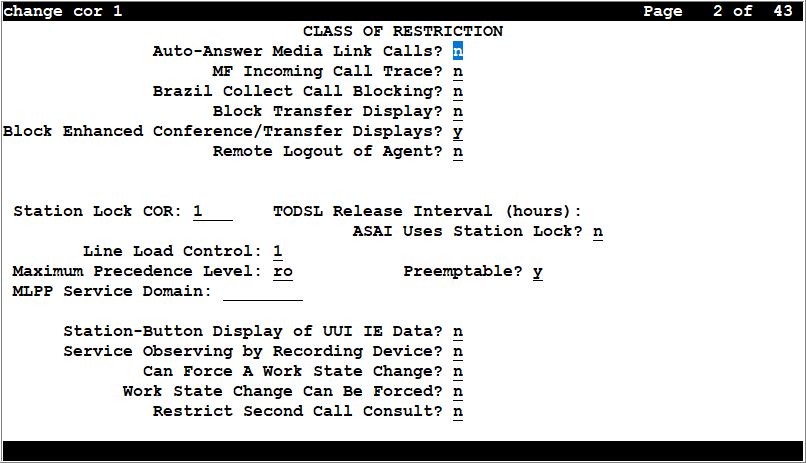
ASAI Uses Station Lock
Valid Entry |
Usage |
|---|---|
y |
Enables the ASAI originated calls to follow the restriction or permission assigned to the locked station, via the Station Lock COR feature. |
n |
Enables the ASAI originated calls to follow the permission or restrictions of the COR assigned to the endpoint. The default value is n. |
Auto-answer media link calls
You can configure the Auto-Answer Media Link Calls field to enable the Communication Manager to answer the calls automatically or not. Auto-Answer Media Link Calls field applies to J169, J179, and Avaya SIP (AvyaSIP) set types.
Valid entry |
Usage |
|---|---|
Y |
Communication Manager enables the endpoints to auto-answer the incoming calls automatically. |
N |
Communication Manager enables the endpoints to ring but disables the endpoints to auto-answer the incoming calls. |
Block Enhanced Conference/Transfer Display
Valid entry |
Usage |
|---|---|
y |
Blocks all the enhanced conference and transfer display messages on digital telephones, except the Transfer Completed message. |
n |
Does not block the enhanced conference and transfer display messages. |
Block Transfer Displays
Valid Entry |
Usage |
|---|---|
y |
Users of DCP, Hybrid, ISDN-BRI, or wireless display telephones cannot receive a confirmation message when they transfer a call. |
n |
Users can receive a confirmation message when they transfer a call. |
Brazil Collect Call Blocking
If enabled, all Brazilian trunk calls that terminate to a station send back a double answer to the local telephone company central office (CO). This double answer tells the CO that this particular station cannot accept collect calls. The CO then tears down the call if it is a collect call.
Line Load Control
Valid Entry |
Usage |
|---|---|
1 to 4 |
Specifies the line load control level for this COR, where 1 has no restrictions and 4 is the most restrictive. |
Maximum Precedence Level
Assigns a maximum precedence level for extensions with this COR for use with the Multiple Level Precedence and Preemption feature.
Valid Entry |
Usage |
|---|---|
fo |
Flash Override |
fl |
Flash |
im |
Immediate |
pr |
Priority |
ro |
Routine. This is the default value. |
MF Incoming Call Trace
If enabled, a Call Trace can be assigned to a station. Communication Manager then generates an MFC backward signal during call setup instead of the free
signal. This triggers the local telephone company central office to collect trace information before releasing the calling party.
MLPP Service Domain
Valid Entry |
Usage |
|---|---|
0 to 16777215 |
The service domain for users and trunks to which this COR is assigned |
This field is visible only if Multi level precedence preemption is set to y on the system-features customer-options form.
Outgoing Trunk Disconnect Timer (minutes)
Disconnects an outgoing trunk automatically after an administrable amount of time.
Valid Entry |
Usage |
|---|---|
2 to 999 |
The number of minutes to wait before automatically disconnecting the call. A warning tone is given to all parties on the trunk call 1 minute before the administered value and a second warning tone is heard 30 seconds later. The call is automatically disconnected 30 seconds after the second warning tone. |
blank |
Outgoing trunk calls disconnect only when dropped by one or all parties. This is the default. |
Preemptable
If enabled, makes extensions with this COR preemptable for Multiple Level Precedence and Preemption calls.
Remote Logout of Agent
If enabled, users can use a feature access code to logout an idle ACD or EAS agent without being at the agent’s telephone.
Restrict Second Call Consult
Use this field to enable the Restrict Second Agent Consult feature. With this feature, Communication Manager allows the agents of Avaya Aura® Contact Center to use only one consult operation at a time. The consult operations include transfer and conference.
Note:
If you set the Restrict Second Call Consult field to n, after you dial the Restrict Second Consult feature access code, the feature access code overrides the setting of the Restrict Second Call Consult field on the COR group of the station.
Service Observing by Recording Device
If enabled, the service observer associated with this COR can use an audio recording device, such as the Witness product.
For more information on Service Observing by Recording Device, see Avaya Aura® Communication Manager Feature Description and Implementation
Station-Button Display of UUI IE Data
If enabled, a station user can push a uui-info station button and see up to 32 bytes of ASAI-related User-User-Information Information Element (UUI-IE) data. Pressing the uui-info button displaces the incoming call/collected digits display. Pressing callr-info re-displays the collected digits.
Available only with Call Center release 3.0 or later.
Station Lock COR
Valid Entry |
Usage |
|---|---|
0 to 995 |
If the user dials the station lock Feature Access Code (FAC), the user's extension applies the Station Lock COR for call restrictions instead of the station's usual COR. For information on call restrictions, see the Station Lock section of Avaya Aura® Communication Manager Feature Description and Implementation. This field defaults to the current COR. |
Class of Restriction: page 3
The Send All Calls and Call Forwarding (SAC/CF) Override feature overrides active rerouting. This feature overrides these active rerouting settings:
Send All Calls (SAC)
Call Forwarding (CF) all
Enhanced Call Forwarding (ECF) unconditional
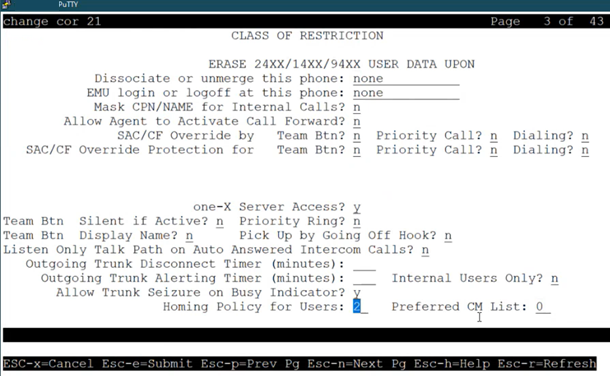
Allow Trunk Seizure On Busy Indicator
This field specifies whether the trunk is seized when the user presses the Busy indicator button.
Valid entry |
Usage |
|---|---|
y |
When the user presses the Busy indicator button for TAC:
|
n |
When the user presses the Busy indicator button for TAC:
|
Auto Answer
Enables or disables automatic answer on team button calls.
Erase 24xx/14xx/94xx User Data Upon: Dissociate or unmerge this phone
Administers what local terminal data items are erased when the 24xx, 14xx, or 94xx is dissociated or unmerged.
Valid Entry |
Usage |
|---|---|
none |
Default value. No local terminal data is erased. |
log |
Terminal's local call Log data is erased. |
customizations |
Call Log, Button labels, Speed Dial List, Local Terminal Options are erased. |
all |
All local terminal data is erased (Call Log, Button Labels, Speed Dial List, Options, Language). |
Erase 24xx/14xx/94xx User Data Upon: EMU login or logoff at this phone
Administers what local terminal data items are erased upon Enterprise Mobility User (EMU) login or logoff.
Valid Entry |
Usage |
|---|---|
none |
This is the default. No local terminal data is erased. |
log |
Terminal's local call Log data is erased. |
customizations |
Call Log, Button labels, Speed Dial List, Local Terminal Options are erased. |
all |
All local terminal data is erased (Call Log, Button Labels, Speed Dial List, Options, Language). |
Homing Policy for Users
A homing policy specifies the Communication Manager node to which a station connects. A homing policy value of one indicates that there is a dynamic assignment of Communication Manager nodes which does not follow any fixed or static pattern. A homing policy value of two indicates that there is a strict node hierarchy.
These values are important for the successful operation of the Communication Manager for Avaya Aura® Distributed Architecture (AADA) using Kafka. This integration requires the movement from one Communication Manager instance to another in a specific order.
Note:
The Kafka integration feature is reserved for future use.
Valid entry |
Usage |
|---|---|
1 |
Dynamic assignment of Communication Manager nodes. |
2 |
Static assignment of Communication Manager nodes in a strict node hierarchy. |
Internal Users Only
Use this feature to enable or disable the zip tone for internal users for all incoming and outgoing trunk calls. The zip tone plays for all calls, such as one-to-one mapping and conference calls.
When you enable the Internal Users Only field, Communication Manager disables the Outgoing Trunk Alerting Timer (minutes) field and enables the Trunk Alerting Timer (minutes) field with an interval ranging from 0 to 999.
Valid entry |
Usage |
|---|---|
y |
The zip tone plays only for the internal users for all incoming and outgoing trunk calls. |
n |
The zip tone plays for internal and external users. |
Listen Only Talk Path on Auto Answered Intercom Calls
If enabled, the intercom call receiver can listen to another party but cannot speak to the other party. By default, this field is disabled.
Mask CPN/Name for Internal Calls
Valid entry |
Usage |
|---|---|
y |
Hides the display of calling and called party numbers and administered name on internal calls. |
n |
Shows the display of calling and called party numbers and administered name on internal calls. |
one-X Server Access
Enables or disables the one-X Server Access for one-X control.
Outgoing Trunk Alerting Timer (minutes)
Applies an zip tone to an outgoing trunk call after an administrable amount of time.
Valid Entry |
Usage |
|---|---|
2 to 999 |
The number of minutes to wait before an zip tone is applied to the call. |
blank |
The Zip Tone for Outgoing Trunk Calls feature is disabled and the zip tone is not applied to the call. This is the default. |
Outgoing Trunk Disconnect Timer (minutes)
Disconnects an outgoing trunk automatically after an administrable amount of time.
Valid Entry |
Usage |
|---|---|
2 to 999 |
The number of minutes to wait before automatically disconnecting the call. A warning tone is given to all parties on the trunk call 1 minute before the administered value and a second warning tone is heard 30 seconds later. The call is automatically disconnected 30 seconds after the second warning tone. |
blank |
Outgoing trunk calls disconnect only when dropped by one or all parties. This is the default. |
Preferred CM List
A list of Communication Manager nodes in a particular order. This grouping of nodes is a Communication Manager cluster. You can configure this list using change cluster preferred-CM-list <list#>. Each node in the list must match the node name that you configured using the System Manager web console.
These values are important for the successful operation of the Communication Manager for Avaya Aura® Distributed Architecture (AADA) using Kafka. This integration requires the movement from one Communication Manager instance to another in a specific order.
Note:
The Kafka integration feature is reserved for future use.
Priority Ring
Enables or disables priority ringing for speed dialing on team button calls.
SAC/CF Override by Priority Call and Dialing
Use this field to enable or disable the SAC/CF override by Priority Call and Dialing feature.
SAC/CF Override by Team Btn
Use this field to allow the user of a monitoring station to override any active rerouting, such as Send All Calls or Call Forwarding, on the monitored station.
The monitoring station can override the rerouting only if the following conditions are met:
The SAC/CF Override by Team Btn field is set to y.
The SAC/CF Override Protection for Team Btn field is set to n.
The monitoring station uses the team button the make the call to the monitored station.
Note:
Communication Manager Release 6.2 and earlier supported this feature on H.323 and DCP stations. Communication Manager Release 6.3.6 extends this support to SIP stations.
SAC/CF Override Protection for Priority Call and Dialing
Use this field to enable or disable the SAC/CF Override Protection for Priority Call and Dialing feature.
SAC/CF Override Protection for Team Btn
Use this field to restrict the user of a monitoring station from overriding the active rerouting, such as Send All Calls or Call Forwarding, on the monitored station. This field works only when the monitoring station uses the team button the make a call to the monitored station.
Note:
Communication Manager Release 6.2 and earlier supported this feature on H.323 and DCP stations. Communication Manager Release 6.3.6 extends this support to SIP stations.
Team Btn Display Name
Enables or disables the display of station name on team button calls.
Team Btn Silent if Active
Enables or disables audible ringing on team button calls.
Team Pick Up by Going Off Hook
Enables or disables pick-up by going off hook on team button calls.
Trunk Alerting Timer (minutes)
With Release 10.2, when you enable Internal Users Only, the Communication Manager disables the Outgoing Trunk Alerting Timer (minutes) field and enables the Trunk Alerting Timer (minutes) field with an interval ranging from 0 to 999.
Valid entry |
Usage |
|---|---|
0 to 999 |
The number of minutes to wait before Communication Manager applies a zip tone to the call. |
blank |
The zip tone for Outgoing Trunk Calls feature is disabled, and Communication Manager does not apply the zip tone to the call. This is the default value. |
Class of restriction: page 4 to page 23
You can use the screens from page 4 to page 13 to assign calling permissions and the screens from page 14 to page 23 to assign service observing permissions to the COR that you administer.
CALLING PERMISSION
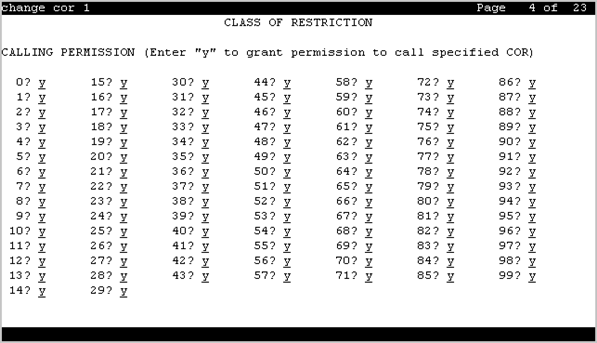
Users with this COR can call users with the CORs from 0 to 995.
Valid entry |
Usage |
|---|---|
y |
A station user with the COR that you administer can call stations with the other COR. The default value is y. |
n |
A station user with the COR that you administer cannot call stations with the other COR. |
SERVICE OBSERVING PERMISSION
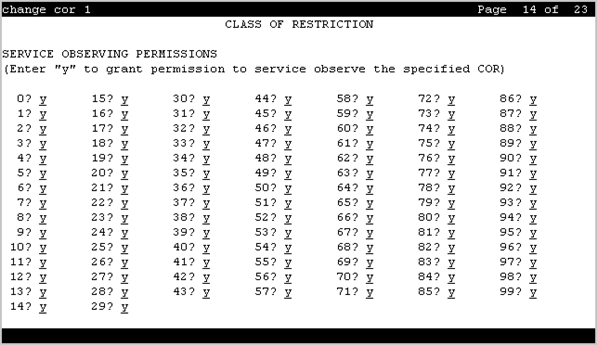
Users with this COR can observe users with the CORs from 0 to 995.
Valid entry |
Usage |
|---|---|
y |
A station user with the COR that you administer can observe stations with the other COR. The default value is y. |
n |
A station user with the COR that you administer cannot observe stations with the other COR. |