

AVAYA DOCUMENTATION CENTER
Find answers to your technical questions and learn how to use our products
Avaya Aura® Communication Manager Screen Reference
Feature-related system parameters: page 6
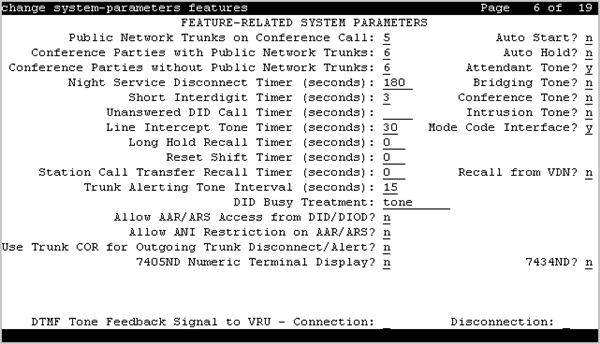
7405ND Numeric Terminal Display
Enables or disables allowing a 7405ND type of station. This is not an actual telephone type, but it can be used to define ports for certain types of voice messaging systems. This numeric display setting sends only numbers, and not names, to the messaging system.
7434ND
Enables or disables allowing a 7434ND type of station. This is not an actual telephone type, but it can be used to define ports for certain types of messaging systems. Used if the voice messaging system operates in Bridged Mode.
Allow AAR/ARS Access from DID/DIOD
Enables or disables allowing calls for DID and DIOD type trunk groups to complete calls using ARS or AAR.
Allow ANI Restriction on AAR/ARS
(For Russia only). Enables or disables allowing a call placed over a Russian shuttle trunk or a Russian rotary trunk using AAR or ARS to have the ANI requirement administered as restricted. In this case, when ANI is requested, if the request fails, the call immediately drops.
Attendant Tone
Enables or disables providing call progress tones to the attendants.
Auto Hold
Enables or disables the Automatic Hold feature on a system-wide basis.
Auto Start
If enabled, the Start buttons on all attendant consoles are disabled and the Automatic Start feature is enabled.
Bridging Tone
Enables or disables providing a bridging tone when calls are bridged on primary extensions.
Conference Parties without Public Network Trunks
Valid entry |
Usage |
|---|---|
3 to 6, or 12 |
The maximum number of parties allowed in a conference call involving no public network trunks.
Note:
For 12 parties to participate in a conference, you must enable the 12–party Conferences field in the Feature-Related System-Parameters screen. |
Conference parties with public network trunks
Available only if public network trunks are allowed on a conference call.
Valid Entry |
Usage |
|---|---|
3 to 6, or 12 |
The maximum number of parties allowed in a conference call involving a public network subscriber.
Note:
For 12 parties to participate in a conference, you must enable the 12–party Conferences field in the Feature-Related System-Parameters screen. |
Conference Tone
Enables or disables providing a conference tone as long as three or more calls are in a conference call.
Note:
Bridging and Conference Tones are not supported by all countries. If these tones are enabled for countries other than Italy, Belgium, United Kingdom, or Australia, the tones are equivalent to no tone (silence) unless the tone is independently administered or customized.
DID Busy Treatment
Specifies how to handle a direct inward dialing (DID) call to a busy station.
Valid Entry |
Usage |
|---|---|
attendant |
Call is routed to attendant. |
tone |
Caller hears a busy tone. |
DTMF Tone Feedback Signal to VRU - Connection, Disconnection
Available only if DTMF Feedback Signals for the Voice Response Unit (VRU) are enabled for the system.
Valid Entry |
Usage |
|---|---|
0 to 9, *, #, A, B, C, D |
The code used to connect or disconnect the VRU. This can be a single digit, or a combination such as *99 to connect, #99 to disconnect. The tones must be programmed at the VRU as well. |
blank |
No tone is sent to the VRU. |
Intrusion Tone
Enables or disables applying an intrusion tone (executive override) when an attendant intrudes on the call.
Line Intercept Tone Timer (seconds)
Valid Entry |
Usage |
|---|---|
0 to 60 |
How long an analog station user can wait after hearing warning tone without going on hook, before the station is placed in the lockout state. |
Long Hold Recall Timer (seconds)
Valid Entry |
Usage |
|---|---|
0 to 999 |
The number of seconds a call can be on hold before the system re-alerts the user to remind them of the call. |
Mode Code Interface
Activates or deactivates the use of the Mode Code Voice Mail System Interface to connect the server running Communication Manager over a DTMF interface to other voice mail systems.
Note:
After making changes, log off and log back on to access the Mode Code Related System Parameters.
Night Service Disconnect Timer (seconds)
Valid Entry |
Usage |
|---|---|
10 to 1024 blank |
The number of seconds a trunk call can be unanswered during night service before being disconnected. The trunk must not have Disconnect Supervision for this timer to apply. |
Public network trunks on conference call
Valid Entry |
Usage |
|---|---|
0 to 5, or 11 |
The number of public network trunks allowed on a conference call.
Note:
For 12 parties to participate in a conference, you must enable the 12–party Conferences field in the Feature-Related System-Parameters screen. |
Recall from VDN
Indicates whether or not a call that is transferred to a VDN and then routed to a station is recalled to the originating station after the Station Call Transfer Recall Timer expires. If enabled, calls are recalled from a VDN when the Station Call Transfer Recall Timer expires.
Available only if Basic Vectoring and Vectoring (Prompting) are enabled for the system.
Reset Shift Timer (seconds)
Valid Entry |
Usage |
|---|---|
0 to 255 |
Specifies the number of seconds that reset shift dial tone is audible before busy tone is heard. With reset shift dial tone, the user can dial a new extension by dialing one new digit that replaces the last digit of the extension previously dialed. The new digit replaces the last digit of the extension previously dialed. An entry of 0 disables this feature. Used only for station-to-station calls or private network calls using ISDN trunks. |
Short Interdigit Timer (seconds)
Valid Entry |
Usage |
|---|---|
3 to 9 |
The time limit that digit analysis will wait for the next digit when it has predicted that all the digits have already been collected. |
Special Dial Tone
If enabled, Special Dial Tone can be used.
Special dial tone notifies an analog-telephone user if certain features are still active when the user goes off-hook. These features include:
Call Forwarding
Send All Calls
Do Not Disturb
Station Call Transfer Recall Timer (seconds)
A user-transferred call (station-to-station, a trunk call, or a DCS call) can re-terminate with priority ringing back to the station user who initiates the transfer operation if the transfer-to party does not answer the call within the administered Station Call Transfer Recall timer.
Valid Entry |
Usage |
|---|---|
0 to 999 |
The time in seconds before a call redirects back to the station user who initiated the transfer operation. The entry 0 disables this feature. |
Trunk Alerting Tone Interval (seconds)
Valid Entry |
Usage |
|---|---|
1 to 60 |
Specifies the interval at which the alerting tone is repeated on the call. By default, the value is 15 seconds. |
Unanswered DID Call Timer (seconds)
Valid Entry |
Usage |
|---|---|
10 to 1024 |
Limits how long a DID call can remain unanswered before routing to the DID/TIE/ISDN Intercept Treatment. This timer interacts with the nonadministrable 50-second Wait for Answer Supervision Timer (WAST). The WAST timer overrides this field. Therefore, if this field is set to a value equal to or greater than 50 seconds, the caller receives intercept tone instead of the normal attendant or announcement treatment that is given when the Unanswered DID Call Timer expires before the WAST. If the Unanswered DID Call Timer expires while the DID call is being processed by call vectoring, the timer is ignored. |
blank |
Disables the timer. |
Use Trunk COR for Outgoing Trunk Disconnect/Alert
Indicates whether the outgoing trunk disconnect timer or the outgoing trunk alerting timer is set based on the COR of the originating station or the trunk group. If enabled, the timer is based on the COR of the trunk, not the originating station. By default, this field is disabled.
Important:
You must disable outgoing trunk disconnect and outgoing trunk alerting timers at the same time. If you try to administer both timers, the system displays the following message:
Cannot enable both Outgoing Trunk Disc and Outgoing Trunk Alert timers
DISTINCTIVE AUDIBLE ALERTING
Available only if Tenant Partitioning is disabled for the system.
Attendant Originated Calls
Indicates which type of ringing applies to attendant-originated calls.
Valid Entry |
Usage |
|---|---|
internal |
Internal ringing applies to attendant-originated calls. |
external |
External ringing applies to attendant-originated calls. Default is external. |
priority |
Priority ringing applies to attendant-originated calls. |
Distinctive Audible Alerting (Internal, External, Priority)
The number of rings for Internal, External, and Priority calls. For virtual stations, this applies to the mapped-to physical telephone.
Valid Entry |
Usage |
|---|---|
1 |
One burst of ringing signal per period. Default for internal calls. |
2 |
Two bursts of ringing signal per period. Default for external and attendant calls. |
3 |
Three bursts of ringing signal per period. Default for priority calls. |