

AVAYA DOCUMENTATION CENTER
Find answers to your technical questions and learn how to use our products
Avaya Aura® Communication Manager Screen Reference
Feature-related system parameters: page 16
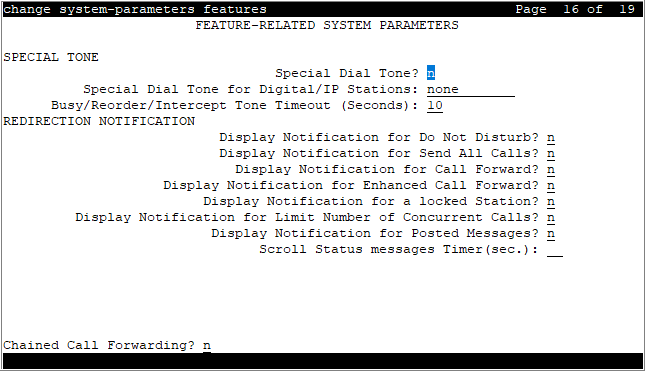
SPECIAL TONE
Special Dial Tone
Enables or disables an audible tone indicating that the station is locked.
Special Dial Tone for Digital/IP Stations
Valid Entry |
Usage |
|---|---|
all none non-display |
System plays special dial tone for digital or IP stations, if the Limit Number of Concurrent Calls, Station Lock, or Call Forward feature is active. |
Busy/Reorder/Intercept Tone Timeout (Seconds)
Valid Entry |
Usage |
|---|---|
3 to 45 |
Allows you to configure the time to play busy, reorder, or intercept tone. Communication Manager releases the call appearance after the specified time. This field is not applicable for SIP stations. This Timer is applicable only when Treatment type is tone. For other Treatment types like announcement, the timer will be ignored. This field is applicable to the following fields:
|
REDIRECTION NOTIFICATION
Chained Call Forwarding
Enables or disables Chained Call Forwarding. With Chained Call Forwarding, calls can be forwarded to as many as 10 forwarded-to stations using a preset forwarding path.
Display Notification Enhanced Call Forward
Enables or disables display notification for Enhanced Call Forward.
Display Notification for a locked Station
Enables or disables display notification for a locked station.
Display Notification for Call Forward
Enables or disables display notification for Call Forward.
Display Notification for Do Not Disturb
Enables or disables display notification for Do Not Disturb.
Display Notification for Limit Number of Concurrent Calls
Enables or disables display notification for Limit Number of Concurrent Calls.
Display Notification for Posted Messages
Enables or disables display notification for posted messages.
Display Notification for Send All Calls
Enables or disables display notification for Send All Calls.
Scroll Status messages Timer (sec.)
Valid Entry |
Usage |
|---|---|
5 to 10 |
The time in seconds for displaying scroll status messages. The status information shows the feature that has the highest priority and is enabled. The features in order of decreasing priority are:
|
blank |
Deactivates the scrolling. This is the default. |