

AVAYA DOCUMENTATION CENTER
Find answers to your technical questions and learn how to use our products
Avaya Aura® Communication Manager Screen Reference
Trunk Group: page 2
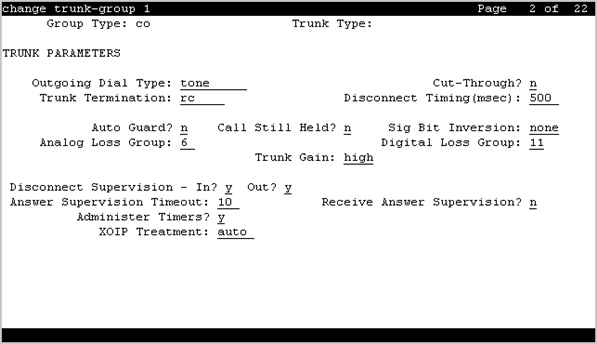
Administer Timers
Enables or disables administration of timers on this trunk group. The default for the ISDN trunk group type is disabled. All other trunk group types are enabled by default.
Available for all trunk group types except cpe, h.323, and sip.
Analog Loss Group
Determines which administered two-party row in the loss plan applies to this trunk group if the call is carried over an analog signaling port in the trunk group.
Valid Entry |
Usage |
|---|---|
1 to 17 |
The index into the loss plan and tone plan. If values are administered other than in between 6 and 10 or 15 and 17, the system displays a warning message indicating that the loss group may not be appropriate for this trunk group. |
Answer Supervision Timeout
Valid Entry |
Usage |
|---|---|
0 to 250 |
The number of seconds Communication Manager waits before it acts as though answer supervision has been received from the far-end. During a cut-through operation, timing begins after each outgoing digit is sent and timing ceases after the far-end sends answer supervision. On senderized operation, the timer begins after the last digit collected is sent. |
Note:
This field’s setting does not override answer supervision sent from the network.
Auto Guard
Enables or disables Auto Guard, which prevents repeated seizures of a defective trunk. Communication Manager does a maintenance busy-out on these trunks. This field controls ports only on TN438B, TN465B, and TN2147 circuit packs. TN438B ports have hardware support for detecting a defective trunk. TN465B and TN2147 ports use a trunk defective if no dial tone is detected on an outgoing call, and the Outpulse Without Tone feature is disabled for the system.
Available only for co or fx trunk groups.
Bit Rate
Available when the Comm Type is avd or rbavd. Also available if the Comm Type is data, but only if ISDN-PRI is enabled for the system.
Valid Entry |
Usage |
|---|---|
300 1200 2400 4600 9600 19200 |
The baud rate to be used by pooled modems. |
Caller ID for Service Link Call to H.323 1xC
This field is available only when you set the Direction field to outgoing or two-way and the trunk group type is ISDN or SIP.
Valid entry |
Usage |
|---|---|
original-calling-number |
Before sending the call to the service link, Communication Manager changes the calling party number to the original calling party number. When the user receives an incoming call, the number that the mobile displays is the original caller ID and not the extension number. |
station-extension |
Communication Manager does not change the calling party number. The default value is station-extension. |
Call Still Held
If enabled, the system prevents glare by extending the Incoming Glare Guard timer and delaying an outgoing seizure of a trunk for at least 140 seconds after it is released from an incoming call. This field is used when the receiving end media server or switch initiates the disconnection of incoming calls. This field affects only TN438B, TN465B, and TN2147 ports and is used primarily when the Country code is 2.
Available only for co or fx trunk groups.
Cut-Through
Available only if the Outgoing Dial Type field is rotary or tone.
Security alert:
Enabling this field reduces the ability to prevent toll fraud.
Valid Entry |
Usage |
|---|---|
y |
Users get dial tone directly from the far end of the trunk. If you set the Cut-Through field to y, some administered restrictions are bypassed. |
n |
Users receive switch dial tone. Instead of digits being sent to the central office, they are collected, and sent all at once when the user finishes dialing. |
Cyclical Hunt
Controls the starting point Communication Manager uses to search for an available trunk when a call is sent to the trunk group. Cyclical hunts can be enabled or disabled at any time, however, all the trunks in the group must be idle or busied out.
Available only for two-way loop-start trunks.
Valid Entry |
Usage |
|---|---|
y |
Communication Manager starts its search from the last trunk seized. This method is faster, and therefore suited for high-traffic trunk groups. |
n |
Communication Manager starts each search at member 1 (the first trunk administered as a group member). |
Delay Call Setup When Accessed Via IGAR
The system displays this, when the Group Type field is isdn or sip. If a user in one network region accesses an ISDN or SIP trunk in another network region through IGAR, the Delay Call Setup When Accessed Via IGAR field determines whether the IGAR trunk and the outgoing trunk are initiated in sequence or parallel.
Valid Entry |
Usage |
|---|---|
y |
The outgoing trunk call waits until the IGAR trunk call is active. |
n |
The two trunk calls are set up in parallel. The default value is n. |
Dial Detection
Indicates whether digit pulses are detected by observing the A-wire (default) or the B-wire only. Applies only to TN2199 ports. The Country code must be 15.
Digital Loss Group
Valid Entry |
Usage |
|---|---|
1 to 19 |
Determines which administered two-party row in the loss plan applies to this trunk group if the call is carried over a digital signaling port in the trunk group. If values other than 18 or between 11 and 15 are administered, the system displays a warning message indicating that the loss group may not be appropriate for this trunk group. |
Digits
If the Digit Treatment is absorption, this field specifies how many digits are deleted. If the Digit Treatment is insertion, this field identifies the specific digits that are added.
Valid Entry |
Usage |
|---|---|
1 to 5 |
The number of digits to be deleted (absorbed). |
Up to 4 digits, including * and # |
The actual digits to be added (inserted). |
blank |
This field can be blank only if Digit Treatment is not administered. |
Digit Treatment
Modifies an incoming digit string by adding or deleting digits. This is required if the number of digits received does not match the dial plan.
Requires administration of the Digits to add or delete.
Valid Entry |
Usage |
|---|---|
absorption |
Deletes digits, starting at the beginning of the string. |
insertion |
Adds digits, starting at the beginning of the string. |
blank |
The incoming digit string is not changed. |
Disconnect Supervision-In
Indicates whether Communication Manager receives disconnect supervision for incoming calls over this trunk group.
Available only for incoming or two-way trunk groups.
Valid Entry |
Usage |
|---|---|
y |
Allows trunk-to-trunk transfers involving trunks in this group. The far-end server or switch sends a release signal when the calling party releases an incoming call, and the far-end server or switch is responsible for releasing the trunk. Enhances Network Call Redirection. |
n |
The far-end server or switch does not provide a release signal, the hardware cannot recognize a release signal, or timers are preferred for disconnect supervision on incoming calls. Prevents trunk-to-trunk transfers involving trunks in this group. |
Caution:
In general, U.S. local telephone company central offices provide disconnect supervision for incoming calls but not for outgoing calls. Public networks in most other countries do not provide disconnect supervision for incoming or outgoing calls. Check with the network services provider.
Disconnect Supervision-Out
Indicates whether Communication Manager receives disconnect supervision for outgoing calls over this trunk group. Available for outgoing or two-way trunk groups.
Valid Entry |
Usage |
|---|---|
y |
Allows trunk-to-trunk transfers involving trunks in this group. The far-end sends a release signal when the called party releases an outgoing call, and the far-end is responsible for releasing the trunk. Enhances Network Call Redirection. Available only if Answer Supervision Timeout is 0 and Receive Answer Supervision is enabled. |
n |
The far-end server or switch does not provide a release signal, the hardware cannot recognize a release signal, or timers are preferred for disconnect supervision on outgoing calls. Prevents trunk-to-trunk transfers involving trunks in this group. |
Caution:
Verify that the far-end server or switch provides answer supervision and disconnect supervision. Most public networks do not provide disconnect supervision over analog trunks. Check with the network services provider.
Disconnect Timing (msec)
Valid Entry |
Usage |
|---|---|
140 to 2550 ms in increments of 10 |
Specifies the minimum time in milliseconds that the local telephone company central office or far-end server requires to recognize that this server has disconnected from a call. Settings on those two timers override this field. The default of 500 is an industry standard and should not be changed. If this field is set too high, the server or switch does not disconnect sometimes when it should. If this field is set too low, the server or switch disconnects when it should not. |
Disconnect Type
Indicates which side or user controls the disconnect. A refers to the calling party, and B refers to the called party.
Available only if the Country code is 15 and the Trunk Type is 2-wire-ac, 2-wire-dc, or 3-wire. Applies only to the TN2199 port.
Valid Entry |
Usage |
|---|---|
AandB |
Both parties control the disconnect. |
AorB |
Either party controls the disconnect. |
Drop Treatment
Valid Entry |
Usage |
|---|---|
intercept busy silence |
Determines what the calling party hears when the called party terminates an incoming call. For security reasons, you must apply a tone; silence can provide an opening for hackers. Applies only to DID trunks. |
Note:
In Italy, Drop Treatment must be administered as intercept for all DID trunk groups.
Duplex
Available if the Comm Type is avd or rbavd. Also available if the Comm Type is data, but only if ISDN-PRI is enabled for the system.
Note:
Even if the trunk group supports full-duplex transmission, other equipment in a circuit might not.
Valid Entry |
Usage |
|---|---|
full |
Allows simultaneous two-way transmission, which is most efficient. |
half |
Supports only one transmission direction at a time. |
End-to-End Signaling
Available only for a cpe (customer-provided equipment) trunk group.
Valid Entry |
Usage |
|---|---|
60 to 360 ms in increments of 10 |
The duration of the touch tone signal sent to auxiliary equipment. Equipment such as paging equipment and music sources might be connected to Communication Manager by auxiliary trunks. Communication Manager might send DTMF signals (touch tones) to these devices. This field sets the duration of these tones. |
Expected Digits
Valid Entry |
Usage |
|---|---|
1 to 18 |
The number of digits that the far-end server sends for an incoming connection. If the end is absorbing digits on this trunk group, the entry in this field must be larger than the value administered for the number of digits to be absorbed. |
blank |
Required if Digit Treatment is insert and Digits is a feature access code (for example, AAR or ARS) followed by digits. In this case, the number of digits expected are set on the AAR and ARS Digit Analysis Table and AAR and ARS Digit Conversion Table. If left blank, digit absorption cannot be administered. |
Extended Loop Range
Available only for a DID trunk group.
Valid Entry |
Usage |
|---|---|
y |
The distance between the local telephone company central office (CO) and the server is greater than the required distance. |
n |
The distance between the CO and the server is not greater than the required distance. |
Format
Specifies the encoding of Numbering Plan Indicator for identification purposes in the Calling Number and/or Connected Number IEs, and in the QSIG Party Number.
Available only if the Send Calling Number or Send Connected Number field is enabled or restricted.
Valid Entry |
Usage |
|---|---|
public |
Indicates that the number plan according to CCITT Recommendation E. 164 is used. |
unknown |
Indicates the Numbering Plan Indicator is unknown. |
private |
Indicates the Numbering Plan Indicator is PNP. |
unk-pvt |
Determines the type of number from the private numbering format, but the Numbering Plan Indicator is unknown. |
Group Type
Displays the type of trunk group.
Incoming Calling Number - Delete
Available only for incoming or two-way trunk groups.
Valid Entry |
Usage |
|---|---|
1 to 15 all blank |
The number of digits, if any, to delete from the calling party number for all incoming calls on this trunk group. |
Incoming Calling Number - Format
The TON/NPI encoding applied to CPN information modified by the CLI Prefix feature. This encoding does not apply to calls originating locally.
If this field is blank, Communication Manager passes on the encoding received in the incoming setup message. If the incoming setup message excludes CPN information and digits are added, the outgoing message contains these digits. If a numbering format is not administered in this case, the value defaults to pub-unk. If the numbering format is administered as unknown, the trunk group is modified to unk-unk encoding of the TON/NPI. Therefore, this field also must contain a value other than unknown.
The values for this field map to the Type of Numbering (TON) and Numbering Plan Identifier (NPI) values shown below.
Valid Entry |
Type of Numbering (TON) |
Numbering Plan Identifier (NPI) |
|---|---|---|
blank |
incoming TON unmodified |
incoming NPI unmodified |
natl-pub |
national(2) |
E.164(1) |
intl-pub |
international(1) |
E.164(1) |
locl-pub |
local/subscriber(4) |
E.164(1) |
pub-unk |
unknown(0) |
E.164(1) |
lev0-pvt |
local(4) |
Private Numbering Plan - PNP(9) |
lev1-pvt |
Regional Level 1(2) |
Private Numbering Plan - PNP(9) |
lev2-pvt |
Regional Level 2(1) |
Private Numbering Plan - PNP(9) |
unk-unk |
unknown(0) |
unknown(0) |
Incoming Calling Number - Insert
Valid Entry |
Usage |
|---|---|
0 to 9 all blank |
Up to 15 digits added to the beginning of the digit string of incoming calls when the calling party is a member of this trunk group. |
Incoming Dial Tone
Indicates whether or not the server running Communication Manager gives dial tone in response to far-end seizures of the trunk group.
Valid Entry |
Usage |
|---|---|
y |
Used if the incoming trunk group transmits digits. For example, this option is used for two-way, dial-repeating tie trunks that users select by dialing a trunk access code. |
n |
Used for trunks that are not sending digits, such as tandem or incoming local telephone company central office trunks. |
Incoming Dial Type
Indicates the type of pulses required on an incoming trunk group. This value should match what the local telephone company central office provides.
Available for Access, APLT, DID, DIOD, DMI-BOS, FX, RLT, Tandem, or WATS trunk groups. Also available for tie trunk groups when the Trunk Signaling Type is blank, cont, or dis.
Valid Entry |
Usage |
|---|---|
tone |
Use this entry for Dual Tone Multifrequency (DTMF) addressing, also known as |
rotary |
Allows only the dial pulse addressing method used by non-touch tone telephones. Though the tone entry supports rotary dialing as well, it is inefficient to reserve touch tone registers for calls that do not use DTMF. |
mf |
Use this option if the Trunk Signaling Type field is blank. The system displays this field only if you set the Multifrequency Signaling field on the System Parameters Customer-Options screen to y. You cannot use this option if the Used for DCS field is y. For pulsed and continuous E&M signaling in Brazil and for discontinuous E&M signaling in Hungary, use tone or mf. |
mf2/6 |
Use this entry for signaling in Spain. This signaling type provides normal public network service and a virtual private network digital trunk service called IBERCOM. Use this entry if the Trunk Signaling Type field is blank. The system displays this entry only if you enable Multifrequency Signaling for the system. The system does not display this entry if the trunk is used for DCS. |
Incoming Rotary Timeout (sec)
Valid Entry |
Usage |
|---|---|
5 to 99 blank |
Sets the maximum time to wait to receive all incoming digits from the far-end switch. |
Line Length
Available only for trunk groups with a Trunk Signaling Type of tge, tgi, or tgu.
Valid Entry |
Usage |
|---|---|
short long |
The line length. |
Outgoing Dial Type
Sets the method used to transmit digits for an outgoing call. Usually, this method should match what the local telephone company central office provides.
DIOD trunks support pulsed and continuous E&M signaling in Brazil and discontinuous E&M signaling in Hungary.
Available for Access, APLT, CO, DIOD, DMI-BOS, FX, RLT, and WATS trunk groups. Also available for Tie trunk groups when the Trunk Signaling Type is blank, cont, or dis.
Valid Entry |
Usage |
|---|---|
tone |
Uses Dual Tone Multifrequency (DTMF) addressing, also known as |
rotary |
Allows only the dial pulse addressing method used by non-touch tone telephones. For example, this value is appropriate for an internal full touch tone system and for a connection to a local telephone company central office that only supports rotary dialing. |
automatic |
For tie trunks if the Trunk Signaling Type is not administered. This provides |
mf |
Used if a Trunk Signaling Type is not administered. Available only if Multifrequency Signaling is enabled on the System-Parameters Customer-Options screen. Not available if this trunk is used for DCS. For pulsed and continuous E&M signaling in Brazil and for discontinuous E&M signaling in Hungary, use tone or mf. |
mf2/6 |
Used if a Trunk Signaling Type is not administered. Available only if Multifrequency Signaling is enabled on the System-Parameters Customer-Options screen. Not available if this trunk is used for DCS. |
r1mf |
Enter r1mf for CAMA trunk groups. It is the only outgoing dial type allowed on CAMA trunk groups. Enter r1mf to allow Russian MF Packet Signaling on outgoing trunks. Russian MF Packet Signaling carries calling party number and dialed number information. Group type field must be set to co. |
Preferred Minimum Session Refresh Interval (sec)
The system displays this field only for the SIP trunk groups that do not support Seamless Converged Communications Across Network (SCCAN) calls.
Use this field to set the value of the session refresh timer of non-SCCAN applications. The timer starts after Communication Manager establishes a session with the far-end SIP entities. After every timer interval, Communication Manager sends a session refresh request as a Re-INVITE or an UPDATE message to the SIP entities. If the SIP entities do not receive the request before the interval period expires, the session ends.
Valid entry |
Usage |
|---|---|
90 to 64800 |
Defines the session refresh timer. The default value is 600. |
Note:
If the SIP trunk is a member of a trunk group connected to Session Manager 6.3.6 or earlier, ensure that the value of the field is not more than 1800. If the SIP trunk is not a member, configure Session Manager with an adaptation module for Communication Manager, and set the SessionTimeout parameter on System Manager to a value greater than the value in the Preferred Minimum Session Refresh Interval field.
Receive Answer Supervision
If enabled, the Communication Manager provides answer supervision for a trunk group. For Outbound Call Management applications, use for trunks supporting network answer supervision. For trunks that do not receive a real answer, this field determines when the CallVisor Adjunct-Switch Application Interface (ASAI) connect event is sent.
Receive Release Ack
If enabled, the Receive Release Ack field is used to set the receive forward and backward release ack options on TN2140 ports (used for Italian and Hungarian tie trunks). Available only if the Trunk Signaling Type is cont or dis.
Redirect on OPTIM failure
Valid Entry |
Usage |
|---|---|
250 to 32000 milliseconds |
Calls are redirected by ROOF (Redirect on OPTIM Failure) procedures if a call terminates to an Extension to Cellular user cell phone (of any application type) that does not have an associated office telephone (or other method of terminating to a physical telephone), or the office telephone is out of order and Communication Manager receives a disconnect prior to the call being answered. The procedure redirects the call so that the caller does not hear ringback forever. |
SCCAN
If enabled, this trunk group provides support for incoming SCCAN calls. Available only for sip type trunk groups when Enhanced EC500 is enabled for the system.
Send Answer Supervision
If enabled, Communication Manager signals the calling server when an incoming call is answered. Available only if the Trunk Signaling Type is cont or dis. The field applies only to TN2140 ports. Available only for incoming or two-way trunks.
Send Release Ack
Indicates whether a release acknowledgment is sent in response to a forward or backward release signal. Available only if the Trunk Signaling Type is cont or dis. This field applies only to TN2140 ports (used for Italian and Hungarian tie trunks).
Sig Bit Inversion
Indicates which bits in bit-oriented signaling should be inverted, if any. This field inverts the A- and B-bits as necessary so that the far-end server or switch can understand seizure and release signals from Communication Manager. If the far-end server, such as a local telephone company central office, on this trunk group interprets the A- and B-bits differently from the default, invert one or both bits — to change 1
to 0
and vice-versa in the A-bit.
Valid Entry |
Usage |
|---|---|
A B A&B none |
For the MM710 media modules. |
A and none |
For the Japanese 2Mbit trunk. |
Supplementary Service Protocol
Available only for ISDN trunk groups.
Valid Entry |
Usage |
|---|---|
a |
Allows ASAI Flexible Billing. AT&T, Telcordia Technologies, Nortel. When the Country code for the DS1 media module is 1A, SSA selects AT&T custom supplementary services. When the Country code for the DS1 media module is 1B, SSA selects Telcordia Technologies Supplementary Services. When the Country code for the DS1 media module is 1C, SSA selects Nortel Proprietary Supplementary Services. |
b |
QSIG; also used for SBS signaling trunk groups when full QSIG functionality is needed. |
c |
ETSI; used for Network Call Deflection. |
d |
ECMA QSIG |
e |
Allows ASAI Flexible Billing. Allows DCS with rerouting when the trunk is used for DCS and DCS with Rerouting is enabled. |
f |
Feature Plus |
g |
ANSI. Available only if ISDN-PRI or ISDN-BRI Trunks is enabled for the system, or the trunk is used for DCS. Used for Network Call Transfer. |
Synchronization
Available only if the Group Type is :
dmi-bos or isdn
access, co, fx, tandem, tie, or wats; and the Comm Type is avd or rbavd
access, co, fx, tandem, tie, or wats; the Comm Type is data; and ISDN-PRI or ISDN-BRI Trunks is enabled for the system
Caution:
Do not change this field without the assistance of Avaya or your network service provider.
Valid Entry |
Usage |
|---|---|
async sync |
Determines whether the trunk group uses synchronous or asynchronous communications. |
Trunk Hunt
Defines the trunk hunt search order. Communication Manager performs a trunk hunt when searching for available channels within a facility in an ISDN trunk group. The search can be administered per ISDN-PRI trunk group, but it infers the direction of search within all ISDN-PRI facilities (or portions of those facilities) administered within the trunk group.
Valid Entry |
Usage |
|---|---|
ascend |
Enables a linear trunk hunt search from the lowest to highest numbered channels. All trunks within an ISDN trunk group are selected without regard to the order in which trunks are administered within the trunk group. |
cyclical |
Enables a circular trunk hunt based on the sequence the trunks were administered within the trunk group. When using ISDN-BRI interfaces, only cyclical is supported. The cyclical option cannot be set if the trunk group using ISDN-PRI interfaces is to be used for Wideband operations. |
descend |
Enables a linear trunk hunt search from the highest to lowest numbered channels. All trunks within an ISDN trunk group are selected without regard to the order in which trunks are administered within the trunk group. |
Trunk Termination
Adjusts the impedance of the trunk group for optimal transmission quality.
Valid Entry |
Usage |
|---|---|
600ohm |
The distance to the local telephone company central office (CO) or to the server at the other end of the trunk is less than 3,000 feet. |
rc |
The distance to the CO or to the server at the other end of the trunk is more than 3,000 feet. |
Trunk Type
Controls the seizure and start-dial signaling used on this trunk group. Entries in this field vary according to the function of the trunk group and must match the corresponding setting on the far-end server or switch.
Available only for CO, DID, FX, and WATS trunk groups.
Valid Entry |
Usage |
|---|---|
ground-start |
Use ground-start signaling for two-way trunks whenever possible. Ground-start signaling avoids glare and provides answer supervision from the far end. |
loop-start |
In general, loop-start signaling is used only for one-way trunks. Loop-start signaling is susceptible to glare and does not provide answer supervision. |
auto/auto auto/delay auto/immed auto/wink |
The term before the slash tells Communication Manager how and when it receives incoming digits. The term after the slash tells Communication Manager how and when it should send outgoing digits.
|
2-wire-ac 2-wire-dc 3-wire |
These entries are used with local telephone company central office (CO) trunks in Russia. The specific CO should match one of these values. Available only if the Country code is 15 and the CO trunks use ports on a TN2199 circuit board. |
Unicode Name
Used to determine whether to send Name1 (legacy name) or Name2 (Unicode name). The value for this field is only examined for calls to SIP stations Available only for sip trunk groups.
Note:
Avaya BRI deskphones support only ASCII characters because non-ASCII characters, such as Eurofont and Kanafont, show up incorrectly.
Valid Entry |
Usage |
|---|---|
y |
Uses the Unicode name. |
n |
Uses the name as specified on the station form.
Note:
Any non-ASCII characters in the name do not appear correctly on a SIP phone. |
auto |
The choice to use the station name or the Unicode name is automatically determined based on the called phone's capability and the user's preference. |
Wink Timer (msec)
Sets the wink timer as follows:
Sets the maximum duration of the wink signal (wait-for-wink-to-end) when Trunk Type (in/out) is administered as .../wink.
Sets the maximum interval after trunk seizure for the wink to begin (wait-for-wink-to-start) when Trunk Type (in/out) is administered as .../delay.
Requirements for the United States domestic network specify that the wink signal for wink-start trunks must begin within 5 seconds after a trunk is seized. For trunks with a delay-dial start, the wink must not last longer than 5 seconds.
Available only for wink-type trunks.
XOIP Treatment
Valid Entry |
Usage |
|---|---|
auto modem fax tty |
Identifies treatment of an incoming trunk call. When set to modem, fax, or tty, the serving digital signal processor algorithms is placed in immediate pass-through mode. Use this field when the incoming trunk is transporting the XOIP traffic. By identifying this external equipment through administration, VoIP firmware uses this field to determine if it is necessary to immediately attempt to put a call in pass-through mode so that the DSPs do not miss identification of the initial tone events. Default is auto.
Note:
|