

AVAYA DOCUMENTATION CENTER
Find answers to your technical questions and learn how to use our products
Avaya Aura® Communication Manager Screen Reference
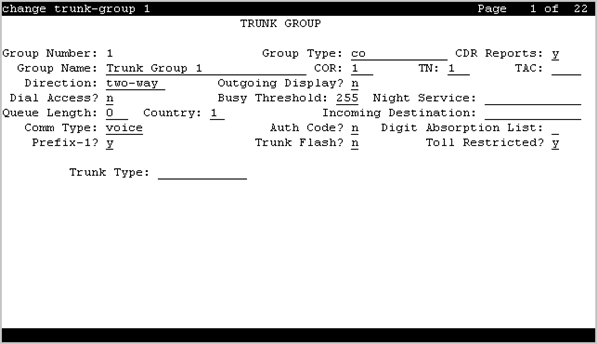
Trunk Group: page 1
Analog Gain
Reduces the strength of incoming signals on TN2199 ports if users regularly experience echo, distortion, or unpleasantly loud volume.
Available only if the country code is 15 and the Trunk Type (in/out) value is 2-wire-ac, 2-wire-dc, or 3-wire.
Valid Entry |
Usage |
|---|---|
a |
Reduces the incoming signal by -3dB. |
b |
Reduces the incoming signal by -6dB. |
c |
Reduces the incoming signal by -8dB. |
none |
No reduction. This setting should not be changed unless the trunk group sound quality is unacceptable. |
Auth Code
The Auth Code field is available only for incoming or two-way trunk groups if you enable the Authorization Codes feature. If you enable the Auth Code field, Communication Manager performs an auth code check for the incoming trunk call that is routed over another trunk.
The following table provides the situations when the caller must enter an auth code.
Calling party |
Called party |
Facility Restriction Level (FRL) check? |
Auth Code, required if |
|---|---|---|---|
Station |
Station |
No |
No |
Trunk |
Yes, if Route Pattern accesses the trunk |
the FRL of the calling station is less than the FRL of the outgoing route pattern preference |
|
Incoming trunk |
Station |
No |
the Auth Code field is enabled on the incoming trunk group |
Trunk |
Yes, if Route Pattern accesses the trunk |
the FRL of the incoming trunk is less than the FRL of the outgoing route pattern preference or the Auth Code field is enabled on the incoming trunk group |
Note:
The Auth Code field is unavailable if:
the Group Type field is tandem
the Group Type field is ISDN and the Service Type field is tandem.
In these situations, permissions of the caller are transmitted using Traveling Class Mark.
BCC
Generalized Route Selection uses the Bearer Capability Class (BCC) to select the appropriate facilities for routing voice and data calls. Far-end tandem servers/switches use the BCC to select outgoing routing facilities with equivalent BCC classes. The BCC entry is used to select the appropriate facilities for incoming ISDN calls. Communication Manager compares the BCC entry with the value of the Bearer Capability information element for the incoming call and routes the call over appropriate facilities.
Available only if all of the following conditions are true:
ISDN-BRI Trunks or ISDN-PRI are enabled for the system.
The trunk group type is access, co, fx, tandem, tie, or wats.
The Comm Type is data, avd, or rbavd.
Valid Entry |
Usage |
|---|---|
0 |
Voice and voice-grade data |
1 |
56 kbps synchronous data transmitted with robbed-bit signaling |
2 |
Less than 19.2 kbps synchronous or asynchronous data |
4 |
64 kbps data on unrestricted channels |
Busy Threshold
Valid Entry |
Usage |
|---|---|
1 to 255 |
The number of trunks that must be busy to alert attendants to control access to outgoing and two-way trunk groups during periods of high use. When the threshold is reached and the warning lamp for that trunk group lights, the attendant can activate trunk group control: internal callers who dial out using a trunk access code are connected to the attendant. Calls handled by AAR and ARS route patterns go out normally. |
CDR Reports
Valid Entry |
Usage |
|---|---|
y |
All outgoing calls on this trunk group generate call detail records. If Record Outgoing Calls Only is disabled for CDR, incoming calls on this trunk group also generate call detail records. |
n |
Calls over this trunk group do not generate call detail records. |
r (ring-intvl) |
CDR records are generated for both incoming and outgoing calls. In addition, the following ringing interval CDR records are generated:
|
CESID I Digits Sent
For emergency 911 service, Communication Manager might send Caller’s Emergency Service Identification (CESID) information to the local telephone company central office or E911 tandem server or switch. This digit string is part of the E911 signaling protocol. Determine the correct entry for this field by talking to the E911 provider. Accepts from one to three digits.
Available only for a cama trunk group.
Comm Type
Indicates whether the trunk group carries voice, data, or both.
Note:
Comm Types of avd, rbavd, and data require trunk member ports on a DS1 port.
Valid Entry |
Usage |
|---|---|
avd |
For applications that mix voice and Digital Communication Protocol data, such as video conferencing applications. The receiving end server discriminates voice calls from data calls and directs each to an appropriate endpoint. Neither originating nor terminating ends insert a modem pool for any calls. The Signaling Mode for the DS1 port must be set to either common-chan or CAS signaling. |
data |
All calls across the trunk group originate and terminate at Communication Manager digital data endpoints. Public networks don’t support data: supported by Avaya’s DCP protocol, this entry is used almost exclusively for the data trunk group supporting DCS signaling channels. The Signaling Mode for the DS1 port must be set to either robbed-bit or common-chan. |
rbavd |
For digital trunk groups that carry voice and data with robbed-bit signaling. The Signaling Mode for the DS1 port must be set to robbed-bit unless mixed mode signaling is allowed on the DS1 port. In that case, the Signaling Mode must be isdn-ext or isdn-pri. |
voice |
For trunk groups that carry only voice traffic and voice-grade data (that is, data transmitted by modem). Analog trunk groups must use voice. |
COR
Valid Entry |
Usage |
|---|---|
0 to 995 |
The Class of Restriction (COR) for the trunk group. Classes of restriction control access to trunk groups, including trunk-to-trunk transfers. Decisions regarding the use of Class of Restriction (COR) and Facility Restriction Levels (FRLs) should be made with an understanding of their implications for allowing or denying calls when AAR/ARS/WCR route patterns are accessed. |
Tip:
Remember that FRLs are assigned to classes of restriction. Even if two trunk groups have classes of restriction that allow a connection, different facility restriction levels might prevent operations such as off-net call forwarding or outgoing calls by remote access users.
CO Type
Available only if the country code is 14. Used only by trunk group members administered on a DS1 circuit pack board.
Valid Entry |
Usage |
|---|---|
analog digital |
Specifies whether the trunk group is connected to analog or digital facilities at the local telephone company central office (CO). |
Country
The country code that corresponds to the protocol used by the local telephone company central office (CO) where the trunk group terminates.
Available only for trunk groups that connect Communication Manager to a CO in the public network — CO, DID, DIOD, FX, and WATS trunk groups.
Valid Entry |
Usage |
|---|---|
1 to 25, except for 19 |
For a list of country codes, see the Country code table. |
11 |
Communication Manager can be administered for Public Network Call Priority (Call Retention and Re-ring). |
15 |
Communication Manager can be administered for Public Network Call Priority (Intrusion and Re-ring). |
18 |
Communication Manager can be administered for Public Network Call Priority (Mode of Release Control, Forced Disconnect, and Re-ring). |
23 |
If the trunk Group Type is either CO or DID, Communication Manager can be administered for Block Collect Calls. |
Dial Access
Controls whether users can route outgoing calls through an outgoing or two-way trunk group by dialing its trunk access code. Allowing dial access does not interfere with the operation of AAR/ARS.
Security alert:
Calls dialed with a trunk access code over WATS trunks bypass AAR/ARS and are not restricted by facility restriction levels. For security, leave this field disabled unless dial access is needed to test the trunk group.
Valid Entry |
Usage |
|---|---|
y |
Users can gain access to the trunk group by dialing its access code. |
n |
Users cannot gain access to the trunk group by dialing its access code. Attendants can still select this trunk group with a Trunk Group Select button. |
Digit Absorption List
Valid Entry |
Usage |
|---|---|
0 to 4 blank |
Assigns a digit absorption list, when used, to a trunk group that terminates at a local telephone company central office. |
Note:
In a DCS network, DCS features that use the remote-tgs button (on telephones at a remote end) do not work when the incoming trunk group at your end deletes or inserts digits on incoming calls. To manipulate digits in a DCS network (for example, to insert an AAR feature access code), do it on the outgoing side based on the routing pattern.
Direction
The direction of the traffic on this trunk group.
Available for all trunk groups except DID and CPE.
Valid Entry |
Usage |
|---|---|
incoming |
Traffic on this trunk group is incoming. |
outgoing |
Traffic on this trunk group is outgoing |
two-way |
Traffic on this trunk group is incoming and outgoing. Required for Network Call Redirection. |
Group Name
A unique name that provides information about the trunk group. Accepts up to 27 characters.
This field should contain names that identify the vendor and function of the trunk group rather than the group type (DID, WATS).
Note:
Supported by Unicode language display for the 4610SW, 4620SW, 4621SW, and 4622SW, 1600-Series, 9600-Series IP Deskphones, 9600-Series H.323 Deskphones, and Avaya J100 Series IP Phones. Unicode is also an option for the 2420J telephone when the Display Character Set is katakana. For more information about 2420J, see 2420 Digital Telephone User's Guide.
Group Number
The trunk group number.
Group Type
The type of trunk group. The fields that are displayed and available might change according to the trunk group type selected.
Valid Entry |
Usage |
|---|---|
Access |
Used to connect satellite servers to the main switch in Electronic Tandem Networks (ETN). Access trunks do not carry traveling class marks (TCM) and, therefore, allow satellite callers unrestricted access to out-dial trunks on the main server. This entry allows Inband ANI. |
APLT |
Advanced Private Line Termination (APLT) trunks. Used in private networks. This entry allows Inband ANI. |
CAMA |
Used to route emergency calls to the local community’s Enhanced 911 systems. |
CO |
Typically used to connect Communication Manager to the local telephone company central office, but can also connect adjuncts such as external paging systems and data modules. |
CPE |
Used to connect adjuncts, such as paging systems and announcement or music sources, to the server running Communication Manager. |
DID |
Used to direct callers directly to individuals within an organization without going through an attendant or some other central point. This entry allows Inband ANI. |
DIOD |
Two-way trunks that are used to transmit dialed digits in both directions. In North America, tie trunks are used for applications that require two-way transmission of dialed digits. This entry allows Inband ANI. |
DMI-BOS |
Digital Multiplexed Interface - Bit-Oriented Signaling (DMI-BOS) trunks allow communication with systems using DMI-BOS protocol. This entry also allows Inband ANI. |
FX |
A local telephone company central office (CO) trunk that connects the server running Communication Manager directly to a CO outside the local exchange area. Used to reduce long-distance charges if the organization averages a high volume of long-distance calls to a specific area code. |
ISDN |
Used when digital trunks are needed that can integrate voice, data, and video signals and provide the bandwidth needed for applications such as high-speed data transfer and video conferencing. ISDN trunks can also efficiently combine multiple services on one trunk group. Also used for Network Call Transfer.
Note:
Available only if ISDN-PRI, ISDN-BRI Trunks, or both have been enabled for the system. For descriptions of the screens and fields that are unique to ISDN trunks, see |
RLT |
Used with Centralized Attendant Service in a private network. |
SIP |
Used to connect a server running Communication Manager to a Session Manager (SM), or to connect two Communication Manager servers.
Note:
The Automatic CallBack, Priority Calling, and Whisper Page features work incorrectly if each of the call's parties is using a SIP endpoint administered on and managed by a different instance of Communication Manager. |
Tandem |
Used to connect tandem nodes in a private network. This entry allows Inband ANI. |
Tie |
Used to connect a server running Communication Manager to a local telephone company central office or to another server or switch in a private network. Tie trunks transmit dialed digits with both outgoing and incoming calls. This entry also allows Inband ANI. |
WATS |
Used to reduce long-distance bills when your organization regularly places many calls to a specific geographical area in North America. With outgoing WATS service, calls can be sent to certain areas ( |
Incoming Budget
Note:
This field complies with the Unified Capabilities Requirements (UCR) 2008 Change 3 requirements and is approved by Joint Interoperability Test Command (JITC). This field is available only for the USA Department of Defense (DoD) and approved Federal government customers.
This field is available only when you set the ASAC Enabled field on the Multiple Level Precedence & Preemption Parameters screen to y.
Incoming Budget is the number of incoming calls that a trunk group can allow based on the total call limit.
Communication Manager counts the number of active incoming calls and compares the total number of incoming calls with the incoming call budget. If the total number equals or exceeds the budget, Communication Manager replaces established low-precedence calls with new high-precedence calls and blocks new low-precedence calls.
Entire trunk budget (Number of Members) = Incoming budget + Outgoing budget
Valid Entry |
Usage |
|---|---|
0–255 |
The number of incoming calls that the trunk group can receive. The total of the Incoming Budget and the Outgoing Budget fields must not be greater than the total number of trunk group members. |
Blank |
This field is blank by default. |
Incoming call budget high threshold
Note:
This field complies with the Unified Capabilities Requirements (UCR) 2008 Change 3 requirements and is approved by Joint Interoperability Test Command (JITC). This field is available only for the USA Department of Defense (DoD) and approved Federal government customers.
Communication Manager sends an SNMP trap when the system reaches the incoming call budget high threshold.
This field is available only when you set the ASAC Enabled field on the Multiple Level Precedence & Preemption Parameters screen to y.
Valid Entry |
Usage |
|---|---|
0–255 |
The call limit at which Communication Manager must send an SNMP trap. |
Blank |
The field is blank by default. |
Incoming call budget low threshold
Note:
This field complies with the Unified Capabilities Requirements (UCR) 2008 Change 3 requirements and is approved by Joint Interoperability Test Command (JITC). This field is available only for the USA Department of Defense (DoD) and approved Federal government customers.
Communication Manager sends an SNMP trap to clear a budget threshold alarm when the system reaches the incoming call budget low threshold.
This field is available only when you set the ASAC Enabled field on the Multiple Level Precedence & Preemption Parameters screen to y.
Valid Entry |
Usage |
|---|---|
0–255 |
The call limit at which Communication Manager must send an SNMP trap. |
Blank |
The field is blank by default. |
Incoming Destination
Sets the destination for all incoming calls on trunk groups such as CO, FX, and WATS that must terminate at a single destination. The destination entered here is also the default night service destination. Available only for incoming or two-way trunk groups.
Valid Entry |
Usage |
|---|---|
Valid extension number |
Calls go to this extension number. You can enter any type of extension, though typically the extension entered here identifies a VDN, a voice response unit, or a voice messaging system. Night service overrides this setting when it is active.
Note:
If you enter a shortened extension of the multilocation dial plan, the system does not perform certain administration and validation tasks. Therefore, the system might not display the resultant warnings or submittal denials. |
attd |
Calls go to the attendant and are recorded as Listed Directory Number (LDN) calls on call detail records. |
blank |
Leave this field blank if Trunk Type (in/out) is not administered as auto/…. |
ITC
Determines the line coding the Generalized Route Selection feature uses for comparison to select appropriate routes for voice and data calls.
Available only when the Comm Type is data, avd, or rbavd and a BCC value is administered.
Valid Entry |
Usage |
|---|---|
rest(tricted) |
Restricted trunks use ami-basic or ami-zcs line coding and can carry only restricted calls. |
unre(stricted |
Unrestricted trunks use b8zs, hdb3, or cmi line coding and can carry restricted or unrestricted calls. A trunk group with an unrestricted ITC can have only unrestricted trunks as members. |
Night Service
Sets the destination for incoming calls when Night Service is operating. If a night service destination is administered for an individual trunk that is a member of this group, that entry overrides the group destination for that trunk. CPE, DID, and DIOD trunk groups do not support night service.
Tip:
Whenever possible, use a night service destination on your switch; otherwise, some features do not function correctly over a DCS network.
Valid Entry |
Usage |
|---|---|
An extension number (can be a VDN) |
The extension of your night service destination.
Note:
If you enter a shortened extension of the multilocation dial plan, the system does not perform certain administration and validation tasks. Therefore, the system might not display the resultant warnings or submittal denials. |
attd |
Calls go to the attendant and are recorded as Listed Directory Number (LDN) calls on call detail records. |
blank |
Leave this field blank if Trunk Type (in/out) is not administered as auto/…. |
Number of Members
The system displays this field SIP and H.323 trunk groups.
In Communication Manager Release 8.0 and later, the number of trunk members that can be administered on a SIP trunk group is increased from the current value of 255 to 9999.
Valid entry |
Usage |
|---|---|
0 to 9999 |
The number of trunks that are members of the Trunk group. You cannot administer more than 255 trunk members, only if the Number Assignment Method field is set to auto. |
Outgoing Budget
Note:
This field complies with the Unified Capabilities Requirements (UCR) 2008 Change 3 requirements and is approved by Joint Interoperability Test Command (JITC). This field is available only for the USA Department of Defense (DoD) and approved Federal government customers.
This field is available only when you set the ASAC Enabled field on the Multiple Level Precedence & Preemption Parameters screen to y.
Outgoing Budget is the number of outgoing calls a trunk group can allow within the total limit.
Communication Manager counts the number of active outgoing calls, and compares the total number of outgoing calls with the outgoing call budget. If the total number equals or exceeds the budget, Communication Manager replaces established low-precedence calls with new high-precedence calls and blocks new low-precedence calls.
Valid Entry |
Usage |
|---|---|
0–255 |
The number of outgoing calls that the trunk group can make. The total of the Incoming Budget and the Outgoing Budget fields must not be greater than the total number of trunk group members. |
Blank |
The field is blank by default. |
Note:
If the total number of Incoming Budget and Outgoing Budget is less than Number of Members, the system displays the following message:
WARNING: Total budget allocated less than total number of trunk group members.
Outgoing call budget high threshold
Note:
This field complies with the Unified Capabilities Requirements (UCR) 2008 Change 3 requirements and is approved by Joint Interoperability Test Command (JITC). This field is available only for the USA Department of Defense (DoD) and approved Federal government customers.
Communication Manager sends an SNMP trap when the system reaches the outgoing call budget high threshold.
This field is available only when you set the ASAC Enabled field on the Multiple Level Precedence & Preemption Parameters screen to y.
Valid Entry |
Usage |
|---|---|
0–255 |
The call limit at which Communication Manager must send an SNMP trap. |
Blank |
The field is blank by default. |
Outgoing call budget low threshold
Note:
This field complies with the Unified Capabilities Requirements (UCR) 2008 Change 3 requirements and is approved by Joint Interoperability Test Command (JITC). This field is available only for the USA Department of Defense (DoD) and approved Federal government customers.
Communication Manager sends an SNMP trap to clear a budget threshold alarm when the system reaches the outgoing call budget low threshold.
This field is available only when you set the ASAC Enabled field on the Multiple Level Precedence & Preemption Parameters screen to y.
Valid Entry |
Usage |
|---|---|
0–255 |
The call limit at which Communication Manager must send an SNMP trap. |
Blank |
The field is blank by default. |
Outgoing Display
With Outgoing Display, telephones can show the name and number of the trunk group used for an outgoing call before the call is connected.
Valid Entry |
Usage |
|---|---|
y |
Displays the trunk group name and number. |
n |
Displays the digits the caller dials. |
Prefix-1
If enabled, the prefix 1
is added to the beginning of the digit string for outgoing calls. Use this field for outgoing and two-way trunk groups handling long distance service. Do not enable for trunk groups in AAR or ARS route patterns.
Available only for CO, FX, and DIOD trunk groups.
Protocol Type
The type of line signaling protocol used by the local telephone company central office for DID and DIOD trunk groups.
Available only if the Country code is 15. Used only by trunk group members.
Valid Entry |
Usage |
|---|---|
inloc |
Incoming local. Only the inloc protocol provides ANI. |
intol |
Incoming toll. |
Queue Length
Available only for outgoing or two-way trunk groups.
Valid Entry |
Usage |
|---|---|
1 to 100 |
The number of outgoing calls that can wait in queue when all trunks in a trunk group are busy. Calls wait in queue in the order in which they were made. If a queue is administered, a caller hears a confirmation tone when no trunk is available for the outgoing call. The caller can then disconnect and wait; when a trunk becomes available, Communication Manager calls the extension that placed the original call. Communication Manager remembers the number the caller dialed and automatically completes the call. |
0 |
Callers receive a busy signal when no trunks are available. Use for DCS trunks. |
Service Type
The service for which this trunk group is dedicated. In addition to the predefined services or features listed as valid entries, any previously administered user-defined Network Facility Facility Type of 0 (feature) or 1 (service) is allowed.
Valid Entry |
Usage |
|---|---|
access |
A tie trunk giving access to an Electronic Tandem Network. |
accunet |
ACCUNET Switched Digital Service — part of ACI (AT&T Communications ISDN) phase 2. |
cbc |
Call-by-Call service — provides different dial plans for different services on an ISDN trunk group. Indicates this trunk group is used by the Call-By-Call Service Selection feature. |
dmi-mos |
Digital multiplexed interface — message-oriented signaling. |
i800 |
International 800 Service — A subscriber can receive international calls without a charge to the call originating party. |
inwats |
INWATS — provides OUTWATS-like pricing and service for incoming calls. |
lds |
Long-Distance Service — part of ACI (AT&T Communications ISDN) phase 2. |
megacom |
MEGACOM Service — an AT&T communications service that provides unbanded long-distance services using special access (switch to 4ESS switch) from an AT&T communications node. |
mega800 |
MEGACOM 800 Service — an AT&T communications service that provides unbanded 800 service using special access (4ESS switch to switch) from an AT&T communications node. |
multiquest |
AT&T MULTIQUEST Telecommunications Service — dial 700 service. A terminating-user’s service that supports interactive voice service between callers at switched-access locations and service provides directly connected to the AT&T Switched Network (ASN). |
operator |
Network Operator — provides access to the network operator. |
outwats-bnd |
OUTWATS Band — WATS is a voice-grade service providing both voice and low speed data transmission capabilities from the user location to defined service areas referred to as bands; the widest band is 5. |
public-ntwrk |
Public network calls — It is the equivalent of CO (outgoing), DID, or DIOD trunk groups. If Service Type is public-ntwrk, Dial Access can be enabled. |
sddn |
Software Defined Data Network — provides a virtual private line connectivity via the AT&T switched network (4ESS switches). Services include voice, data, and video applications. These services complement the SDN service. Do not use for DCS with Rerouting. |
sdn |
Software Defined Network (SDN) — an AT&T communications offering that provides a virtual private network using the public switched network. SDN can carry voice and data between customer locations as well as off-net locations. |
sub-operator |
Presubscribed Common Carrier Operator — provides access to the presubscribed common carrier operator. |
tandem |
Tandem tie trunks integral to an ET. |
tie |
Tie trunks — general purpose. |
wats-max-bnd |
Maximum Banded Wats — a WATS-like offering for which a user’s calls are billed at the highest WATS band subscribed to by users. |
Signaling Group
Available only for sip trunk groups.
Valid Entry |
Usage |
|---|---|
1 to 999 |
The number of the SIP signaling group associated with this trunk group. |
TAC
The trunk access code (TAC) that must be dialed to access the trunk group. A different TAC must be assigned to each trunk group. CDR reports use the TAC to identify each trunk group. The characters *
and #
can be used as the first character in a TAC. Accepts a one- to four-digit number.
TN
Use this field to specify a tenant number. You can enter a value from 1 to 250.
Toll Restricted
If enabled, restricts toll-restricted users from using a trunk access code to make restricted outgoing calls over this trunk group.
Trunk Flash
Enables or disables multifunction telephones to access local telephone company central office (CO) customized services that are provided by servers at the far-end or CO. These CO customized services are electronic features, such as conference and transfer, that are accessed by a sequence of flash signal and dial signals from the Communication Manager telephone on an active trunk call.
Trunk Signaling Type
Controls the signaling used by members in private network trunk groups, mainly in Italy, Brazil, and Hungary. This field also controls the signaling used by members in public network digital trunk groups.
Available only for access, aplt, rlt, tandem, or tie trunk groups.
E&M trunks in Italy, Brazil, and Hungary can use either continuous or discontinuous signaling. Each entry specifies a set of signals and available timers used in the process of setting up and releasing connections. The type of signaling must match the signaling type administered on the far-end server.
Valid Entry |
Usage |
|---|---|
cont |
Continuous |
dis |
Discontinuous |
The following entries are for tie trunks in Main-Satellite/Tributary networks. Use these values only when all trunk group members are assigned to a TN497 circuit pack.
Valid Entry |
Usage |
|---|---|
tgu |
For outgoing trunks, tgu at the main server running Communication Manager administers a tie trunk group connected to a satellite server. (This same group should be administered as tge at the satellite.) |
tge |
For incoming trunks, tge at a satellite server administers a tie trunk group connected to the main server running Communication Manager. (This same group should be administered as tgu at the main server.) |
tgi |
For internal trunks, tgi administers a two-way tie trunk group between two satellites or between the main server and a satellite. (This trunk group should be administered as tgi on both servers.) |
DIOD trunks support pulsed and continuous E&M signaling in Brazil and discontinuous E&M signaling in Hungary. The following entries are for DIOD trunks. Use these values only when all trunk group members are assigned to a TN464F (or later version) or TN2464 circuit pack.
Valid Entry |
Usage |
|---|---|
cont |
Continuous E&M signaling. |
pulsed |
Pulsed E&M signaling. |
discont |
Discontinuous E&M signaling. |
blank |
Leave blank for R2 signaling. |
Trunk Type (in/out)
Controls the seizure and start-dial signaling used on this trunk group. Settings might differ for incoming and outgoing trunks.
Valid Entry |
Usage |
|---|---|
auto |
Used for immediate connection to a single preset destination (incoming local telephone company central office trunks, for example). No digits are sent, because all calls terminate at the same place. |
cont |
Continuous signaling is used with Italian E&M tie trunks. The server/switch seizes a trunk by sending a continuous seizure signal for at least the duration specified by the Incoming Seizure Timer. |
delay |
The sending switch does not send digits until it receives a delay dial signal (an off-hook signal followed by an on-hook signal) from the far-end switch, indicating that it is ready to receive the digits. |
disc |
Discontinuous signaling is used with Italian tie trunks that use E&M signaling. The Avaya server can seize a trunk by sending a single, short signal for the duration specified by the Normal Outgoing Seize Send value. However, with the Three-Way Seizure option, the calling end can also send routing information to the called end by sending one or a series of brief seizure signals. |
wink |
The sending server or switch does not send digits until it receives a wink start (momentary off-hook) signal from the far-end server or switch, indicating that it is ready to receive the digits. |
immed |
The sending server or switch sends digits without waiting for a signal from the far-end server or switch. |
2-wire-ac 2-wire-dc 3-wire |
Used with local telephone company central office (CO) trunks in Russia. Select the type of connection to the CO. Check with the network service provider for the type of connection. To use these entries, the Country code must be 15 and the CO trunks must use ports on a TN2199 circuit board. |
Tip:
When incoming trunks use the setting immed/immed, the far-end server seizes the trunk and sends digits without waiting for acknowledgment from the receiving end. When traffic is heavy, the receiving server or switch might not immediately attach a Touch Tone Receiver to a call and, therefore, lose digits. Use wink-start trunks or increase the dial-guard timer value on the far-end server or switch to avoid this problem.
Version
Adjusts the signaling on multi-country local telephone company central office (CO) trunk circuit packs. Entries adjust signaling characteristics on these circuit packs to match the signaling characteristics of the public network in a specific country.
Available only for CO, FX, and WATS trunk groups when the Country code is 5, 16, or 23.
If the Country code is 5, this field controls only TN2147 ports.
Valid Entry |
Usage |
|---|---|
a |
Uses standard signaling for the Netherlands public network. |
b |
Uses country 1 (U.S.) signaling. This value is appropriate if Communication Manager is connected to a CO using an Ericcson AXE-10 switch. |
If the Country code is 16 or 23, this field sets the input impedance value and only controls TN465C (vintage 2 or later) ports.
Valid Entry |
Usage |
|---|---|
a |
Sets input impedance to 600 Ohms. |
b |
Sets input impedance to 900 Ohms. This value is appropriate in Brazil. |