

AVAYA DOCUMENTATION CENTER
Find answers to your technical questions and learn how to use our products
Avaya Aura® Communication Manager Screen Reference
Vector Directory Number
Defines vector directory numbers (VDN) for the Call Vectoring feature. A VDN is an extension number used to access a call vector. Each VDN is mapped to one call vector. VDNs are software extension numbers (that is, not assigned to physical equipment). A VDN is accessed through direct dial local telephone company central office trunks mapped to the VDN (incoming destination or night service extension), DID trunks, and LDN calls. The VDN can be the Night Destination for a LDN.
An asterisk (*) next to a field indicates that the field follows VDN override rules when the system changes the active VDN for a call.
Example command: add vdn n, where n is the VDN extension number.
Vector Directory Number: page 2 (Meet-me Conference disabled)
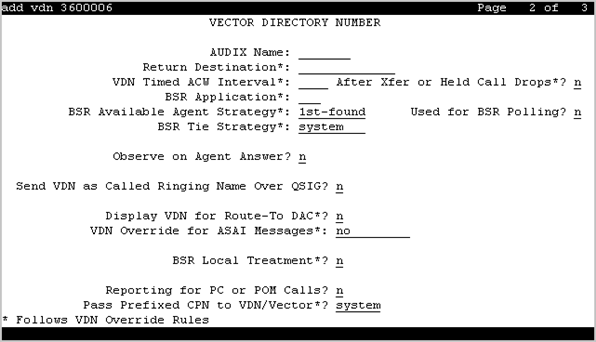
After Xfer or Held Call Drops
Use this field to put an auto-in agent into the Timed ACW mode when an ACD or DAC call on hold drops or the call is transferred and the Timed ACW feature is active. This replaces the Available mode.
Valid Entry |
Usage |
|---|---|
y |
Communication Manager places an agent in the Timed ACW state if a caller on hold disconnects or the call is transferred, in addition to the existing conditions for Timed ACW. |
n |
Communication Manager continues with the existing operation. This is the default value. |
AUDIX Name
The name of the AUDIX machine if this VDN is associated with the AUDIX vector.
BSR Application
Available only if Lookahead Interflow (LAI) and Vectoring (Best Service Routing) are enabled for the system. When Meet-me Conferencing is disabled, this field follows VDN override rules when the system changes the active
VDN for a call.
Valid Entry |
Usage |
|---|---|
1 to 511 blank |
A one- to three-digit number that specifies an application plan for the VDN when using multi-site Best Service Routing with this VDN. |
BSR Available Agent Strategy
This field determines how Best Service Routing (BSR) identifies the best split or skill in an agent surplus situation to route a call. The system displays this field only if Vectoring (Best Service Routing) is enabled. If Meet-me Conferencing is disabled, the BSR Available Agent Strategy field follows VDN override rules when the system changes the active VDN for a call.
Valid entry |
Usage |
|---|---|
1st-found |
The call is routed to the first available agent. |
UCD-LOA |
The call is routed to the least occupied agent, without regard to skill level. This option is available only if Least Occupied Agent (LOA) or Business Advocate is enabled. |
UCD-MIA |
The call is routed to the most idle agent, without regard to skill level. This option ensures a high degree of equity in agent workloads even when call-handling times vary. |
EAD-LOA |
The call is routed to the highest skill level agent with the lowest occupancy. This option is available only if Expert Agent Selection, and Least Occupied Agent (LOA) or Business Advocate are enabled. |
EAD-MIA |
The call is routed to the most idle agent with the highest skill level. This option is available only if Expert Agent Selection (EAS) is enabled. |
BSR Local Treatment
Enables or disables local server control of BSR treatment. In a multi-site BSR configuration, a call that arrives at a local communication server can be rerouted to a remote server located in a different part of the world. This feature maintains control at the local server and allows the server to provide local audio feedback for IP and ISDN calls, or to take back the call while the call waits in queue on a remote server. When Meet-me Conferencing is disabled, this field follows VDN override rules when the system changes the active
VDN for a call.
Note:
This field must be enabled on both the local and remote vdns, or else call interflow attempts might result in dropped calls.
BSR Tie Strategy
Available only if Vectoring (Best Service Routing) is enabled for the system. When Meet-me Conferencing is disabled, this field follows VDN override rules when the system changes the active
VDN for a call.
Valid Entry |
Usage |
|---|---|
system |
System-wide settings apply. |
1st-found |
BSR uses the previously selected best choice as the best skill or location. This is the default setting. |
alternate |
Alternates the BSR selection algorithm when a tie in EWT or available agent criteria occurs. Every other time a tie occurs for calls from the same VDN, the step with the tie is selected to send the call instead of the first selected split, skill, or location. This helps balance the routing when the cost of routing remotely is not a concern. |
Call Origin
The Call Origin field is applicable only if you enter a VDN extension in the Return Destination field. Use this field to administer the types of calls that will be redirected to the extension in the Return Destination field when the destination is released.
Valid Entry |
Usage |
|---|---|
external |
Applies VDN Return Destination only to incoming external trunk calls directly to the VDN. This is the default setting. |
internal |
Applies VDN Return Destination only to internal calls that have not been through vector processing. Internal calls for this purpose include trunk calls that are transferred, forwarded, or covered to the VDN or ASAI routed. |
both |
Applies VDN Return Destination to both internal and external calls. |
Display VDN for Route-To DAC
Enables or disables the display of the VDN when a call arrives as a result of a route-to at an agent terminal under the following conditions:
A route-to number with coverage is enabled, or route-to digits with coverage is enabled and the vector command routes a call to an agent as an EAS direct agent call.
Adjunct routing routes a direct agent call to the agent.
When Meet-me Conferencing is disabled, this field follows VDN override rules when the system changes the active
VDN for a call.
Available only if Expert Agent Selection (EAS) is enabled for the system.
Observe on Agent Answer
Enables or disables a service observer to start observing a call to the VDN when the call is delivered to the agent or station. The ability to observe VDNs when the call is delivered to an agent/station is activated by setting the Observe on Agent Answer field to y. The observer sees the name of the VDN, agent, or trunk as each is accessed in sequence by the VDN. For example, during vector processing the VDN name is displayed, but when the call connects to an agent, the agent name is displayed. When the observer connects to a call in vector processing, the system maintains the connection until the call is disconnected or the observer disconnects, even if the call is routed or transferred externally. If the observer does not disconnect after one observed call is disconnected, the observer is connected to another call on the same VDN. Observing is listen only as long as the call is in vector processing. Once the call is out of vector processing, an observer with listen/talk capability can talk as well as listen.
Note:
When the Observe on Agent Answer field is set to y, service observers of the VDN are not connected to a call until the call is delivered to an agent. The default setting of this field is n. With the default setting, the non-by location observer of the VDN can hear the call throughout the vector processing and delivery to the agent. For information on Observe on Agent Answer, see Avaya Aura® Call Center Elite Feature Reference.
Pass Prefixed CPN to VDN/Vector
This feature is used to optionally pass the CPN prefix to VDNs and vectors as part of the CPN. This option can be set on a system wide basis, and overridden, if required, on an individual VDN screen. Accordingly, international call handling can be improved by prioritizing and routing more intelligently, such as by automatically routing calls to agents who speak the pertinent language. For example, if a customer from Germany calls in to a call center in Spain, based on the international code of Germany (0049 - international prefix + country code), the call can be routed to a German speaking agent. Also, an international call might be given priority over a national call to save toll charges.
PC Predictive Reports Skill
The PC Predictive Reports Skill field is applicable only if the ASAI Link Plus Capabilities or the Computer Telephony Adjunct Links field is enabled on page 3 of the System-Parameters Customer-Options screen, and if you enable the Reporting for PC or POM Calls field on page 2 of the Vector Directory Number screen.
Valid Entry |
Usage |
|---|---|
1 to 99 |
Skill number for Avaya Solutions Platform S8300 switches. VDN option applies to PC reporting. |
1 to 8000 |
Skill number for all other platforms. VDN option applies to PC reporting. |
blank |
VDN option applies to Proactive Outreach Manager (POM) calls. |
Reporting for PC or POM Calls
The Reporting for PC or POM Calls field indicates that the VDN is used for POM or Proactive Contact (PC) outbound calling. If you have switch-classified outbound calling with PC, use this field and the associated skill field to activate the improved integration with PC feature. If you have POM, use the field to activate this VDN for indication to reporting of a Proactive Outreach Manager call to the VDN. Valid entries are y and n. The default is n.
Note:
You can administer the field only after you set the Measured field on page 1 of the Vector Directory Number screen to either external or both.
For more information on how to use the feature, see Proactive Contact outbound calling improved reporting in the Avaya Aura® Call Center Feature Reference document.
Return Destination
The VDN extension number to which an incoming trunk call is routed if it returns to vector processing after the agent drops the call. When Meet-me Conferencing is disabled, this field follows VDN override rules when the system changes the active
VDN for a call.
Send VDN as Called Ringing Name Over QSIG
Valid Entry |
Usage |
|---|---|
y |
If the ISDN trunk call is made, receiver can view the VDN name when the telephone is ringing. |
n |
The receiver cannot view the VDN name when the telephone is ringing. The default value is n. |
Used for BSR Polling
Use the Used for BSR Polling field to prevent Communication Manager from sending messages to CMS or Avaya IQ regarding unmeasured calls for unmeasured VDNs that route to vectors with the BSR reply-best command.
The Used for BSR Polling field is applicable to unmeasured VDNs assigned to a vector that has consider steps terminated by the reply-best step and no-queuing step. The trunk groups that are used to route to the VDNs are also unmeasured.
For Used for BSR Polling to function, set the Measured field to none.
Valid entry |
Usage |
|---|---|
y |
Communication Manager does not send messages for unmeasured calls to CMS or Avaya IQ. |
n |
Communication Manager sends messages, even for unmeasured calls, to CMS or Avaya IQ. The default value is n. |
VDN Override for ASAI Messages
Determines if the active VDN is sent as the called number for ISDN Trunk ASAI messages. When Meet-me Conferencing is disabled, this field follows VDN override rules when the system changes the active
VDN for a call. The active
VDN is the VDN receiving the call and will be changed to a routed-to VDN if Allow VDN Override is enabled. Available only if ASAI Link Core Capabilities is enabled for the system.
Valid Entry |
Usage |
|---|---|
n |
The |
ISDN Trunk |
When an incoming ISDN trunk call is routed to this VDN, the |
all |
The active VDN is used for the called number for all types of calls to the VDN, including local/internal calls as well as external incoming ISDN trunk calls. |
VDN Timed ACW Interval
Valid Entry |
Usage |
|---|---|
1 to 9999 blank |
Sets the length of the timed ACW Interval. When a value is entered in this field, an agent in auto-in work mode who receives a call from this VDN is automatically placed into After Call Work (ACW) when the call drops. When the administered time is over, the agent automatically becomes available. This field takes precedence over the hunt group Timed ACW Interval. When Meet-me Conferencing is disabled, this field follows VDN override rules when the system changes the |
Vector Directory Number: page 3
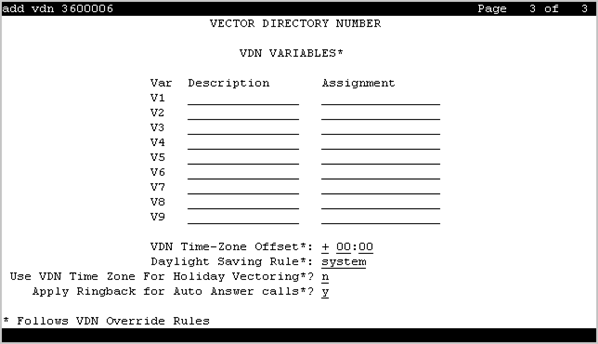
VDN VARIABLES
When Meet-me Conferencing is disabled, the system displays an asterisk (*) next to the heading, indicating that variables V1 through V9 follow VDN override rules when the system changes the active
VDN for a call.
Assignment
Valid Entry |
Usage |
|---|---|
0 to 9 |
Assigns an up to 16-digit unvalidated decimal number to each of the VDN variables V1 through V5. |
blank |
No decimal number is assigned to the VDN variable. |
Description
A description of the VDN variable. Accepts up to 15 characters.
Var
The number assigned to the VDN variable.
Apply Ringback for Auto Answer calls
The Apply Ringback for Auto Answer calls field is applicable only if you enable the Auto Answer field on either page 2 of the Station screen or on page 1 of the Agent Login ID screen. You can use the field to not apply ringback to the callers for calls delivered to agents in the auto answer mode when application of ringback is undesirable. This field follows VDN Override rules and the setting on the active VDN for the call is applicable.
Valid Entry |
Usage |
|---|---|
y |
Applies audible ringback to the callers during any delay experienced for calls delivered to agents in the auto answer mode. This is the default value. |
n |
Prevents returning audible ringback to the callers for calls delivered to agents in the auto answer mode. |
Daylight Saving Rule
Defines the daylight saving time rule. The daylight saving time rule is applied to goto time-of-day commands in the vector that is assigned to the VDN. The time-of-day calculations are based on the local time of the receiving call’s VDN. The assigned rule number applies start and stop rules that are administered for the system for that rule.
Valid Entry |
Usage |
|---|---|
system |
The system uses the same daylight saving time rule as the system clock. |
0 |
No daylight saving rule is applied. If the system time has a daylight saving rule specified, this rule is removed before evaluating the |
1 to 15 |
The Daylight Saving Rule number. When you use a number other than 0, the rule associated with the main server clock display time and the main server offset are not used. The offset and rule assigned to the active VDN for the call are applied to the operating system standard time so that local time for the VDN is used to test the time-of-day step. |
Use VDN Time Zone For Holiday Vectoring
Valid Entry |
Usage |
|---|---|
y |
Communication Manager uses the VDN time zone offset and DST adjustment for processing the date and time assigned in the Holiday Table screen. |
n |
Communication Manager uses the system time for processing the date and time assigned in the Holiday Table screen. This is the default value. |
VDN Time Zone Offset
Valid Entry |
Usage |
|---|---|
+, - 00-23 - hour 00-59 - minute |
This field is applied against the switch clock when a time of day vector command is executed. Daylight saving time changes are handled by the switch clock using the existing operation. When Meet-me Conferencing is disabled, this field follows VDN override rules when the system changes the The valid entries are based on a syntax of +HH:MM. The default is +00:00. When the default is set, the system switch time is used without modification. |