

AVAYA DOCUMENTATION CENTER
Find answers to your technical questions and learn how to use our products
Avaya Aura® Communication Manager Screen Reference
Time of Day Coverage Table
This screen allows administration of up to five different coverage paths, associated with five different time ranges, for each day of the week. Only one coverage path can be in effect at any one time.
Example command: change coverage time-of-day n, where n is the assigned time of day coverage table.
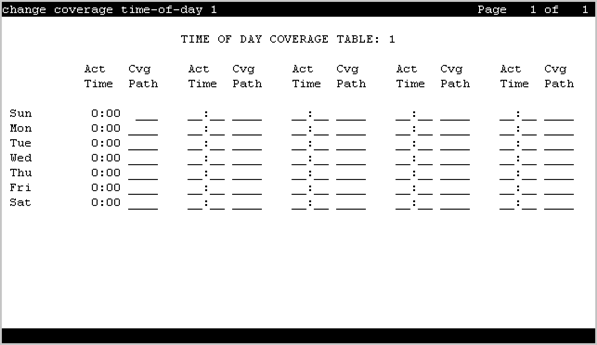
Act Time
Valid Entry |
Usage |
|---|---|
00:01– 23:59 |
Specifies the activation time of the associated coverage path. Information must be entered in 24-hour time format. If there are time gaps in the table, there will be no coverage path in effect during those periods. The first activation time for a day is set to 00:00 and cannot be changed. Activation times for a day must be in ascending order from left to right. |
CVG Path
Valid Entry |
Usage |
|---|---|
1 to 9999 blank |
The coverage path number. |
Time of Day Coverage Table
Displays the Time of Day Coverage Table number.