

AVAYA DOCUMENTATION CENTER
Find answers to your technical questions and learn how to use our products
Avaya Aura® Communication Manager Screen Reference
Tenant
This screen defines tenants to the system. If your server running Communication Manager uses tenant partitioning, see Tenant Partitioning in Avaya Aura® Communication Manager Feature Description and Implementation.
Example command: change tenant n, where n is the tenant partitioning number.
Tenant: page 1
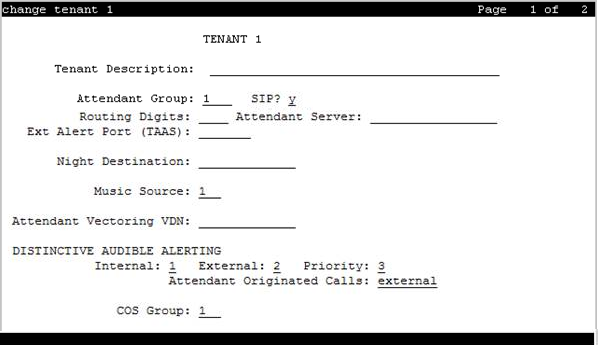
Attendant Group
Valid Entry |
Usage |
|---|---|
digits |
The attendant group assigned to the tenant. For the maximum allowed entry, see Avaya Aura® Communication Manager System Capacities Table. |
Attendant Vectoring VDN
Assigns the VDN extension for Attendant Vectoring to a console. Available only if Attendant Vectoring is enabled for the system and Tenant Partitioning is disabled.
COS Group
Valid Entry |
Usage |
|---|---|
digits |
The Class of Service (COS) group assigned to the tenant. Available only if Tenant Partitioning is enabled for the system. For the maximum allowed entry, see Avaya Aura® Communication Manager System Capacities Table. |
Ext Alert Port (TAAS)
The Trunk Answer Any Station (TAAS) alert port assigned to this tenant, if any. The port type and the object type must be consistent. The port can be assigned to only one tenant.
Valid Entry |
Usage |
|---|---|
1 to 999 |
Gateway |
V1 to V9 |
Module |
01 to 31 |
Circuit |
Ext Alert (TAAS) Extension
The extension of the external alert TAAS extension. A system installer can then use the Terminal Translation Initialization (TTI) feature from a telephone plugged into any port to assign this extension number to that port. Doing so makes that port the external alert TAAS port.
Available only if Ext Alert Port (TAAS) is administered without hardware.
Music Source
Valid Entry |
Usage |
|---|---|
digits |
The music or tone source for this tenant partition. For the maximum allowed entry, see Avaya Aura® Communication Manager System Capacities Table. |
Night Destination
The night service station extension, if night service is wanted for this tenant.
SIP
Use this field to assign a SIP attendant to a tenant without using SIP stations.
Note:
If native attendant like type 302
or console
is already configured in the same Attendant Group, then the Communication Manager will not allow you to enable SIP on Tenant form. Also, if SIP is enabled on the Tenant form, Communication Manager will not allow you to add a new attendant user of type 302
or console
in the same Attendant Group. Before SIP is enabled, Attendant Vectoring VDN field must be blank.
Valid Entry |
Usage |
n |
Disables SIP attendant. This is the default value. |
y |
Enables SIP attendant. When you change the value to y, then the following values appear:
|
Routing Digits
Access code to route calls to SIP attendant server. You can enter up to four digits only.
The Routing Digits field appears on the Tenant form, only if the Tenant Partition is enabled.
Valid Entry |
Usage |
digits from 0 to 9 |
Digits comprising the AAR or ARS access code. The default value is blank. |
blank |
Call routing to attendant server is not specified. |
Attendant Server
Attendant server number. This field cannot be blank.
The Attendant Server field appears on the Tenant form, only if the Tenant Partition is enabled.
Valid Entry |
Usage |
digits from 0 to 9 |
You can enter up to 17 digits. |
Tenant
Displays the tenant number.
Tenant Description
A description of the tenant that consists of up to 40 alpha-numeric characters.
DISTINCTIVE AUDIBLE ALERTING
Available only if Tenant Partitioning is enabled for the system.
Attendant Originated Calls
Indicates which type of ringing applies to attendant-originated calls.
Valid Entry |
Usage |
|---|---|
internal |
Internal ringing applies to attendant-originated calls. |
external |
External ringing applies to attendant-originated calls. Default is external. |
priority |
Priority ringing applies to attendant-originated calls. |
Distinctive Audible Alerting (Internal, External, Priority)
The number of rings for Internal, External, and Priority calls. For virtual stations, this applies to the mapped-to physical telephone. This is also known as Distinctive Ringing. Defaults are as follows:
Internal calls
External and attendant calls
Priority calls
Note:SIP messaging includes the ring types internal, external, intercom, auto-callback, hold recall, transfer recall, or priority. In Communication Manager, types intercom, auto-callback, hold recall, and transfer recall are treated as priority.
Valid Entry |
Usage |
|---|---|
1 |
1 burst, meaning one burst of ringing signal per period |
2 |
2 bursts, meaning two bursts of ringing signal per period |
3 |
3 bursts, meaning two bursts of ringing signal per period |
Tenant: page 2
This screen is used to enable additional tenant-to-tenant calling permissions.
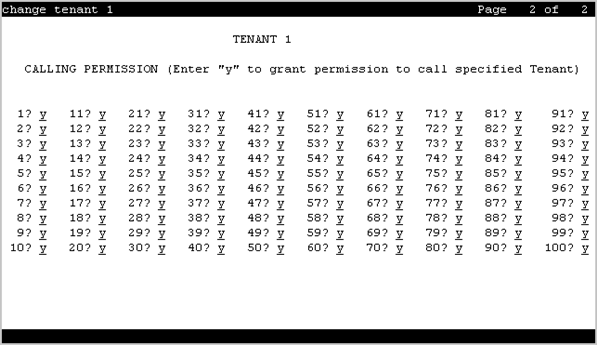
Calling permissions
Establishes or blocks calling permission between the tenant being administered and any other tenant. The system default allows each tenant to call only itself and Tenant 1.
Tenant
Displays the tenant number.