

AVAYA DOCUMENTATION CENTER
Find answers to your technical questions and learn how to use our products
Avaya Aura® Communication Manager Screen Reference
Music Sources
Use this screen to define music sources for Tenant Partitions. Each of these music sources can be used by one or more Tenant Partitions. However, a partition can have only one music source.
Note:
If you use equipment that rebroadcasts music or other copyrighted materials, you might be required to obtain a copyright license from or pay fees to a third party. You can purchase a Magic Hold system which does not require a license from Avaya LLC or Avaya Business Partners.
Available only if Tenant Partitioning is enabled for the system.
Example command: change music-sources
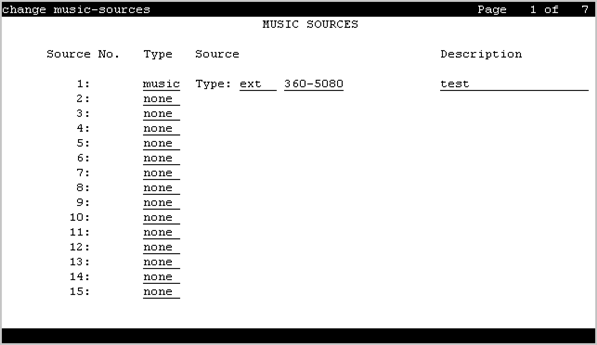
Description
A description of the administered music source. Accepts up to 20 alphanumeric characters. Available only if music or tone is administered for treatment for hold.
Source
Available only if music is administered for treatment for hold.
Valid Entry |
Usage |
|---|---|
ext |
Audio source extension for a single or group audio source. |
group |
A Music-on-Hold analog group number. |
port |
An analog or auxiliary trunk source location. |
Source No
The number assigned to this music source.
Type (Column)
Valid Entry |
Usage |
|---|---|
music tone none |
The type of treatment to be provided by the music source. Only one music source can use the tone value. |
Type (field)
Available only if music is administered for treatment for hold.
Valid Entry |
Usage |
|---|---|
ext group port |
The source for the music on hold. The source can be an announcement extension, an audio group, or a port on a VAL board.
Note:
A source identifier (extension number, audio group number, or port number) must be administered with the source type. |