

AVAYA DOCUMENTATION CENTER
Find answers to your technical questions and learn how to use our products
Avaya Aura® Communication Manager Screen Reference
CDR system parameters
Administers the Call Detail Recording (CDR) feature used to record information on incoming, outgoing, and tandem calls for each trunk group administered for CDR, including auxiliary trunks. The system records information on each trunk-group call and each station-to-station call.
Example command: change system-parameters cdr
CDR system parameters: page 1
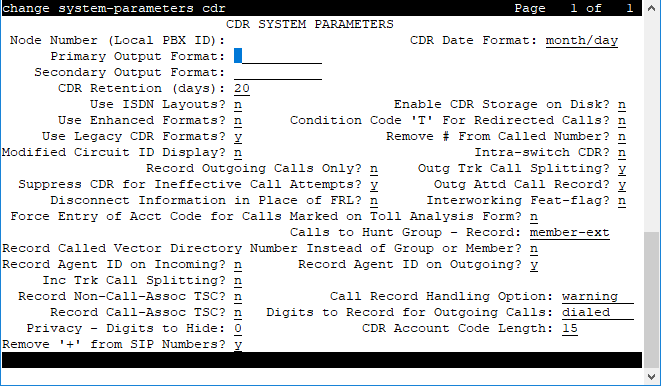
Calls to Hunt Group — Record
Valid Entry |
Usage |
|---|---|
member-ext |
Records the extension of the telephone or data terminal where the call terminated. |
group-ext |
Records the extension that was dialed. |
CDR Account Code Length
Valid Entry |
Usage |
|---|---|
1 to 15 |
The number of digits to record when a user enters an account code. For some record formats, a long account code overwrites spaces on the record that are usually assigned to other fields. |
CDR Date Format
Valid Entry |
Usage |
|---|---|
month/day day/month |
The format for the date stamp that begins each new day of call records. |
CDR retention (days)
Valid Entry |
Usage |
|---|---|
1 to 20 |
Specify the number of days for which you want to retain the CDR logs. The default value is 20. To retain the CDR logs, you must:
|
Condition Code ‘T’ for Redirected Calls
Enables or disables identification of CDR records of calls that have been redirected automatically off the server running Communication Manager.
Valid Entry |
Usage |
|---|---|
y |
The Condition Code of both CDR records for the call is ‘T.’ |
n |
Special identification is applied. |
Digits to Record for Outgoing Calls
Valid Entry |
Usage |
|---|---|
dialed |
Record the digits a user dials. |
outpulsed |
Record the digits that Communication Manager sends out over the trunk, including any additions or deletions that take place during routing. |
Disconnect Information in Place of FRL
Valid Entry |
Usage |
|---|---|
y |
Replace the Facility Restriction Level (FRL) with information about why a call disconnects. |
n |
Record the call FRL. |
Enable CDR Storage on Disk
Enables or disables the Survivable CDR feature for the main server, Survivable Remote Server (Local Survivable Processor), and Survivable Core Server (Enterprise Survivable Server). Default is disabled.
Force Entry of Acct Code for Calls Marked on Toll Analysis Form
Specifies whether or not an account code is required when making a toll call. Account codes are not required on all charged calls, and are required on some non-charged calls.
Valid Entry |
Usage |
|---|---|
y |
Restricts all toll calls unless the user dials an account code. Available only if Forced Entry of Account Codes is enabled for the system. |
n |
Users can place a call without an account code. This does not override other calling restrictions. |
Inc Attd Call Record
Enables or disables separate recording of attendant portions of outgoing calls that are transferred or conferenced.
Available only if Incoming Trunk Call Splitting is enabled.
Inc Trk Call Splitting
Enables or disables the creation of separate records for each portion of incoming calls that are transferred or conferenced.
Available only if Record Outgoing Calls Only is disabled.
Interworking Feat-flag
Valid Entry |
Usage |
|---|---|
y |
The feature flag indicates interworked outgoing ISDN calls. |
n |
The feature flag indicates no answer supervision for interworked calls. |
Intra-Switch CDR
Enables or disables the recording of calls within Communication Manager. Requires administration of intra-switch CDR extensions.
Modified Circuit ID Display
Affects the printer
, teleseer
, and 59-character
output formats.
Valid Entry |
Usage |
|---|---|
y |
Displays the circuit ID in its actual format (100’s, 10’s, units). For example, circuit ID 123 displays as 123.
Note:
Requires verification that an output device can accept this format. |
n |
Displays the circuit ID in its default format (10’s, units, 100’s). For example, the system displays circuit ID 123 as 231. |
Node Number (Local PBX ID)
Displays the DCS switch node number in a network of switches.
Outg Attd Call Record
Enables or disables separate recording of attendant portions of outgoing calls that are transferred or conferenced.
Available only if Outgoing Trunk Call Splitting is enabled.
Outg Trk Call Splitting
Enables or disables the creation of separate records for each portion of outgoing calls that are transferred or conferenced
Primary Output Endpoint
Primary Output Endpoint determines where the server running Communication Manager sends the CDR records. You require Primary Output Endpoint if a Primary Output Format is specified.
Valid Entry |
Usage |
|---|---|
eia |
The EIA port is used to connect the CDR device. |
Extension number |
The extension of the data module that links the primary output device to the server running Communication Manager. |
CDR1, CDR2 |
The CDR device is connected over a TCP/IP link, and this link is defined as either CDR1 or CDR2 for IP Services. |
DISK |
If you configure the CDR Retention (Days) field, then you must enter DISK in the Primary Output Endpoint field so that the CDR logs are retained. If you configure the retention policy, the retention policy is applicable if the Primary Output Endpoint field is set to DISK only. |
Primary Output Format
Indicates the format of the call records sent to the primary output device.
Valid Entry |
Usage |
|---|---|
customized |
For special call accounting needs that are prevented for standard record formats. Requires call accounting software that is also customized to receive these records. Call accounting vendors should be consulted before using this option. |
printer |
Call detail records are sent to a printer rather than to a record collection or call accounting system. |
59-char expanded lsu lsu-expand int-direct int-isdn int-process teleseer unformatted |
For standard record formats. The selection must be compatible with your call accounting software. Verify this through your vendor or the accounting system documentation. |
Privacy — Digits to Hide
Indicates how much of the dialed number to hide on the CDR record for stations administered for CDR privacy.
Valid Entry |
Usage |
|---|---|
0 to 7 |
The number of digits to hide, counting from the end right to left. |
For a value of 4, when the user dials 555-1234, the system displays only 555
in the CDR record.
Record Agent ID on Incoming
Determines whether the EAS agent login ID mut be included instead of the physical extension in the CDR record.
Available only if Expert Agent Selection (EAS) is enabled for the system. Cannot be enabled if Record Called Vector Directory Number Instead of Group or Member is enabled.
Record Agent ID on Outgoing
Determines whether the EAS agent’s LoginID must be included instead of the physical extension in the CDR record.
Available only if Expert Agent Selection (EAS) is enabled for the system.
Record Call-Assoc TSC
Enables or disables the creation of records for call-associated temporary signaling connections. A large number of data connections could increase the number of records, so call collection device capacity must be taken into consideration.
Record Called Vector Directory Number Instead of Group or Member
Determines whether or not to include the Vector Directory Number (VDN) in the CDR record. If enabled, the called VDN overrides the group or member information that normally the system displays in the CDR record. If a call is directed through more than one VDN, the first VDN used for the call is stored. This applies only to calls routed to a hunt group by a vector, not to calls routed directly to an extension by a vector.
Cannot be enabled if Record Agent ID on Incoming is enabled.
Record Non-Call-Assoc TSC
Enables or disables the creation of records for non-call-associated temporary signaling connections. A large number of data connections could increase the number of records, so record collection device capacity must be taken into consideration.
Record Outgoing Calls Only
Valid Entry |
Usage |
|---|---|
y |
Record only outgoing calls.
Note:
This can save space if you are only concerned with charges for outbound calls. |
n |
Record both outgoing and incoming calls. |
Remove '+' from SIP Numbers
If you set the Remove '+' from SIP Numbers field on the CDR System Parameters screen to y and if a leading plus (+) sign is present in a calling or called number sent over a CDR adjunct, Communication Manager removes the leading plus (+) sign from the number. The default value is y.
Remove # From Called Number
Valid Entry |
Usage |
|---|---|
y |
Removes the |
n |
Retains the trailing |
Secondary Output Endpoint
Available only if Secondary Output Format is administered.
Valid Entry |
Usage |
|---|---|
eia |
The secondary output device is connected to the eia port. |
Extension number |
The extension of the data module that links the secondary output device to the server running Communication Manager. |
CDR1, CDR2 |
The CDR device is connected over a TCP/IP link, and this link is defined as either CDR1 or CDR2 for IP Services. |
Secondary Output Format
Caution:
Only qualified Avaya service personnel should administer a secondary output device. This option might cause loss of data when the buffer contains large amounts of data.
Valid Entry |
Usage |
|---|---|
customized int-direct int-process lsu unformatted |
The format of the call records sent to the secondary output device. Only these formats can be used for a secondary output device. The format must be compatible with call accounting software. Verify this through the vendor or the accounting system documentation. |
Suppress CDR for Ineffective Call Attempts
Ineffective call attempts are the calls that are blocked because the user has insufficient calling privileges or all outgoing trunks are busy. These calls appear on the CDR record with a condition code E
.
Valid Entry |
Usage |
|---|---|
y |
Ignores ineffective call attempts. Used when there is limited storage space for CDR records and when records often overrun the buffer. |
n |
Reports ineffective call attempts. Used when users are often unable to place outgoing calls, or if a large number of incoming calls are incomplete. Also used to keep records of attempts to contact a client, and when ISDN trunks are used. This option requires more space for records. |
Use Enhanced Formats
Enables or disables the use of the Enhanced version of the specified primary output formats. Enhanced formats provide additional information about time in queue and ISDN call charges, where available. This affects the expanded, teleseer, lsu, printer, and unformatted output formats. Enhanced formats and ISDN formats cannot be used at the same time.
Use ISDN Layouts
Enables or disables using the ISDN version of the specified primary output format. ISDN Layouts provide more accurate information about the inter-exchange carrier and ISDN network services used for a call. This affects lsu and printer output formats, as well as any format with ISDN layouts, such as teleseer. ISDN formats and Enhanced formats cannot be used at the same time.
Use Legacy CDR Formats
Enables or disables the use of pre-Communication Manager 4.0 legacy Call Detail Recording (CDR) formats for CDR records. The default is enabled. Listed below are the CDR formats that are impacted by this field. All other CDR formats remain unchanged.
CDR Format |
Communication Manager 3.1 and earlier length |
Communication Manager 4.0 and later length |
|---|---|---|
ISDN Teleseer |
80 |
82 |
Enhanced Teleseer |
81 |
83 |
ISDN Printer |
84 |
86 |
Enhanced Printer |
85 |
87 |
ISDN LSU |
59 |
61 |
Enhanced LSU |
59 |
61 |
Expanded |
135 |
139 |
Enhanced Expanded |
151 |
155 |
Unformatted |
105 |
109 |
Enhanced Unformatted |
119 |
123 |
Int-ISDN |
136 |
140 |
CDR System Parameters: page 2
Used if there is an arrangement with the vendor to customize the call accounting system to receive these records.
Available only if Primary Output Format is customized.
Data Item
Use this field to itemize the data items that appear on the customized record.
You must include at least one field for a record. The last two data items in the record must be line-feed and return.
Data Item |
Length |
|---|---|
acct-code |
15 |
attd-console |
2 |
auth-code |
7 |
bandwidth |
2 |
bcc |
1 |
calltype |
1 |
calling-num |
15 |
cca-id |
20 |
clg-pty-cat |
2 |
clg-num/in-tac |
10 |
code-dial |
4 |
code-used |
4 |
cond-code |
1 |
contact-uri |
20 |
country-from |
3 |
country-to |
3 |
date |
6 |
dialed-num |
23 |
duration |
4 |
end-date(4d) |
8 |
feat-flag |
1 |
frl |
1 |
from-uri |
20 |
in-crt-id |
3 |
in-trk-code |
4 |
ins |
3 |
internal-codec |
2 |
isdn-cc |
11 |
isdn-cc/ppm |
11 |
ixc-code |
4 |
line-feed |
1 |
local-time-from |
|
local-time-to |
|
location-from |
3 |
location-to |
3 |
ma-uui |
1 |
node-num |
2 |
null |
3 |
out-crt-id |
3 |
ppm |
5 |
request-uri |
20 |
res_flag |
1 |
return |
1 |
sec-dur |
5 |
seq-num |
10 |
space |
1 |
start-date |
6 |
start-date(4d) |
8 |
start-time |
6 |
time |
4 |
timezone-from |
3 |
timezone-to |
6 |
to-uri |
20 |
tsc_ct |
4 |
tsc_flag |
1 |
trunk-codec |
2 |
ucid |
20 |
vdn |
5 |
Length
The length of each data item. The maximum record length depends on the call accounting system. Check with the vendor. The date field should be six digits to ensure proper output. Certain fields default to the required length.
Record Length
Displays the accumulated total length of the customized record, updated each time the length of a data item changes.