

AVAYA DOCUMENTATION CENTER
Find answers to your technical questions and learn how to use our products
Avaya Aura® Communication Manager Screen Reference
Daylight Saving Rules
Administers up to 15 customized daylight saving rules. Specifies the exact date and time each daylight saving rule goes into effect and when it stops. Rule 0 makes no adjustment to the system clock for daylight saving and cannot be modified.
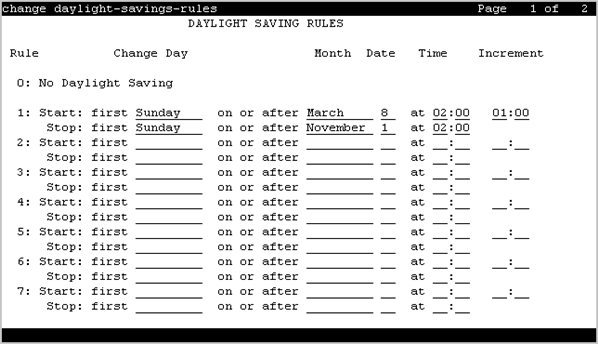
In this example, Rule 1 applies to all time zones in the U.S. and begins on the first Sunday on or after March 8 at 2:00 a.m. with a 01:00 increment. Daylight Saving Time stops on the first Sunday on or after November 1 at 2:00 a.m., also with a 01:00 increment used as a decrement when switching back to Standard time. Telephone displays reflect these settings.
1:	Start: first _ Sunday_ on or after _March   8_ at 2:00_  01:00__
	Stop:  first _ Sunday_ on or after November 1_ at 2:00_
Example command: change daylight-savings-rules
Change Day (Start)
Valid Entry |
Usage |
|---|---|
Sunday to Saturday |
The day of the week the clock moves ahead to begin daylight saving. |
Day |
The clock changes on the exact date entered for Month (Start) and Date (Start) values. |
Change Day (Stop)
Valid Entry |
Usage |
|---|---|
Sunday to Saturday |
The day of the week the clock moves back to standard time |
Day |
The clock changes on the exact date entered for the Month (Stop) and Date (Stop) values |
Date (Start)
Valid Entry |
Usage |
|---|---|
0 to 31 |
The day of the month the clock moves ahead to begin daylight saving. |
Date (Stop)
Valid Entry |
Usage |
|---|---|
0 to 31 |
The day of the month the clock moves back to standard time |
Increment (Start)
Valid Entry |
Usage |
|---|---|
0 to 23 |
The number of hours the clock moves ahead for daylight saving and moves back to return to standard time. |
0 to 59 |
The number of minutes you want the clock to move ahead for daylight saving and to move back to return to standard time. |
Month (Start)
Valid Entry |
Usage |
|---|---|
January to December |
The month the clock moves ahead to begin daylight savings |
Month (Stop)
Valid Entry |
Usage |
|---|---|
January to December |
The month the clock moves back to standard time |
Rule
The daylight saving rule number.
Time (Start)
Valid Entry |
Usage |
|---|---|
0 to 23 |
The hour the clock moves ahead to begin daylight saving. The system uses a 24-hour clock. For example, 14:00 is the same as 2:00 p.m. |
0 to 59 |
The minute the clock moves ahead to begin daylight saving. |
Time (Stop)
Valid Entry |
Usage |
|---|---|
0 to 23 |
The hour the clock moves back to standard time. The system uses a 24-hour clock. For example, 14:00 is the same as 2:00 p.m. |
0 to 59 |
The minute the clock moves back to standard time |