

AVAYA DOCUMENTATION CENTER
Find answers to your technical questions and learn how to use our products
Avaya Aura® Communication Manager Screen Reference
Station
Administers individual telephone sets or virtual telephones. Some of the fields are used for specific telephone types, while others are used for all telephone types.
To change the value of the fields on the Station screen, run the following command:
change station n, where n is the station number.
To add a station, run the following command:
add station next
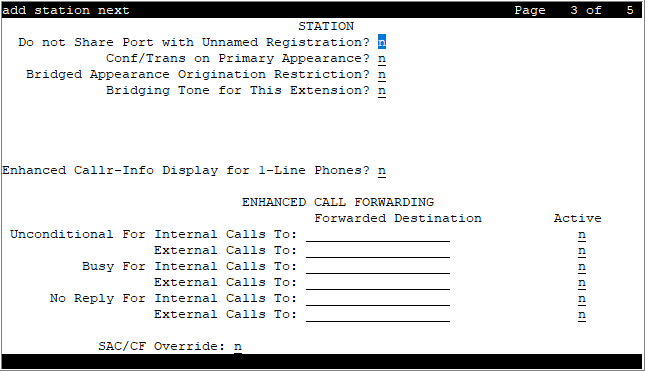
The following table lists various set types.
Note:
The table also contains older set types. However, Avaya does not provide support for End of Manufacturers Support (EoMS) set types. For more information on EoMS set types, see https://downloads.avaya.com/css/P8/documents/100172510.
Telephone type |
Model |
Administered as |
|---|---|---|
Single-line analog |
500 |
500 |
2500 and 2500 with Message Waiting Adjunct |
2500 |
|
6210 |
6210 |
|
6211 |
6210 |
|
6218 |
6218 |
|
6219 |
6218 |
|
6220 |
6220 |
|
6221 |
6220 |
|
CallerID |
Analog telephone with caller ID |
CallrID |
7101A and 7102A |
7101A |
|
7103A Programmable and Original |
7103A |
|
7104A |
7104A |
|
8110 |
8110 |
|
DS1FD |
DS1FD |
|
7302H, 7303H |
7303S |
|
Voice Response Unit (VRU) with C and D tones |
VRU |
|
VRU without C and D tones |
2500 |
|
Single-line DS1/DSO (Lineside T1/DS1) |
DS1 device without forward disconnect |
OPS |
VRU with forward disconnect without C and D tones |
DS1FD or DS1SA |
|
VRU with forward disconnect without C and D tones |
VRUFD or VRUSA |
|
Terminals |
510D |
510 |
515BCT |
515 |
|
Multi-appearance hybrid |
7303S |
7303S, 7313H |
7305H |
7305S |
|
7305S |
7305S, 7316H, 7317H |
|
7309H |
7309H, 7313H |
|
7313H |
7313H |
|
7314H |
7314H |
|
7315H |
7315H |
|
7316H |
7316H |
|
7317H |
7317H |
|
Multi-appearance digital |
2402 |
2402 |
2410 |
2410 |
|
2420 |
2420 |
|
6402 |
6402 |
|
6402D |
6402D |
|
6408 |
6408 |
|
6408+ |
6408+ |
|
6408D |
6408D |
|
6408D+ |
6408D+ |
|
6416D+ |
6416D+ |
|
6424D+ |
6424D+ |
|
7401D |
7401D |
|
7401+ |
7401+ |
|
7403D |
7403D |
|
7404D |
7404D |
|
7405D |
7405D |
|
7406D |
7406D |
|
7406+ |
7406+ |
|
7407D |
7407D |
|
7407+ |
7407+ |
|
7410D |
7410D |
|
7410+ |
7410+ |
|
7434D |
7434D |
|
7444D |
7444D |
|
8403B |
8403B |
|
8405B |
8405B |
|
8405B+ |
8405B+ |
|
8405D |
8405D |
|
8405D+ |
8405D+ |
|
8410B |
8410B |
|
8410D |
8410D |
|
8411B |
8411B |
|
8411D |
8411D |
|
9408 |
9408 |
|
9404 |
9404 |
|
CALLMASTER I |
602A1 |
|
CALLMASTER II, CALLMASTER III, CALLMASTER IV |
603A1, 603D1, 603E1, 603F1 |
|
CALLMASTER VI |
606A1 |
|
IDT1 |
7403D |
|
IDT2 |
7406D |
|
IP Telephone |
4601+
Note:
When adding a new 4601 IP telephone, you must use the 4601+ station type. This station type has the Automatic Callback feature enabled. |
4601+ |
4602+
Note:
When adding a new 4602 IP telephone, you must use the 4602+ station type. This station type has the Automatic Callback feature enabled. |
4602+ |
|
4606 |
4606 |
|
4610 |
4610 |
|
4612 |
4612 |
|
4620SW IP with G3.5 hardware |
4620 |
|
4621 |
4621 |
|
4622 |
4622 |
|
4624 |
4624 |
|
4625 |
4625 |
|
4690 |
4690 |
|
9611 |
9611 |
|
9621 |
9621 |
|
9630 |
9630 |
|
9641 |
9641 |
|
9650 |
9650 |
|
SIP IP Telephone |
Note:
Any model telephone with SIP firmware used for SIP networking must be administered as a 4620SIP, 96xxSIP, or 16CC telephone.
Note:
Communication Manager Release 6.2 and later do not support 1616SIP CC and 4620SIP CC telephones. |
4620SIP |
9601SIP |
9608SIP |
|
9620, 9630, 9630G, 9640, 9640G with SIP firmware
Note:
|
96xx or 96xxSIP telephone |
|
9608 with SIP firmware |
— |
|
9611 with SIP firmware |
9611SIP |
|
9621 with SIP firmware |
9621SIP |
|
9641 with SIP firmware |
9641SIP |
|
Avaya J129 IP Phone |
J129 |
|
Avaya J169 IP Phone |
J169 |
|
Avaya J179 IP Phone |
J179 |
|
J169CC IP Phone |
J169CC |
|
J179CC IP Phone |
J179CC |
|
AvyaSIP |
J139, J159, J189 |
|
AvyaSIPCC |
J189CC |
|
H.323 SoftPhone |
Road Warrior application |
H.323 or DCP type |
Native H.323 |
H.323 |
|
Single connect |
H.323 or DCP type |
|
Any NI-BRI N1 and N2 telephone |
NI-BRI |
|
7505D |
7505D |
|
7506D |
7506D |
|
7507D |
7507D |
|
8503D |
8503D |
|
8510T |
8510T |
|
8520T |
8520T |
|
Personal computer |
6300 or 7300 |
Personal computer |
Voice or data |
6538 or 6539 |
Constellation |
Test line |
ATMS |
105TL |
Administered without hardware |
— |
XDID or XDIDVIP |
Key telephone system interface |
— |
K2500 |
Administered without hardware |
any digital set |
— |
Computer telephony integration (CTI) station |
CTI |
|
CTI |
CTI station |
CTI |
XMOBILE |
EC500, DECT, or PHS |
XMOBILE |
ISDN-BRI data module |
7500 |
7500 |
Separation of Bearer and Signaling (SBS) extension |
SBS test extension without hardware |
SBS |
CS1K Endpoints |
|
CS1k |
Actual
Displays the actual endpoint configured in System Manager for the AvyaSIP and AvyaSIPCC set types. Actual is a read-only field.
In System Manager, you can add the following J-Series endpoints for the AvyaSIP and AvyaSIPCC set types:
J139, J159, J189, and J189CC.
Attendant
Use this field to configure SIP attendant. This field appears for set type 9641SIP only.
Valid Entry |
Usage |
n |
Disables SIP attendant. This is the default value. |
y |
Enables SIP attendant. When you set the SIP value to y, ensure that:
|
BCC
Indicates voice or voice-grade data when the value is set to 0. The Bearer Capability Classes (BCC) value is used to determine compatibility when non-ISDN facilities are connected to ISDN facilities (ISDN Interworking). Available only if ISDN-PRI or ISDN-BRI Trunks are enabled for the system.
Bearer
Used when Secure Terminal Equipment (STE) telephones are administered as 8510 telephones. The system the Bearer field for 8503, 8510, and 8520 stations in Communication Manager 2.1 and 2.2 only. Secure Terminal Equip is for Bearer functionality in Communication Manager 3.0 and later.
Valid Entry |
Usage |
|---|---|
speech |
Forces the Bearer Cap IE to |
3.1khz |
Leaves the Bearer Cap IE unchanged. Use 3.1khz to let secure calls from Secure Terminal Equipment (STE) telephones to work properly. |
Button Module Pages
This field can be configured for CS1000 station types only.
Buttons per Page
This field can be configured for CS1000 station types only. This field appears if Button Module Pages field is set to a non-zero value. This field displays a default value of 24 and allows the values 8, 12, 18, 22, and 24. If the value in this field is lower than 24, Communication Manager will do one of the following:
Allows the Button Module Page to display 24 buttons. However, it blocks form submission if there is a non-blank button in a position higher than the configured number.
Reduce the number of button fields on the Button Module Pages to the configured number.
Coverage Path 1 or Coverage Path 2
The coverage-path number or time-of-day table number assigned to the station.
Note:
If Modified Misoperation is active, a Coverage Path must be assigned to all stations on Communication Manager.
Cell Phone Number
This field can be configured when the set type is XMOBILE. The unformatted cell telephones published external numbers consisting of 1 to 15 digits. This field can contain a three-digit area code plus the seven-digit main number. If the same Cell Phone Number is administered for multiple XMOBILE stations, then the Dial Prefix associated with each instance of the Cell Phone Number must be the same. This number consist of a full 10-digit Cell Phone Number regardless of whether the cell telephone is local or not.
Caller ID Message Waiting Indication
Allows or prevents aliasing of various non-Avaya telephones and adjuncts. Available only if Type is CallrID. For CallrID type telephones or analog telephones with Caller ID adjuncts only.
Note:
The Caller ID Message Waiting Indication administration is independent of the administration of LED or NEON-lamp Communication Manager Message Waiting Indication (MWI). For example, it is possible to administer a Caller ID telephone with Caller ID Message Waiting Indication is disabled and Message Waiting Indicator set to neon.
Customizable Labels
Enables or disables the Increase Text for Feature Buttons feature for this station. This feature expands the text labels associated with Abbreviated Dial buttons from the current five uppercase alphanumeric characters to a maximum of 13 upper and lower case alphanumeric characters. Ensures that there will always be sufficient customized button resources to support VIP users. Available only when the station type is one of the following:
2410 (Release 2 or later)
2420 (Release 4 or later)
4610 (IP Telephone Release 2.2 or later)
4620 (IP Telephone Release 2.2 or later)
4621 (IP Telephone Release 2.2 or later)
4622 (IP Telephone Release 2.2 or later)
4625 (IP Telephone Release 3.1 or later)
COR
Class of Restriction (COR) number with the required restriction.
COS
The Class of Service (COS) number used to select allowed features.
Configuration Set
Configuration Set field can be configured when the set type is XMOBILE.
Valid Entry |
Usage |
|---|---|
1 to 10 |
The configuration set number that contains the call treatment options required for the XMOBILE station. This field must be administered if:
|
blank |
If the Mobility Trunk Group is a trunk group number and the administered trunk group is DECT or PHS, this field can be left blank. |
Calls Allowed
Identifies the Extension to Cellular call filter type for an XMOBILE station. This field allows an XMOBILE station to function as a bridge and still be restricted. Available only with an EC500-type XMOBILE station and with a Mapping Mode of termination or both.
Valid Entry |
Usage |
|---|---|
internal |
External calls are blocked. Internal calls terminate to the XMOBILE station. Attendant-originated and attendant-delivered calls are not delivered |
external |
Internal calls are blocked. External calls terminate to the XMOBILE station. |
all |
All calls terminate to the XMOBILE station. |
none |
Prevents calls from terminating to the XMOBILE station. Can be used to prevent business-related calls from accruing telephone charges on cellular telephones that are lost, being transferred to a new user, or being disabled for other business reasons. |
Note:
Interswitch calls on DCS trunks are treated as internal calls. When this field is set to:
internal or all, DCS calls are delivered to the cell telephone
external or none, DCS calls are not delivered
Incoming calls from other Extension to Cellular users are internal if office caller ID is enabled for the XMOBILE station associated with the cell telephone. When this field is set to:
internal or all, calls from other Extension to Cellular users are delivered
external or none, calls from other Extension to Cellular users are not delivered
Dial Prefix
This field can be configured when the set type is XMOBILE. The unformatted sequence of up to four digits or characters that are prepended to the cell telephone’s published cell telephone number before dialing. Accepts the * and # characters. If the same Cell Phone Number is administered on multiple XMOBILE stations, then the Dial Prefix associated with each instance of the Cell Phone Number must be the same.
Data Module
Indicates whether or not this telephone has an associated data module.
Display Caller ID
Enables or disables transmission of calling party information to the Caller ID telephone or adjunct. For CallrID type telephones or analog telephones with Caller ID adjuncts only. Available only if the station type is CallrID.
Display Cartridge
Enables or disables displaying the cartridge associated with the station. For 7404 D telephones only.
Display Language
Valid Entry |
Usage |
|---|---|
english french italian spanish user-defined |
The language that displays on stations. Time of day is displayed in 24-hour format (00:00 - 23:59) for all languages except English, which is displayed in 12-hour format (12:00 a.m. to 11:59 p.m.). |
unicode |
Displays English messages in a 24-hour format. If no Unicode file is installed, displays messages in English by default.
Note:
Unicode display is only available for Unicode-supported telephones. Currently, 4610SW, 4620SW, 4621SW, 4622SW, 16xx, 96xx, 96x1, 9600-series telephones (Avaya one-X Deskphone Edition SIP R2 or later), and Avaya J100 Series IP Phones support Unicode display. Unicode is also an option for DP1020 (aka 2420J) and SP1020 (Toshiba SIP Phone) telephones when enabled for the system. |
Extension
The extension for this station.
For a virtual extension, a valid physical extension or a blank can be entered. With blank, an incoming call to the virtual extension can be redirected to the virtual extension busy
or all
coverage path.
The extension length must be within 16 digits.
Endpt Init
Indicates the terminal’s endpoint initialization capability. Endpoint initialization is a procedure, required for multipoint operation, by which User Service Order Profile (USOP) is associated with an endpoint on the ISDN-BRI. This association is made through the SPID, administered into the system, and entered into the ISDN-BRI terminal.
Available only if MIM Support is enabled.
Valid Entry |
Usage |
|---|---|
y |
The terminal supports Telcordia Technologies ISDN-1 terminal initialization procedures. |
n |
For all other country protocols. |
Expansion Module
Indicates whether or not this telephone has an expansion module. Enables the administration of the buttons for the expansion module.
EMU Login Allowed
Enables or disables using the station as a visited station by an Enterprise Mobility User (EMU).
Endpt ID
Available only if Endpt Init is enabled.
Valid Entry |
Usage |
|---|---|
00 to 62 |
A unique two-digit number for this endpoint. Each Endpt ID field must have a unique value for each endpoint on the same port. |
Fixed TEI
Indicates whether or not the endpoint has a fixed Terminal Endpoint Identifier (TEI). The TEI identifies a unique access point within a service. TEIs must be administered for fixed TEI terminals.
Available only for ISDN-BRI data modules, NI-BRI telephones and WCBRI data modules.
Hunt-to Station
The extension the system must hunt to for this telephone when the telephone is busy. You can create a station hunting chain by assigning a hunt-to station to a series of telephones.
IP Softphone
Indicates whether or not this extension is either a PC-based multifunction station or part of a telecommuter complex with a call-back audio connection.
Available only for DCP station types and IP Telephones.
IP Video Softphone
Indicates whether or not this extension is a video softphone. Available only if IP Softphone is enabled.
IP Video
Use this field to specify whether the extension has IP video capability. The system displays this field for H.323 and SIP station types.
ITC (Information Transfer Capability)
The type of transmission facilities used for ISDN calls originating from this endpoint. Unavailable for voice-only or BRI stations.
Valid Entry |
Usage |
|---|---|
restricted |
Either restricted or unrestricted transmission facilities are used to complete the call. A restricted facility is a transmission facility that enforces 1’s density digital transmission. In other words, a sequence of eight digital zeros are converted to a sequence of seven zeros and a digital one. |
unrestricted |
Only unrestricted transmission facilities are used to complete the call. An unrestricted facility is a transmission facility that does not enforce 1’s density digital transmission. In other words, digital information is sent exactly as is. |
Lock Messages
Controls access to voice messages by other users.
Valid Entry |
Usage |
|---|---|
y |
Restricts other users from reading or canceling the voice messages, or retrieving messages using Voice Message Retrieval. |
n |
Allows other users to read, cancel, or retrieve messages. |
Location
The system displays this field only when you set the Multiple Locations field on the system parameters customer options screen to y, and set the Type field to H.323 or SIP station types.
Valid entry |
Usage |
|---|---|
1 to 2000 |
(Depending on your server configuration, see Avaya Aura® Communication Manager System Capacities Table.) Assigns the location number to a particular station. Allows IP telephones and softphones connected through a VPN to be associated with the branch an employee is assigned to. This field is one way to associate a location with a station. For the other ways and for a list of features that use location, see the Location sections in Avaya Aura® Communication Manager Feature Description and Implementation. |
blank |
Indicates that the existing location algorithm applies. By default, the value is blank. |
Loss Group
Valid Entry |
Usage |
|---|---|
1 to 17 |
Determines which administered two-party row in the loss plan applies to each station. Is not displayed for stations that do not use loss, such as x-mobile stations. |
Mapping Mode
This field can be configured when the set type is XMOBILE. Controls the mode of operation in which the cell telephone operates when mapped to this XMOBILE extension. An XMOBILE station can be bridged to a deskset. These restrictions or modes exist because the COR of a bridge is ignored; instead the principal’s COR is used. With Mapping Mode, an XMOBILE station can function as a bridge and still be restricted.
When a cell telephone is mapped to more than one XMOBILE station, then only one of the mapped XMOBILE stations can have origination or both as its Mapping Mode. Therefore, only one of the XMOBILE stations mapped to the cell telephone number is permitted to originate calls.
Valid Entry |
Usage |
|---|---|
both |
The cell telephone can be used to originate and terminate calls from its associated XMOBILE extension. This is the default when the XMOBILE type is PHS or DECT. |
none |
The XMOBILE station is disabled administratively and cannot originate and terminate calls from its associated internal extension. |
origination |
The cell telephone can be used only to originate calls from its associated internal XMOBILE extension by dialing into the office server running Communication Manager. |
termination |
The cell telephone can be used only to terminate calls from its associated internal XMOBILE extension. This is the default when the XMOBILE type is EC500. |
Message Lamp Ext
The extension of the station tracked with the message waiting lamp.
Media Complex Ext
When used with Multi-media Call Handling, indicates which extension is assigned to the data module of the multimedia complex. Users can dial this extension to place either a voice or a data call, and voice conversion, coverage, and forwarding apply as if the call were made to the 1-number.
Valid Entry |
Usage |
|---|---|
A valid BRI data extension |
For MMCH, enter the extension of the data module that is part of this multimedia complex. |
H.323 station extension |
For 4600 series IP Telephones, enter the corresponding H.323 station. For IP Softphone, enter the corresponding H.323 station. If you enter a value in this field, you can register this station for either a road-warrior or telecommuter/Avaya IP Agent application. |
blank |
Leave this field blank for single-connect IP applications. |
Message Waiting Indicator
Specifies the type of message waiting indicator. This field is independent of the administration of the Caller ID Message Waiting Indication for CallrID telephones. Must be set to a value other than none when the station type is set to H.323.
Available only for ISDN-BRI data modules and for 500, 2500, K2500, 7104A, 6210, 6218, 6220, 8110, H.323 and VRU telephones.
Valid Entries |
Usage |
|---|---|
led |
The message waiting indicator is a light-emitting diode (LED). |
neon |
The message waiting indicator is a neon indicator.
Note:
The neon message waiting indicator is supported only on a small subset of boards, including older US-only boards, such as the TN746 and the TN793. Check the documentation for your board to see if neon is supported. Available only if the Analog Ringing Cadence is set to 1 (US) for the location parameters. |
none |
No message waiting indicator is selected. This is the default. |
MIM Mtce/Mgt
Indicates if the telephone supports MIM Maintenance and Management capabilities other than endpoint initialization. Available only if MIM Support is enabled.
MIM Support (Management Information Message Support)
Enables or disables MIM endpoint initialization (SPID support) and other Maintenance or Management capabilities.
Message Waiting Type
This field can be configured when the set type is XMOBILE.
Valid Entry |
Usage |
|---|---|
DISPL |
The MW text is added to the end of the display line during an incoming or outgoing call. |
ICON |
The MWI message is used to update to the Wireless Terminal. |
NONE |
No MWI message is sent to the Wireless Terminal |
Mobility Trunk Group
Associates the XMOBILE station to a trunk.
Valid Entries |
Usage |
|---|---|
2000 |
A valid trunk group number for mobility routing. This trunk group is used for routing. |
aar |
The Automatic Alternate Routing (AAR) capabilities of Communication Manager are used to direct the call to an ISDN trunk. If no ISDN trunk is available, the call is not extended out of the server. It provides ringback to the calling company and might eventually go to coverage. |
ars |
The Automatic Route Selection (ARS) capabilities of Communication Manager are used to direct the call to an ISDN trunk. If no ISDN trunk is available, the call is not extended out of the server. It provides ringback to the calling company and might eventually go to coverage. |
blank |
Not administered. |
Model
The model of the NI-BRI telephone.
Valid Entry |
Usage |
|---|---|
L-3 Communication STE |
The NI-BRI telephone is a model L-3 Communication STE. |
Tone Commander |
The NI-BRI telephone is a model 6210 and 6220 Tone Commander. |
Other |
The NI-BRI telephone is another model (for example, a Nortel 5317T). |
Name
The name of the person associated with this telephone or data module. The system uses this value to create the system directory.
Note:
This field is supported by Unicode language display for the 4610SW,4620SW, 4621SW, and 4622SW telephones.
For more information on Unicode language display, see Administering Avaya Aura® Communication Manager.
Note:
In the display for emergency notification when completing the Name field, fill the most important identifying information at the beginning of the field. When an emergency call is made and a crisis alert station with a 27-character display is notified, only 17 characters of the Name field appear on the first display line, followed by the extension. The second line contains the last three characters of the Name field, followed by the word EMERGENCY. Characters 18 through 24 of the Name field are not displayed at all.
Off Premises Station
Available only for analog telephones.
Valid Entries |
Usage |
|---|---|
y |
This telephone is located in a different building with the system. Requires administration of R Balance Network. |
n |
The telephone is located in the same building with the system. |
Personalized Ringing Pattern
Defines the personalized ringing pattern for the station. Personalized Ringing allows users of some telephones to have one of 8 ringing patterns for incoming calls. For virtual stations, this field dictates the ringing pattern on its mapped-to physical telephone.
L = 530 Hz, M = 750 Hz, and H = 1060 Hz
Valid Entries |
Usage |
|---|---|
1 |
MMM (standard ringing) |
2 |
HHH |
3 |
LLL |
4 |
LHH |
5 |
HHL |
6 |
HLL |
7 |
HLH |
8 |
LHL |
Port
The Auxiliary and Analog ports assigned to the station are as follows.
Valid Entry |
Usage |
|---|---|
x or X |
Indicates that there is no hardware associated with the port assignment since the switch was set up, and the administrator expects that the extension has a non-IP set. Or, the extension had a non-IP set, and it dissociated. Use x for Administered WithOut Hardware (AWOH) and Computer Telephony (CTI) stations, as well as for SBS Extensions. |
IP |
Indicates that there is no hardware associated with the port assignment since the switch was set up, and the administrator expects that the extension would have an IP set. This is automatically entered for certain IP station set types, but you can enter for a DCP set with softphone permissions. This changes to the s00000 type when the set registers. |
xxxVmpp |
Specifies the Branch Gateway.
|
Analog Trunk port |
Analog trunk port is available with:
|
Passive Signalling Station
The entries y and n indicate the call processing status of the analog trunk port user. This field is available only when you select an analog trunk port as the station type.
Valid Entry |
Usage |
|---|---|
y |
The analog station port does not process calls when off hook. |
n |
The analog station port processes and receives calls as an analog station. This is the default value. |
R Balance Network
You must enter a value in this field if you set the Off-Premise Station field to y.
Valid Entry |
Usage |
|---|---|
y |
Selects the Resistor Only Balance network. The Resistor Only Balance network is used when Communication Manager is connected to terminal equipment, such as an SLC carrier or an impedance compensator, that provides an input impedance of 600 ohm and Communication Manager is less than 3,000 feet from the equipment. |
n |
Selects the Resistor and Capacitor (RC) balance network. RC balance network, when connected to off-premise stations, provide better signal transmission than Resistor only balance network. |
Remote Office Phone
Indicates whether or not this station is used as an endpoint in a remote office configuration.
Set
Appears only when the selected station type is CS1000.
Security Code
The security code required by users for specific system features and functions are as follows:
Extended User Administration of Redirected Calls
Personal Station Access
Redirection of Calls Coverage Off-Net
Leave Word Calling
Extended Call Forwarding
Station Lock
Voice Message Retrieval
Terminal Self-Administration
Enterprise Mobility User
Extension to Cellular
Call Forwarding
Posted Messages
Security Violation Notification
Demand Printing
The required security code length is administered system wide.
Short/Prefixed Registration Allowed
If the IP Stations or the IP Softphone field is set to y, the system displays the Short/Prefixed Registration Allowed field for this H.323 IP set types: 1603, 1608, 1616, 4601, 4601P, 4602, 4602P, 4606, 4610, 4612, 4620, 4622, 4624, 4630, 9610, 9620, 9630, and 9650.
Valid Entry |
Usage |
|---|---|
y |
Call processing allows the short registration to proceed per station basis. This entry overrides the System Parameters IP Options screen field value for that station. |
n |
Call processing rejects the short registration per station basis. This entry overrides the System Parameters IP Options screen field value for that station. |
default |
Call processing uses the Short/Prefixed Registration Allowed field option on the System Parameters IP Options screen for short registration. The default value is default. |
Speakerphone
Controls the behavior of speakerphones.
Valid Entry |
Usage |
|---|---|
1-way |
Indicates that the speakerphone listen-only. |
2-way |
Indicates that the speakerphone is both talk and listen. |
grp-listen |
With Group Listen, a telephone user can talk and listen to another party with the handset or headset while the telephone’s two-way speakerphone is in the listen-only mode. Others in the room can listen, but cannot speak to the other party through the speakerphone. The person talking on the handset acts as the spokesperson for the group. Group Listen provides reduced background noise and improves clarity during a conference call when a group needs to discuss what is being communicated to another party. Available only with 6400-series and 2420/2410 telephones. |
none |
Not administered for a speakerphone. |
Signaling Type
The Signaling Type field is used to specify how the A and B bits are used on an Off Premise Station (OPS) line.
Valid Entry |
Usage |
|---|---|
Fx |
The signaling bits are manipulated as if the port is terminating on a Foreign Exchange (FX) unit in a D4 channel bank. This value is default. |
Inverted |
The signaling bits are manipulated as if the port is terminating on a Special Access Unit (SAU) in a D4 channel bank. |
Survivable COR
Sets a level of restriction for stations to be used with the survivable dial plan to limit certain users to only to certain types of calls. You can list the restriction levels in order from the most restrictive to least restrictive. Each level has the calling ability of the ones above it.
Available for all analog and IP station types.
Valid Entries |
Usage |
|---|---|
emergency |
This station can only be used to place emergency calls. |
internal |
This station can only make intra-switch calls. This is the default. |
local |
This station can only make calls that are defined as locl, op, svc, or hnpa in the Survivable Gateway Call Controller's routing tables. |
toll |
This station can place any national toll calls that are defined as fnpa or natl on the Survivable Gateway Call Controller's routing tables. |
unrestricted |
This station can place a call to any number defined in the Survivable Gateway Call Controller's routing tables. Those strings marked as deny are also denied to these users. |
Survivable Trunk Dest
Designates certain telephones as not being allowed to receive incoming trunk calls when the Branch Gateway is in survivable mode.
Available for all analog and IP station types.
Valid Entry |
Usage |
|---|---|
y |
Allows this station to be an incoming trunk destination while the Branch Gateway is running in survivability mode. This is the default. |
n |
Prevents this station from receiving incoming trunk calls when in survivable mode. |
Survivable GK Node Name
Any valid previously-administered IP node name. Identifies the existence of other H.323 gatekeepers located within gateway products that offer survivable call features. For example, the MultiTech MVPxxx-AV H.323 gateway family and the SLS function within the Branch Gateways. When a valid IP node name is entered into this field, Communication Manager adds the IP address of this gateway to the bottom of the Alternate Gatekeeper List for this IP network region. As H.323 IP stations register with Communication Manager, this list is sent down in the registration confirm message. With this, the IP station can use the IP address of this Survivable Gatekeeper as the call controller of last resort.
If blank, there are no external gatekeeper nodes within a customer's network. This is the default value.
Available only if the station type is an H.323 station for the 46xx or 96xx models.
Secure Terminal Equip
Used when Secure Terminal Equipment (STE) telephones are administered as 8510 telephones. Available only for 8503, 8510, and 8520 stations in Communication Manager 3.0 and later.
Valid Entries |
Usage |
|---|---|
y |
Leave the Bearer Cap IE unchanged. 3.1khz is used to let secure calls from Secure Terminal Equipment (STE) telephones work properly. |
n |
Force the Bearer Cap IE to |
SPID — (Service Profile Identifier)
The Service Profile IDentifier (SPID) for this station. The SPID is a variable length parameter required for ISDN-BRI stations.
The SPID is a numeric string, which means that the value of 00 is different from 000. The SPID must be different for all terminals on the BRI and from the Service SPID. The SPID should always be assigned. If the SPID is not assigned for the first BRI on a port, any other BRI assignment to that port is blocked.
Note:
If you have not administered a port for an ISDN-BRI extension and intend to use Terminal Translation Initialization (TTI) to assign the port, then the SPID number must equal the station number.
Available only if the terminal supports ISDN terminal initialization procedures.
Special Dialing Option
Identifies the type of dialing for calls when this data module originates calls.
Valid Entry |
Usage |
|---|---|
hot-line |
The Hot Line Service destination number is stored in an Abbreviated Dialing List. When the user goes off-hook on a Data Hot Line call, the system dials the AD number. |
default |
The system dials the default dialing AD number. |
blank |
Normal keyboard dialing. |
System ID
This field can be configured for CS 1000 station types only. This field allows you to leave the field blank or enter a string of up to 9 characters. With Release 8.0 and later, more than one station can use the combination of System ID and Terminal Number.
With Release 8.0.1 and later, each station must have a unique combination of System ID and Terminal Number.
TEI
Available only if the station has a fixed Terminal Endpoint Identifier (TEI).
Valid Entry |
Usage |
|---|---|
0 to 63 |
A one- or two-digit number that identifies the TEI of the station. |
Tests
Valid Entry |
Usage |
|---|---|
y |
Enables port maintenance tests. |
n |
Disables port maintenance tests. Required if the equipment (dictaphone) connected to the port does not support these tests. |
Time of Day Lock Table
Valid Entry |
Usage |
|---|---|
1 to 5 |
Assigns the station to a Time of Day (TOD) Lock/Unlock table. The assigned table must be administered and active. |
blank |
Indicates no TOD Lock/Unlock feature is active. This is the default. |
TN
Use this field to specify a tenant number. You can enter a value from 1 to 250.
Type
Use this field to specify the telephone type. You must administer the station type for each station that you add to the system.
The following table lists the telephones, virtual telephones, and personal computers that you can administer on Communication Manager. Telephones that are not in the table require an alias to a supported set type.
Note:
If Terminal Translation Initialization is enabled, you cannot change the analog telephones administered with hardware to a virtual extension.
Telephone type |
Model |
Administered as |
|---|---|---|
Single-line analog |
500 |
500 |
2500, 2500 with Message Waiting Adjunct |
2500 |
|
6210 |
6210 |
|
6211 |
6210 |
|
6218 |
6218 |
|
6219 |
6218 |
|
6220 |
6220 |
|
6221 |
6220 |
|
CallerID |
Analog telephone with Caller ID |
CallrID |
7101A, 7102A |
7101A |
|
7103A Programmable and Original |
7103A |
|
7104A |
7104A |
|
8110 |
8110 |
|
DS1FD |
DS1FD |
|
7302H, 7303H |
7303S |
|
Voice Response Unit (VRU) with C&D tones |
VRU |
|
VRU without C&D tones |
2500 |
|
Single-line DS1/DSO |
DS1 device without forward disconnect |
ops |
VRU with forward disconnect without C&D tones |
ds1fd or ds1sa |
|
VRU with forward disconnect without C&D tones |
VRUFD or VRUSA |
|
Terminals |
510D |
510 |
515BCT |
515 |
|
Multi-appearance hybrid |
7303S |
7303S, 7313H |
7305H |
7305S |
|
7305S |
7305S, 7316H, 7317H |
|
7309H |
7309H, 7313H |
|
7313H |
7313H |
|
7314H |
7314H |
|
7315H |
7315H |
|
7316H |
7316H |
|
7317H |
7317H |
|
Multi-appearance digital |
2402 |
2402 |
2410 |
2410 |
|
2420 |
2420 |
|
6402 |
6402 |
|
6402D |
6402D |
|
6408 |
6408 |
|
6408+ |
6408+ |
|
6408D |
6408D |
|
6408D+ |
6408D+ |
|
6416D+ |
6416D+ |
|
6424D+ |
6424D+ |
|
7401D |
7401D |
|
7401+ |
7401+ |
|
7403D |
7403D |
|
7404D |
7404D |
|
7405D |
7405D |
|
7406D |
7406D |
|
7406+ |
7406+ |
|
7407D |
7407D |
|
7407+ |
7407+ |
|
7410D |
7410D |
|
7410+ |
7410+ |
|
7434D |
7434D |
|
7444D |
7444D |
|
8403B |
8403B |
|
8405B |
8405B |
|
8405B+ |
8405B+ |
|
8405D |
8405D |
|
8405D+ |
8405D+ |
|
8410B |
8410B |
|
8410D |
8410D |
|
8411B |
8411B |
|
8411D |
8411D |
|
8434D |
8434D |
|
9404 |
9404 |
|
9408 |
9408 |
|
CALLMASTER I |
602A1 |
|
CALLMASTER II, III, IV |
603A1, 603D1, 603E1, 603F1 |
|
CALLMASTER VI |
606A1 |
|
IDT1 |
7403D |
|
IDT2 |
7406D |
|
IP Telephone |
4601+
Note:
When you add a new 4601 IP telephone, you must use the 4601+ station type. This station type has the Automatic Callback feature enabled. |
4601+ |
4602+
Note:
When you add a new 4602 IP telephone, you must use the 4602+ station type. This station type has the Automatic Callback feature enabled. |
4602+ |
|
4606 |
4606 |
|
4610 |
4610 |
|
4612 |
4612 |
|
4620SW IP (G3.5 hardware) |
4620 |
|
4621 |
4621 |
|
4622 |
4622 |
|
4624 |
4624 |
|
4625 |
4625 |
|
4690 |
4690 |
|
9608 |
9608 |
|
9610 |
9610 |
|
9611 |
9611 |
|
9620 |
9620 |
|
9621 |
9621 |
|
9630 |
9630 |
|
9640 |
9640 |
|
9641 |
9641 |
|
9650 |
9650 |
|
SIP IP Telephone |
Note:
You must administer any telephone with SIP firmware used for SIP networking as a 4620SIP, 96xxSIP, or 16CC SIP telephone.
Note:
Communication Manager Release 6.2 and later do not support 1616SIP CC and 4620SIP CC telephones. |
4620SIP |
9601SIP |
9608SIP |
|
9620, 9630, 9630G 9640, 9640G with SIP firmware |
96xx or 96xxSIP telephone |
|
9608 with SIP firmware |
9608SIP |
|
9611 with SIP firmware |
9611SIP |
|
9621 with SIP firmware |
9621SIP |
|
9641 with SIP firmware |
9641SIP |
|
9608 with SIP firmware (for call center) |
9608SIPCC |
|
9611 with SIP firmware (for call center) |
9611SIPCC |
|
9621 with SIP firmware (for call center) |
9621SIPCC |
|
9641 with SIP firmware (for call center) |
9641SIPCC |
|
AvyaSIP |
J139, J159, J189 |
|
AvyaSIPCC |
J189CC |
|
H.323 SoftPhone |
application Road Warrior |
H.323 or DCP type |
Native H.323 |
H.323 |
|
Singleconnect |
H.323 or DCP type |
|
Any NI-BRI (N1 and N2) telephone |
NI-BRI |
|
7505D |
7505D |
|
7506D |
7506D |
|
7507D |
7507D |
|
8503D |
8503D |
|
8510T |
8510T |
|
8520T |
8520T |
|
Personal computer |
6300/7300 |
PC |
(voice/data) |
6538/9 |
Constellation |
Test Line |
ATMS |
105TL |
No hardware assigned at the time of administration. |
|
|
Key telephone system interface |
— |
K2500 |
AWOH |
any digital set |
— |
CTI station |
CTI |
|
CTI |
CTI station |
CTI |
XMOBILE |
EC500, DECT, PHS |
XMOBILE |
ISDN-BRI data module |
7500 |
7500 |
SBS Extension |
SBS test extension (no hardware) |
sbs |
Terminal Number
This field can be configured for CS 1000 station types only. You can enter numbers in the following range: 0.0.0.0 to 252.1.15.31.
The first digit must be divisible by 4. For example: 0, 4, 8, …, 252.
Unicode Name
This read-only field shows the assignment of Unicode Name to the station.
Valid entry |
Usage |
|---|---|
n |
Unicode Name is not assigned to the station. |
y |
Unicode Name is assigned to the station. |
For more information on Unicode Language Display, see Administering Avaya Aura® Communication Manager.
XOIP Endpoint type
Available only for 500, 2500, K2500 and CallrID station types.
Valid Entries |
Usage |
|---|---|
auto modem fax tty |
Identifies the endpoint type of the analog station. Use this field for older or non-standard external equipment such as modems, fax, and TTY devices that are not easily recognized by VoIP resources within Communication Manager. By identifying this external equipment through administration, VoIP firmware can determine whether to immediately attempt to put a call in pass-through mode, or allow the system to handle it normally. Default is auto.
Note:
This field is intended for exception cases only. For the majority of stations, use the default setting of auto. |
XID
Use this field to enable the Layer 2 XID testing capability. The system displays this field only for an ISDN-BRI data module.
XMOBILE Type
The type of XMOBILE station. Available only if the Type field is XMOBILE and the Mobility Trunk Group field is administered.
Valid Entry |
Usage |
|---|---|
DECT |
The DECT Access System or the AGCS (ROAMEO) IS-136 (TDMA cellular). This represent the ISDN-based DECT system. |
EC500 |
Any public cellular networks. |
IPDECT |
The H.323 IP-based DECT system. This can either be the ASCOM or the DeTeWe product. |
PHS |
The DENSO 300M. |
Att. Call Waiting Indication
With attendant call waiting, attendant-originated or attendant-extended calls to a busy single-line telephone can wait and sends distinctive call-waiting tone to the single-line user.
Valid Entry |
Usage |
|---|---|
y |
Activates Call Waiting for the telephone without Caller ID information. This feature must be enabled when the Type is set to H.323. This is the default. |
n |
Call Waiting is disabled for the station. Disable this feature if:
|
c |
Enables the Caller ID Delivery with Call Waiting feature, which displays CID information on for the waiting call. Available only if the station Type is CallrID. |
Active Station Ringing
Defines how calls ring to the telephone when it is off-hook without affecting how calls ring at this telephone when the telephone is on-hook.
Valid Entry |
Usage |
|---|---|
continuous |
All calls to this telephone ring continuously. |
single |
Calls to this telephone receive one ring cycle and then ring silently. |
if-busy-single |
Calls to this telephone ring continuously when the telephone is off-hook and idle. Calls to this telephone receive one ring cycle and then ring silently when the telephone is off-hook and active. |
silent |
All calls to this station ring silently. |
AUDIX Name
The voice messaging system associated with the station. Must contain a user-defined adjunct name that was previously administered.
Always Use
Use this field to enable the following emergency call handling settings:
A softphone can register irrespective of the emergency call handling settings the user has entered into the softphone. If a softphone dials 911, the value administered in the Emergency Location Extension field is used as the calling party number. The user-entered emergency call handling settings of the softphone are ignored.
If an IP telephone dials 911, the value administered in the Emergency Location Extension field is used as the calling party number.
If an agent dials 911, the physical station extension is used as the calling party number, overriding the value administered in the LoginID for ISDN Display field.
Does not apply to SCCAN wireless telephones, or to extensions administered as type H.323.
Auto Answer
In an Expert Agent Environment (EAS) environment, the auto answer setting for an Agent LoginID overrides the endpoint settings when the agent logs in.In EAS environments, the auto answer setting for the Agent LoginID can override a station’s setting when an agent logs in.
Valid entry |
Usage |
|---|---|
all |
All ACD and non-ACD calls to an idle station cut through immediately. The agent cannot use automatic hands-free answer for intercom calls. With non-ACD calls, the station rings while the call is cut through. To prevent the station from ringing, activate the ringer-off feature button, provided the Allow Ringer-off with Auto-Answer feature is enabled for the system. |
acd |
Only ACD split, ACD skill, and direct agent calls cut through. Non-ACD calls to the station ring audibly. For analog stations:
|
none |
All calls to the station receive an audible ringing. |
icom |
The user can answer an intercom call from the same intercom group without pressing the intercom button. |
Audible Message Waiting
Audible Message Waiting field enables or disables an audible message waiting tone indicating the user has a waiting message consisting of a stutter dial tone when the user goes off-hook.
This field does not control the Message Waiting lamp.
Available only if Audible Message Waiting is enabled for the system.
Automatic Moves
With Automatic Moves, you can unplug a DCP telephone from one location and moved to a new location without additional Communication Manager administration. Communication Manager automatically associates the extension to the new port.
Caution:
When a DCP telephone is unplugged and moved to another physical location, the Emergency Location Extension must be changed for that extension or the USA Automatic Location Identification data base must be manually updated. If the Emergency Location Extension is not changed or if the USA Automatic Location Identification data base is not updated, the DID number sent to the Public Safety Network could send emergency response personnel to the wrong location.
Valid Entry |
Usage |
|---|---|
always |
The DCP telephone can be moved anytime without additional administration by unplugging from one location and plugging into a new location. |
once |
The DCP telephone can be unplugged and plugged into a new location once. After a move, the field is set to done the next time that routine maintenance runs on the DCP telephone. Use when moving a large number of DCP telephones so each extension is removed from the move list. Also use to prevent automatic maintenance replacement. |
no |
Requires administration to move the DCP telephone. |
done |
Communication Manager sets the field to done after the telephone is moved and routine maintenance runs on the DCP telephone. |
error |
Communication Manager sets the field to error, after routine maintenance runs on the DCP telephone, when a non-serialized telephone is set as a movable telephone. |
Auto Select Any Idle Appearance
Auto Select Any Idle Appearance field enables or disables automatic selection of any idle appearance for transferred or conferenced calls. Communication Manager first attempts to find an idle appearance that has the same extension number as the call being transferred or conferenced has. If that attempt fails, Communication Manager selects the first idle appearance.
Adjunct Supervision
Available only if the station type is 500, 2500, k2500, 8110, ops, ds1fd, ds1sa, VRU, VRUFD, or VRUSA.
Valid Entry |
Usage |
|---|---|
y |
An analog disconnect signal is sent automatically to the port after a call terminates. Analog devices, such as answering machines and speakerphones, use this signal to turn the devices off after a call terminates. |
n |
Required hunt group agents are alerted to incoming calls. In a hunt group environment, the disconnect signal blocks the reception of zip tone and incoming call notification by an auto-answer station when a call is queued for the station. |
Busy Auto Callback without Flash
Enables or disables automatic callback for a calling analog station without flashing the hook. Available for analog telephones only if Without Flash is enabled for the system.
Bridged Call Alerting
Controls how the user is alerted to incoming calls on a bridged appearance.
Valid Entry |
Usage |
|---|---|
y |
The bridged appearance rings when a call arrives at the primary telephone. |
n |
The bridged appearance flashes but does not ring when a call arrives at the primary telephone. This is the default. If disabled and Per Button Ring Control is also disabled, audible ringing is suppressed for incoming calls on bridged appearances of another telephone’s primary extension. |
Bridged Idle Line Preference
Use this field to specify that the line that the system selects when you go off hook is always an idle call appearance for incoming bridged calls.
Valid entry |
Usage |
|---|---|
y |
The user connects to an idle call appearance instead of the ringing call. |
n |
The user connects to the ringing bridged appearance. |
CDR Privacy
Enables or disables Call Privacy for each station. With CDR Privacy, digits in the called number field of an outgoing call record can be blanked on a per-station basis. The number of blocked digits is administered system-wide as CDR parameters.
Coverage Msg Retrieval
Allows or denies users in the telephone’s Coverage Path to retrieve Leave Word Calling (LWC) messages for this telephone. Applies only if the telephone is enabled for LWC Reception.
Coverage After Forwarding
Governs whether an unanswered forwarded call is provided coverage treatment.
Valid Entry |
Usage |
|---|---|
y |
Coverage treatment is provided after forwarding regardless of the administered system-wide coverage parameters. |
n |
No coverage treatment is provided after forwarding regardless of the administered system-wide coverage parameters. |
s(ystem) |
Administered system-wide coverage parameters determine treatment. |
Call Waiting Indication
User, attendant-originated, and outside calls to a busy single-line telephone can wait and sends a distinctive call-waiting tone to the single-line user. Not available if Data Restriction is enabled, Switchhook Flash is disabled, or if Data Privacy is active by way of the telephone COS assignment.
Valid Entry |
Usage |
|---|---|
y |
Activates Call Waiting without Caller ID information for the telephone. This is the default. |
n |
Call Waiting is disabled for the station. |
c |
Enables the Caller ID Delivery with Call Waiting feature, which displays CID information on for the waiting call. This value can only be entered when the station type is CallrID. |
Call Appearance Display Format
Specifies the display format for the station. Bridged call appearances are not affected by this field. This field is available only on telephones that support downloadable call appearance buttons, such as the 2420 and 4620 telephones.
Note:
This field sets the administered display value only for an individual station.
Valid Entry |
Usage |
|---|---|
loc-param-default |
The system uses the administered system-wide default value. This is the default. |
inter-location |
The system displays the complete extension on downloadable call appearance buttons. |
intra-location |
The system displays a shortened or abbreviated version of the extension on downloadable call appearance buttons. |
Conf/Trans On Primary Appearance
Enables or disables the forced use of a primary appearance when the held call to be conferenced or transferred is a bridge. This is regardless of the administered value for Auto Select Any Idle Appearance.
Data Restriction
Enables or disables data restriction that is used to prevent tones, such as call-waiting tones, from interrupting data calls. Data restriction provides permanent protection and cannot be changed by the telephone user. Cannot be assigned if Auto Answer is administered as all or acd. If enabled, whisper page to this station is denied.
Display Client Redirection
Enables or disables the display of redirection information for a call originating from a station with Client Room Class of Service and terminating to this station. When disabled, only the client name and extension or room display. Available only if Hospitality is enabled for the system.
Note:
This field must be enabled for stations administered for any type of voice messaging that needs display information.
Direct IP-IP Audio Connections
Use this field to enable direct audio connections between IP endpoints. Direct audio connections save bandwidth resources and improve the sound quality of voice over IP transmissions.
Note:
This field has no impact on a SIP station (OPS) on shuffling. For SIP stations, this field is controlled by the "Direct IP-IP Audio Connections" field in the Signaling group form.
Distinctive Audible Alert
Use this field to enable the distinctive audible alerts to allow telephones to receive three different types of ringing patterns that identify the type of incoming calls. Distinctive ringing might not work properly for off-premises telephones.
Emergency Location Ext
The Emergency Location Extension for this station. This extension identifies the street address or nearby location when an emergency call is made. Defaults to the telephone’s extension. Accepts up to sixteen digits.
Note:
On the ARS Digit Analysis Table in Communication Manager, 911 must be administered to be call type emer or alrt for the E911 Emergency feature to work properly.
EC500 State
Use this field to observe or change the EC500 state of the station .This status is also observed and changed by administering an EC500 button on the station.
Valid Entry |
Usage |
|---|---|
enabled |
When EC500 state is enabled, a call to that station generates a new outbound call from the Communication Manager to the configured EC500 destination, typically a mobile phone. |
disabled |
When EC500 state is disabled, the outbound call to the EC500 destination is not generated. |
H.320 Conversion
Use this field to enable the conversion of H.320-compliant calls to voice-only calls for the attendant console.
Note:
The system can handle only a limited number of conversion calls. Therefore, the number of attendant consoles with H.320 conversion must be limited.
Ignore Rotary Digits
Indicates whether or not rotary digits from the set are ignored. If enabled, the short switch-hook flash (50 to 150) from a 2500-type set is ignored.
LWC Reception
Use this field to specify the location where the system must store the LWC messages.
Valid entry |
Usage |
|---|---|
spe |
Use this option to store the LWC messages on Switch Processor Element (SPE). |
none |
Use this option if you do not want to store the LWC messages. |
audix |
Use this option to store the LWC messages on the voice messaging system. |
LWC Activation
Activates or deactivates the Leave Word Calling (LWC) feature. With LWC, internal telephone users on this extension can leave short pre-programmed messages for other internal users.
You must use LWC if:
The system has hospitality and the guest-room telephones require LWC messages indicating that wakeup calls failed
The LWC messages are stored in a voice-messaging system
LWC Log External Calls
This field can be configured when the set type is XMOBILE. Determines whether or not unanswered external call logs are available to end users. When external calls are not answered, Communication Manager keeps a record of up to 15 calls provided information on the caller identification is available. Each record consists of the latest call attempt date and time.
Multimedia Early Answer
Enables or disables multimedia early answer on a station-by-station basis.
You must enable the station for the Multimedia Early Answer feature if the station receives coverage calls for multimedia complexes, but is not multimedia-capable. This ensures that calls are converted and the talk path is established before ringing at this station.
MWI Served User Type
Controls the auditing or interrogation of a served user’s message waiting indicator (MWI).
Valid Entries |
Usage |
|---|---|
fp-mwi |
The station is a served user of an fp-mwi message center. |
qsig-mwi |
The station is a served user of a qsig-mwi message center. |
sip-adjunct |
Used to audit message waiting lamps. |
blank |
The served user’s MWI is not audited or if the user is not a served user of either an fp-mwi or qsig-mwi message center. |
Per Button Ring Control
Using this option you can enable or disable ring control for every button, provided you have the station user credentials.
Valid Entries |
Usage |
|---|---|
y |
To enable Automatic Abbreviated and Delayed ring transition for each call-appr on the station, select ring behavior individually for each call-appr or brdg-appr option. To prevent the system from automatically moving the line selection to a silently alerting call, unless the call was audibly ringing earlier.
Note:
The abrdg-appr option is unavailable for SIP station. |
n |
To enable the calls on call-appr buttons always to ring the station To enable the calls on brdg-appr buttons always ring or not ring based on the Bridged Call Alerting value To move line selection to a silently alerting call, if the call is not audibly ringing the station
Note:
The abrdg-appr option is unavailable for SIP station. |
Per Station CPN - Send Calling Number
Determines Calling Party Number (CPN) information sent on outgoing calls from this station.
Valid Entries |
Usage |
|---|---|
y |
All outgoing calls from the station deliver the CPN information as |
n |
No CPN information is sent for the call. |
r |
Outgoing non-DCS network calls from the station delivers the Calling Party Number information as |
blank |
The sending of CPN information for calls is controlled by administration on the outgoing trunk group the calls are carried on. |
Precedence Call Waiting
Activates or deactivates Precedence Call Waiting for this station.
Redirect Notification
Enables or disables redirection notification that gives a half ring at this telephone when calls to this extension are redirected through Call Forwarding or Call Coverage. Must be enabled if LWC messages are stored on a voice-messaging system.
Restrict Last Appearance
Valid Entries |
Usage |
|---|---|
y |
Restricts the last idle call appearance used for incoming priority calls and outgoing call originations only. |
n |
Last idle call appearance is used for incoming priority calls and outgoing call originations. |
Recall Rotary Digit
Enables or disables the Recall Rotary Digit dialing that enables this user to perform conference and transfer operations.
Available only if the station type is 500 or 2500.
Remote Soft Phone Emergency Calls
Tells Communication Manager how to handle emergency calls from the IP telephone.
Caution:
An Avaya IP endpoint can dial emergency calls (for example, 911 calls in the U.S.). It only reaches the local emergency service in the Public Safety Answering Point area where the telephone system has local trunks. You cannot use an Avaya IP endpoint to dial to and connect with local emergency service when dialing from remote locations that do not have local trunks. Avoid using an Avaya IP endpoint to dial emergency numbers for emergency services when dialing from remote locations. Avaya LLC is not responsible or liable for any damages resulting from misplaced emergency calls made from an Avaya endpoint. Your use of this product indicates that you have read this advisory and agree to use an alternative telephone to dial all emergency calls from remote locations. If you have questions about emergency calls from IP telephones, go to the Avaya Support website at http://support.avaya.com.
Available only if the station is an IP Softphone or a remote office station.
Valid Entry |
Usage |
|---|---|
as-on-local |
If the emergency location extension that corresponds to this station's IP address is not administered (left blank), the value as-on-local sends the station emergency location extension to the Public Safety Answering Point (PSAP). If the administrator populates the IP address mapping with emergency numbers, the value as-on-local functions as follows:
|
block |
Prevents the completion of emergency calls. Use this entry for users who move around but always have a circuit-switched telephone nearby, and for users who are farther away from the server than an adjacent area code served by the same 911 Tandem office. When users attempt to dial an emergency call from an IP Telephone and the call is blocked, they can dial 911 from a nearby circuit-switched telephone instead. |
cesid |
Allows Communication Manager to send the CESID information supplied by the IP Softphone to the PSAP. The end user enters the emergency information into the IP Softphone. Use this entry for IP Softphones with road warrior service that are near enough to the server that an emergency call reaches the PSAP that covers the softphone's physical location. If the server uses ISDN trunks for emergency calls, the digit string is the telephone number, provided that the number is a local direct-dial number with the local area code, at the physical location of the IP Softphone. If the server uses CAMA trunks for emergency calls, the end user enters a specific digit string for each IP Softphone location, based on advice from the local emergency response personnel. |
option |
Allows the user to select the option (extension, block, or cesid) that the user selected during registration and the IP Softphone reported. This entry is used for extensions that can be swapped back and forth between IP Softphones and a telephone with a fixed location. The user chooses between block and cesid on the softphone. A DCP or IP telephone in the office automatically selects the extension. |
Service Link Mode
Use this field to specify the duration of a service link connection. The service link is the combined hardware and software multimedia connection between an H.320 Desktop Video Conferencing (DVC) system and Communication Manager.
The service link is established when a user receives or makes a call during a multimedia, IP softphone, or IP telephone session.
Valid entry |
Usage |
|---|---|
as-needed |
For multimedia, IP softphone, and IP telephone users. The service link remains connected for 10 seconds after the user disconnects a call so that the user can immediately make or receive another call. After 10 seconds, the link is disconnected, and a new link must be established to make or receive a call. |
permanent |
For call center agents who are constantly making or receiving calls during the multimedia, IP softphone, or IP telephone session. The service link remains connected for the entire duration of the session. |
Switchhook Flash
Valid Entry |
Usage |
|---|---|
y |
Allows users to use the switchhook flash function to activate Conference/Transfer/Hold and Call Waiting. Required for H.323 station types. |
n |
Disables the flash function so that when the switchhook is pressed while active on a call, the call drops. Requires that Call Waiting Indication is disabled. |
Select Last Used Appearance
Valid Entry |
Usage |
|---|---|
y |
Indicates a station’s line selection is not to be moved from the currently selected line button to a different, non-alerting line button. The line selection on an on-hook station only moves from the last used line button to a line button with an audibly alerting call. If there are no alerting calls, the line selection remains on the button last used for a call. |
n |
The line selection on an on-hook station with no alerting calls can be moved to a different line button that might be serving a different extension. |
Access Code
A five-digit access code used to place a wireless terminal into service. The access code is a temporary, shorter version of the complete User Authentication Key (UAK) required by the system when the terminal is first put into service. It is used to automatically generate a unique UAK for that wireless terminal over-the-air.
Available only if a wireless terminal model number is selected as the station type.
Bridged Appearance Origination Restriction
Restricts or allows call origination on the bridged appearance.
Valid Entry |
Usage |
|---|---|
y |
Call origination on the bridged appearance is restricted. |
n |
Call origination ion the bridged appearance is allowed. This is normal behavior, and is the default. |
Bridging Tone for This Extension
Allows you to enable or disable a single burst of tone when a station bridges on to the principal’s call.
Valid Entry |
Usage |
|---|---|
y |
Enables a single burst of tone when a station bridges on to the principal’s call. |
n |
Disables a single burst of tone when a station bridges on to the principal’s call. This is the default value for a new SIP station, or when a SIP station upgrades to Communication Manager 8.0 or later from a previous release. |
Do not Share Port with Unnamed Registration
Controls whether x-port station can be shared or not when a request comes from an un-named IP address. This field is applicable for DCP phones with x-port only. This field appears only when Unnamed Registrations and PSA for IP Telephones field is set to y on the system-parameters features screen and DCP station.
Valid Entry |
Usage |
|---|---|
y |
Communication Manager does not allow x-port station to be shared when a request comes from un-named IP address. |
n |
Communication Manager allows x-port station to be shared when a request comes from un-named IP address. This is the default value. |
Enhanced Callr-Info display for 1-line display phones
Use this field to enable or disable the Callr-Info Persists feature. Use this feature with telephones that have a one-line display and a callr-info button that displays the collected digits. For more information on Callr-info Persists, see Avaya Aura® Call Center Elite Feature Reference.
Valid entry |
Usage |
|---|---|
n |
This entry is the default. If an agent presses the callr-info button, the telephone displays the callr-info digits. The callr-info digits are cleared after:
|
y |
On receiving an incoming call with callr-info digits associated, the indicator of the callr-info button flashes.
|
Forwarded Destination
A destination extension for both internal and external calls for each of the three types of enhanced call forwarding (Unconditional, Busy, and No Reply). Accepts up to 18 digits. The first digit can be an asterisk *.
Requires administration to indicate whether the specific destination is active (enabled) or inactive (disabled).
Home
Indicates the roaming status of the wireless user. Available only when a wireless terminal model number is selected as the station type.
Valid Entry |
Usage |
|---|---|
y |
The user’s home. This is the default. |
n |
The roaming system. |
IP Phone Group ID
Available for H.323 and SIP station types.
Valid entry |
Usage |
|---|---|
0 to 999 blank |
The Group ID number for the station. |
IPEI
Available when a wireless terminal model number is selected as the station type.
Valid Entry |
Usage |
|---|---|
0 to 9 a to f A to F blank |
The International Portable Equipment Identifier of the wireless terminal. Accepts a unique nine-character hexadecimal ID number. |
Offline Call Logging
Use the Offline Call Logging field to back up and restore call logs for an offline user.
Valid entry |
Usage |
|---|---|
y |
Communication Manager tracks the calls that the user missed when the telephone was in the logged-out state, and updates the call logs on the telephone when the user logs in. The default option is y. |
n |
Communication Manager does not track the calls that the user missed when the telephone was in the logged-out state. |
Require Mutual Authentication if TLS
The TLS server, Communication Manager, and the TLS client, 96x1 H.323 phone, must both exchange Identity certificates and mutually authenticate the other side certificate.
If an H.323 phone has a certificate and the Require Mutual Authentication if TLS field is set to:
Valid entry |
Usage |
|---|---|
y |
Communication Manager validates the certificate. If the certificate is valid, Communication Manager allows TLS setup with H.323 phones. If the certificate is invalid, Communication Manager rejects the TLS request. |
n |
Communication Manager does not check for the phone certificate. Instead Communication Manager checks for the root certificate. If the root certificate is valid, Communication Manager allows TLS setup with H.323 phones to proceed without an endpoint certificate. If the root certificate is invalid or expired, Communication Manager rejects the TLS request. |
If an H.323 phone does not have a certificate and the Require Mutual Authentication if TLS field is set to:
Valid entry |
Usage |
|---|---|
y |
Communication Manager does not accept the security profile, H323TLS, in the Gatekeeper Confirmation (GCF). If the endpoint attempts to set up TLS, Communication Manager rejects the TLS request. |
n |
Communication Manager does not check for the phone certificate. Instead, Communication Manager checks for the root certificate. If the root certificate is valid, Communication Manager allows TLS setup with H.323 phones to proceed without an endpoint certificate. If the root certificate is invalid or expired, Communication Manager rejects the TLS request. |
SAC/CF Override
With SAC/CF Override, the user of the calling station can override the redirection set by the called station.
Valid entry |
Usage |
|---|---|
ask |
The system prompts the user of the calling station whether the call must follow the redirection path or override the redirection path. The user can type y or n. |
no |
The user of the calling station cannot override the redirection path of the call. The call follows the redirection path. |
yes |
The user of the calling station can override the redirection path of the call, provided the called station has at least one idle call appearance. |
Auto-A/D
Enables or disables automatic abbreviated/delayed ringing for a call appearance. Available only if Per Button Ring Control is enabled.
Abbreviated Dialing List 1, List 2, List 3
Assigns up to three abbreviated dialing lists to each telephone.
Valid Entry |
Usage |
|---|---|
enhanced |
Telephone user can access the enhanced system abbreviated dialing list. |
group |
Telephone user can access the specified group abbreviated dialing list. Requires administration of a group number. |
personal |
Telephone user can access and program their personal abbreviated dialing list. Requires administration of a personal list number. |
system |
Telephone user can access the system abbreviated dialing list. |
Building
A valid building location.
Cable
Identifies the cable that connects the telephone jack to the system.
Cord Length
The length of the cord attached to the receiver. This is a free-form entry, and can be in any measurement units.
Floor
A valid floor location.
Headset
Indicates whether or not the telephone has a headset.
HOT LINE DESTINATION — Dial Code
Hot Line Destination - Dial code is the dial code in the specified abbreviated dialing list where the hotline destination number is stored. This field can be configured when the set type is XMOBILE or 8510T(and other BRI types).
HOT LINE DESTINATION — Abbreviated Dialing Dial Code
This field is available only if Special Dialing Option is hot-line.
Hot Line Service is used when very fast service is required and when a telephone is used only for accessing a certain facility. This field can be configured when the set type is XMOBILE or 8510T(and other BRI types).
HOT LINE DESTINATION — Abbreviated Dialing List Number
The abbreviated dialing list where the hotline destination number is stored. This field can be configured when the set type is XMOBILE or 8510T(and other BRI types).
Jack
Alpha-numeric identification of the jack used for this station.
Mounting
Indicates whether the station mounting is d(esk) or w(all).
Rg
Valid Entry |
Usage |
|---|---|
a(bbreviated-ring) d(elayed-ring) n(o-ring) r(ing) |
The type of automatic abbreviated/delayed ringing for each call appearance when per button ring control is enabled. Default is r. |
Room
Valid Entry |
Usage |
|---|---|
Telephone location |
Identifies the telephone location. Accepts up to 10 characters. |
Guest room number |
Identifies the guest room number if this station is one of several to be assigned a guest room and the Display Room Information in Call Display is enabled for the system. Accepts up to five digits. |
Speaker
Indicates whether or not the station is equipped with a speaker.
Set Color
Indicates the set color. Valid entries include the following colors: beige, black, blue, brown, burg (burgundy), gray, green, ivory, orng (orange), red, teak, wal (walnut), white, and yel (yellow).
You can change the list of allowed set colors by using the Valid Set Color fields on the site-data screen.
Voice mail Number
Valid Entries |
Usage |
|---|---|
digits (1 to 9) * # ~p (pause) ~w/~ (wait) ~m (mark) ~s (suppress) |
Provides a voice mail retrieval AUX dial button on 4xx, 46xx, and 96xx telephones. When a number is entered in this field, the telephone's fixed voice mail retrieval button acts as an autodial button, dialing the number entered in this field to access voice mail. Accepts up to 24 digits.
Note:
If this field is left blank, the telephone's fixed voice mail retrieval button acts as a |
BUTTON ASSIGNMENTS
The feature assigned to each button on the station. Feature buttons are assigned by entering the abbreviated feature. For a list of feature buttons, see Telephone Feature Buttons Table in Administering Avaya Aura® Communication Manager.
Note:
To use Terminal Translation Initialization (TTI), a call appearance (call-appr) must be assigned to the first button position. TTI needs the button on the first call appearance to get dial tone.
Data Extension
Use this field to assign an extension to the data module. You can enter up to five digits. This value must conform to the dial plan.
Default Dialing Abbreviated Dialing Dial Code
The list number associated with the abbreviated dialing list.
When the user goes off-hook for a data call and presses the Enter button following the DIAL prompt, the system dials the AD number.
Available only if the Special Dialing Option is set to default.
1-Step Clearing
Enables or disables call termination at the WCBRI terminal when the user drops from the call.
Enable Reachability for Station Domain Control
Using the Enable Reachability for Station Domain Control field, you can enable or disable options polling for specific stations.
Note:
When the system-parameters features form is set to disable-all, the station form field is overridden or made inaccessible.
Enable Reachability for Station Domain Control field has the following options:
Valid Entry |
Usage |
|---|---|
y |
To enable the polling feature for an individual SIP station. |
n |
To disable the polling feature for an individual SIP station. |
system |
To take action based on the option selected on the system-parameters features form, type system.
Note:
The default option is set to system. The administration option has effect only if the station is domain-controlled. |
Primary Session Manager, Secondary Session Manager, Third Session Manager, and Fourth Session Manager
These four fields are populated by System Manager and are read-only on Communication Manager. You cannot modify these fields from the Communication Manager SAT interface.
If the call to this SIP station is routed to a SIP trunk with a clustered signaling group, then the SIP Trunk Optimization feature sends the Invite to the station on the primary Session Manager. If primary Session Manager is not reachable, the Invite is sent to the secondary Session Manager.
The Session Manager selection for routing to a SIP station does not apply to a call between two SIP stations. In this case, Session Manager decides the destination Session Manager for the called SIP station.
Note:
IP addresses are allocated to these fields, when the policy-based assignment is enabled in System Manager.
Route Selection
This field displays the value of the Trunk Selection of the corresponding off-pbx-telephone station mapping entry if there is one. The valid entries are:
ars
aar
Trunk group number: tg1 to tg2000
Route pattern number: rp1 to rp2000
SIP URI
Use this field to place a call using the URI. URI is an alphanumeric string such as letters, numbers, and special characters. You can enter up to 70 characters, including handle and domain name. For example:
help.desk@example.com
helpdesk123@example.com
helpdesk@example.com
Following are not supported:
Unicode characters
Eurofont characters
Using same URIs across hunt groups, VDNs, and stations within the same Communication Manager.
Type of 3PCC Enabled
Indicates if the telephone can be controlled by an Avaya third Party Call Control (3PCC) adjunct or a Computer Telephony Integration (CTI) adjunct. The valid entries are none and Avaya.
Assigned Member — Ext
The extension of the user who has an associated Data Extension button and shares the module. This field is available only if the station type is 6408D and data module is set to y.
Assigned Member — Name
The name associated with the extension of the user who has an associated Data Extension button and shares the module. This field is available only if the station type is 6408D and data module is set to y.
Automatic Selection of DID Numbers
Enables or disables the Automatic Selection of DID Numbers for Guest Rooms feature. This feature assigns a two- to five-digit extension from a predetermined list of numbers to a hotel room telephone number that is disassociated with the room number.
Mute Button Enabled
Enables or disables the mute button on the station.
Country Protocol
The protocol that corresponds to the supported initialization and codesets. The Country Protocol must match any previously-administered endpoint on the same port.
Coverage Module
Indicates whether or not a coverage module is connected to the station.
Custom Selection of VIP DID Numbers
The selection or removal of a DID number assigned to a room when a guest checks in. Available only if Automatic Selection of DID Numbers is enabled.
Data Option
Valid Entry |
Usage |
|---|---|
analog |
A second line on the telephone is administered on the I-2 channel. |
data module |
A second line on the telephone is not administered on the I-2 channel. |
none |
The data option is not administered. |
DSN Number
You can enter a 10-digit extension, or leave the field blank.
Feature Module
Indicates whether or not the station is connected to a feature module.
Idle/Active Ringing (Callmaster)
Defines how a call rings to the telephone when it is on-hook. Applies to CALLMASTER telephones. This field is available only if station type is 602A1.
Valid Entry |
Usage |
|---|---|
continuous |
All calls to this telephone ring continuously. |
if-busy-single |
Calls to this telephone ring continuously when the telephone is off-hook and idle, and calls to this telephone receive one ring cycle and then ring silently when the telephone is off-hook and active. |
silent-if-busy |
Calls ring silently when this station is busy. |
single |
Calls to this telephone receive one ring cycle and then ring silently. |
Idle Appearance Preference
Indicates which call appearance is selected when the user lifts the handset and there is an incoming call.
Valid Entry |
Usage |
|---|---|
y |
The user connects to an idle call appearance instead of the ringing call. |
n |
The Alerting Appearance Preference is set and the user connects to the ringing call appearance. |
Map-to Station
The extension of a physical telephone used for calls to a virtual extension. Cannot be used with an xmobile, xdid or any other virtual extension.
This field is applicable only for the virtual endpoints.
Message Server Name
Specifies which Message Server is associated with the station. Must contain a user-defined adjunct name that was previously administered. Names must be administered in alphabetical order.
PCOL/TEG Call Alerting
Enables or disables alerting at the station for Personal CO Line/Terminating Extension Group calls.
Available only for 510 telephones.
Public (PSTN) Number
You can enter an 11-digit extension, or leave the field blank.