

AVAYA DOCUMENTATION CENTER
Find answers to your technical questions and learn how to use our products
Avaya Aura® Communication Manager Screen Reference
Call Vector
Use this screen to run a series of commands to specify how the system must handle calls directed to a vector directory number (VDN).
For example, to change the value of the fields on the screen, run the following command:
change vector n,
where n is the VDN.
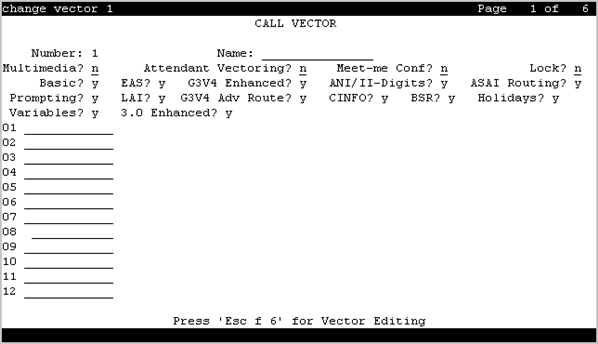
01 through XX
Use this field to enter the vector commands. The maximum number of commands that you can enter depends on the system configuration.
Valid entry |
Usage |
|---|---|
adjunct routing |
To send a message to an adjunct for routing instructions. |
announcement |
To provide an announcement to the caller. |
busy |
To provide a busy signal to the caller and to end the vector processing. |
check |
To check the status of a split or skill. |
collect |
To collect the Caller Information Forwarding (CINFO) digits. The user can enter up to 16 digits. |
consider |
To define the resource that the system selects as part of a Best Service Routing (BSR) consider series and to get the data that BSR uses to compare resources. |
converse-on |
To direct a call to a split or skill and activate the voice response script in a Voice Response Unit (VRU). |
disconnect |
To disconnect a call. The system plays an announcement before the call is disconnected. |
goto |
To move the vector processing to an earlier or later step in the vector. |
messaging |
To enable the user to leave a message for the specified extension or the active VDN extension. |
queue-to |
To queue a call to a split or skill and assign a priority level to the call. |
reply-best |
To return the data to the primary vector on the server. Use this option only in status poll vectors and BSR applications. |
return |
To return the vector processing to the step following the goto command after a subroutine call is processed. |
route-to |
To route a call to the destination specified in the administered digit string.
Note:
Communication Manager prepends a plus sign (+) to the called number when Network Call Redirection is enabled. |
set |
To perform arithmetic and string operations and assign value to a vector variable. |
stop |
To stop the processing of subsequent vector steps. |
wait-time |
To delay the vector processing of the next step. |
ANI/II-Digits
Indicates whether the ANI and II-Digits vector routing commands can be used or not. ANI/II-Digits Routing is a G3V4 Enhanced feature.
ASAI Routing
Indicates whether or not the CallVisor Adjunct/Switch Applications Interface (ASAI) Routing option is active or inactive.
Attendant Vectoring
Indicates whether or not Attendant Vectoring is selected on this VDN. Attendant Vectoring does not support Call Center features.
Basic
Indicates whether Vectoring (Basic) is enabled for system.
BSR
Indicates if the Best Service Routing option is enabled on the system. BSR commands and command elements can be used in vectors only if this option is enabled.
CINFO
Indicates whether Caller Information Forwarding (CINFO) Routing is enabled on the system. A call with CINFO routes based on the digits supplied by the network in an ISDN-PRI message.
EAS
Indicates if Expert Agent Selection (EAS) is enabled on the system.
Note:
When EAS is enabled, the terminology changes from Split
to Skill
for help messages, error messages, and vector commands. For example, check backup split becomes check backup skill.
G3V4 Adv Route
Indicates whether G3V4 Advanced Vector Routing commands are allowed.
G3V4 Enhanced
Indicates whether G3V4 Enhanced Vector Routing commands and features are allowed.
Holidays
Indicates whether Holiday Vectoring features are allowed.
LAI
Indicates if Look-Ahead Interflow is enabled.
Lock
Controls access to the vector from the Call Management System.
Security alert:
Always lock vectors that contain secure information (for example, access codes).
Valid Entry |
Usage |
|---|---|
y |
This vector is inaccessible from the CMS. Locked vectors can only appear and be administered through the SAT or a terminal emulator. If Meet-me Conference is enabled, Lock must also be enabled. |
n |
Gives CMS users the ability to administer this vector. |
Meet-me Conf
Indicates if the Meet-me Conference feature is enabled. If enabled, designates the VDN as a Meet-me Conference VDN. Attendant Vectoring and Meet-me Conference cannot be enabled at the same time.
Multimedia
Valid Entry |
Usage |
|---|---|
y |
Multimedia calls are set to be answered and billed at the start of vector processing. Multimedia Call Handling must be enabled. |
n |
The vector stops receiving multimedia calls. Multimedia Call Handling is disabled. This is the default. |
Name
Use this field to assign a name to the vector. You can enter up to 27 alphanumeric characters.
The system displays this field only if you enable the Network Call Redirection feature.
Number
The vector number.
Prompting
Indicates whether Vectoring (Prompting) is enabled for the system.