

AVAYA DOCUMENTATION CENTER
Find answers to your technical questions and learn how to use our products
Avaya Aura® Communication Manager Screen Reference
Feature-related system parameters: page 3
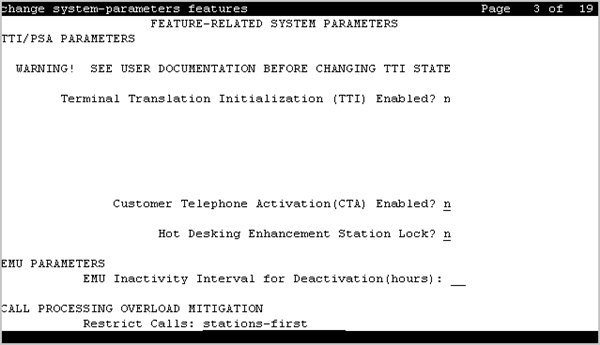
TTI/PSA PARAMETERS
CPN, ANI for Dissociated Sets
Specifies the ISDN calling party number (CPN), R2-MFC ANI, and CAMA CESID applied to calls made from PSA dissociated sets if no system-wide calling party information has been administered for those protocols. A dissociated set is a telephone without an extension. Available only if a default COR has been administered for dissociated sets. Accepts up to 20 digits.
Customer Telephone Activation (CTA) Enabled
Enables or disables the Customer Telephone Activation (CTA) feature that associates a physical telephone with a station extension. CTA applies only to DCP and analog telephones.
Default COR for Dissociated Sets
Available only when Terminal Translation Initialization is enabled for the system.
Valid Entry |
Usage |
|---|---|
0 to 995 blank |
The Class of Restriction (COR) that the system uses for calls made from dissociated telephones. A dissociated set is a telephone without an extension. |
Enhanced PSA Location/Display Information Enabled
Enables or disables the display of Personal Station Access (PSA) information used to disassociate and associate telephones.
When enabled, displays:
PSA login and associated station information when a station is PSA associated
PSA logout and the port when a station is PSA dissociated
Available only when Terminal Translation Initialization (TTI) is enabled for the system.
Hot Desking Enhancement Station Lock
Administers the Hot Desking Enhancement (HDE) feature. Hot desking
is a feature that can lock and unlock telephones or move a fully customized station profile to another compatible telephone.
Valid Entry |
Usage |
|---|---|
y |
Enables the Hot Desking Enhancement feature. |
n |
Disables the Hot Desking Enhancement feature. |
Terminal Translation Initialization (TTI) Enabled
Technicians use the Terminal Translation Initialization (TTI) Enabled field to associate and disassociate telephones. This field is available only if TTI is enabled.
Caution:
Before making changes to the TTI settings, go to the Avaya Support website at http://support.avaya.com/ for current documentation, product notices, knowledge articles.
Valid entry |
Usage |
|---|---|
y |
Starts ACTR, TTI, and PSA transactions for extension and telephone moves between ports. |
n |
Removes existing TTI port translations and prevents the generation of new TTI port translations. |
TTI Security Code
Number that a TTI user uses to access TTI from a telephone or data terminal. Accepts up to seven digits. Available only if Terminal Translation Initialization (TTI) is enabled.
TTI State
The type of port translation used for unadministered digital ports. Available only when Terminal Translation Initialization (TTI) is enabled.
Valid Entry |
Usage |
|---|---|
data |
A stand-alone data module is the TTI port translation for the system. The activation and deactivation sequence is entered at the data terminal. |
resume |
TTI is available after TTI has been manually suspended. The state of TTI returns to the state that it was in before TTI was manually suspended. |
suspend |
TTI voice or TTI data translations are temporarily unavailable. The system does not remove existing TTI translations. |
voice |
A voice or voice/data terminal is the TTI port translation for the system. The activation and deactivation sequence is entered from a telephone. |
Unnamed Registrations and PSA for IP Telephones
Use this field to allow IP telephones access to the Personal Station Access (PSA) feature. If you set this field to y, IP telephones can register into the PSA dissociated state. The PSA dissociated state is also known as TTI unmerged state, TTI state, and Unnamed Registered for H.323 standards state.
EMU PARAMETERS
EMU Inactivity Interval for Deactivation (hours)
A system-wide administrable interval for EMU de-registration at the visited switch. This timer is applicable to inter and intra-Communication Manager EMU registrations.
Valid Entry |
Usage |
|---|---|
1 to 24 |
The interval in hours, after which a visiting user is dropped due to inactivity. Default is 1. An entry of 1 means that after 1 hour of inactivity, the telephone is dropped from the visited home server. |
blank |
The timer is not used and the visited station remains active until de-registration by another means occurs. |
CALL PROCESSING OVERLOAD MITIGATION
Restrict Calls
Indicates the type of calls to block first during overload traffic conditions on the system.
Valid Entry |
Usage |
|---|---|
stations-first |
Deny new traffic generated by internal stations, allowing inbound calls only. This works best in call center environments. |
all-trunks-first |
Deny all incoming trunk calls and does not block station off-hook. |
public-trunks-first |
Deny incoming calls on ISDN public trunks and analog CO trunks. |