

AVAYA DOCUMENTATION CENTER
Find answers to your technical questions and learn how to use our products
Avaya Aura® Communication Manager Screen Reference
CTI Link
Available if either ASAI Link Core Capabilities or Computer Telephony Adjunct Links are enabled on the system.
Example command: add cti-link n, where n is the CTI link number.
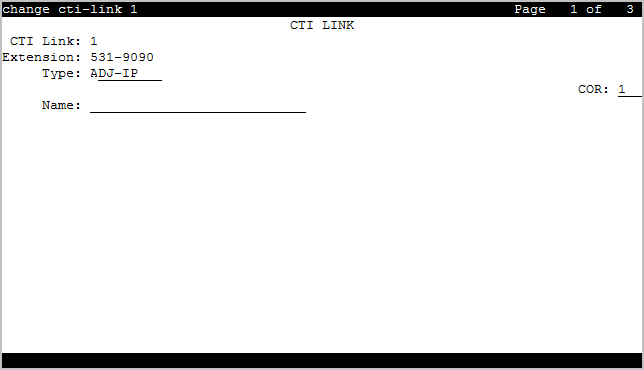
CTI link: page 1
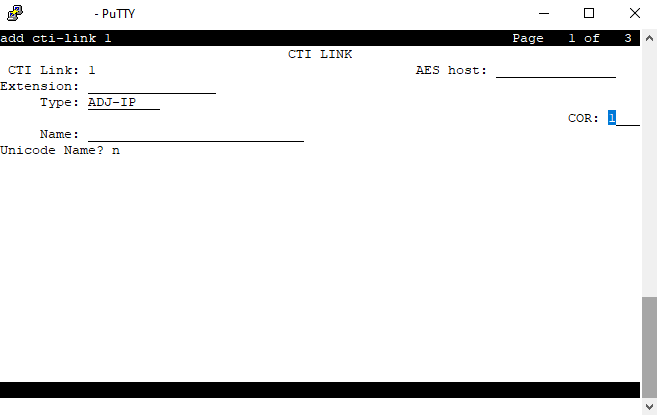
If the solution uses clustering, the screenshot below is displayed.
Note:
The AES host field is reserved for future use.
AES host
This is the hostname of Application Enablement Services (AES), without the domain. It should be fewer than 15 characters. AES does not connect directly with the Avaya Aura® CM in Avaya Aura® Distributed Architecture. Instead it connects via the Kafka cluster and uses the AES Host name to connect to the correct Kafka topic.
Note:
The AES host field is reserved for future use.
COR
Class of Restriction (COR) number with the required restriction.
CTI Link
The Computer Telephony Integration (CTI) link number.
Extension
The extension for this link.
Name
The name associated with this CTI link.
Type
Use this field to specify the type of Computer Telephony Integration (CTI) link.
Valid entry |
Usage |
|---|---|
ADJ-IP |
CTI links administered without hardware. |
ASAI-IP |
CTI links administered without hardware. The associated adjunct controls agent logins, and the logged-in agents can use the data terminal keyboards to perform telephone functions. |
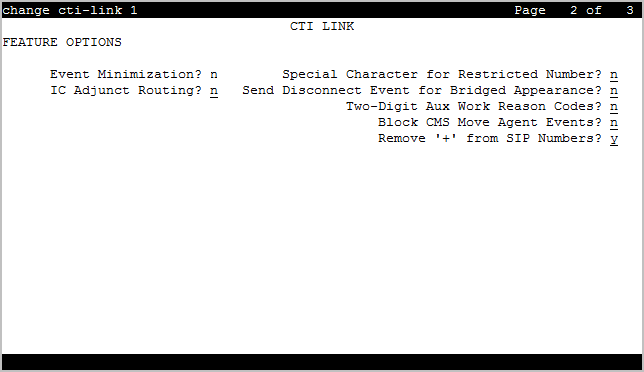
CTI link: page 2
Block CMS Move Agent Events
Enables or disables the blocking of certain event report messages involved with the move of agents while staffed. If the Call Management System sends an agent-move-while-staffed message (MVAGSFD8), ASAI does not send the associated agent Logout Event Report (C_Logout), Login Event Report (C_login) and Agent Work Mode Change event report messages.
Event Minimization
Enables or disables event minimization for this link that limits the number of event reports sent to an adjunct. This option can be used when event reports normally would be sent on multiple associations, but the adjunct can see only a single report. Typically, these event reports are identical except for the association they are sent over (for example, call control, domain control, or active notification). Some applications discard duplicate events, so in this case, there is no point in sending them across the ASAI CTI link. When activated, only a single such event can be sent. The selection of the association on which the event is sent is based on association precedence as follows: active notification (if enabled), call control (if enabled), or domain control (if enabled).
IC Adjunct Routing
IC Adjunct Routing enables or disables the Enhanced Adjunct Routing wait sequence. When disabled, the wait sequence consists of only one wait or announcement step following one or more adjunct-route steps. When enabled, the wait sequence can contain multiple wait steps, announcement steps, goto steps, and the collect step. If the adjunct route step is successful, the adjunct must respond before the wait sequence completes. Otherwise, the adjunct route step is canceled. If the adjunct route step fails, the vector steps in the wait sequence are skipped.
Remove '+' from SIP Numbers
If you set the Remove '+' from SIP Numbers field on the CTI Link screen to y and if a leading plus (+) sign is present in a calling or called number sent over a CTI link, Communication Manager removes the leading plus (+) sign from the number. The default value is y.
Send Disconnect Event for Bridged Appearance
Indicates whether or not an event report is sent when a bridged appearance disconnects.
Special Character for Restricted Number
Enables or disables an ASAI CTI link that indicates the calling number restricted presentation within an event report. When enabled, a calling number received in a SETUP message has the presentation indicator set (octet 3a in the calling number), then *
is appended to the calling party number in the ASAI message.
Two-Digit Aux Work Reason Codes
Use this field to send a two-digit Reason code over the ASAI link. All messages that include the Aux-work Reason code allow codes from 1 to 99.
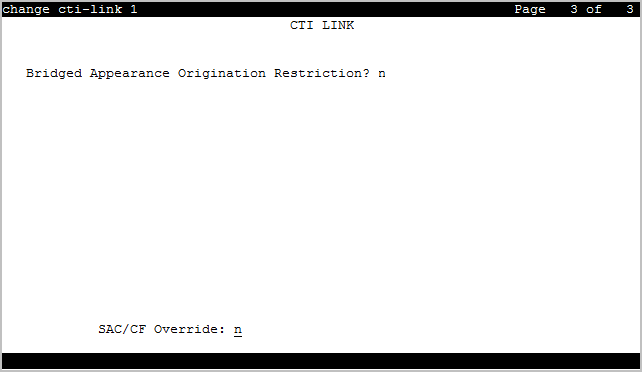
CTI link: page 3
Bridged Appearance Origination Restriction
Restricts or allows call origination on the bridged appearance.
Valid Entry |
Usage |
|---|---|
y |
Call origination on the bridged appearance is restricted. |
n |
Call origination ion the bridged appearance is allowed. This is normal behavior, and is the default. |
SAC/CF Override
With SAC/CF Override, the user of the calling station can override the redirection set by the called station.
Valid entry |
Usage |
|---|---|
ask |
The system prompts the user of the calling station whether the call must follow the redirection path or override the redirection path. The user can type y or n. |
no |
The user of the calling station cannot override the redirection path of the call. The call follows the redirection path. |
yes |
The user of the calling station can override the redirection path of the call, provided the called station has at least one idle call appearance. |