

AVAYA DOCUMENTATION CENTER
Find answers to your technical questions and learn how to use our products
Avaya Aura® Communication Manager Screen Reference
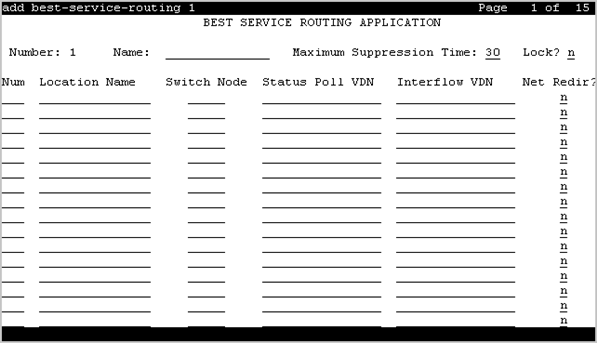
Best Service Routing
Use this screen to enable the system to compare the specified skills, identify the skill that provides best service to a call, and deliver the call to an agent in the skill. If no agents are available in the skill, the call is queued. You can also use this screen to monitor the status of the specified skills and adjust call processing and routing as appropriate.
To change the value of the fields on the Best Service Routing screen, use the following command:
change best-service-routing n, where n is the routing number
Interflow VDN
Use this field to specify the dial access code that the user must use to access the interflow vector directory number (VDN) at the remote location. You can enter up to 16 alphanumeric characters.
Valid entry |
Usage |
|---|---|
0 to 9, *, # |
To enter the digit. |
~p |
To enable the system to pause. |
~w or ~W |
To enable the system to wait. |
~m |
To enable the system to mark. |
~s |
To enable the system to suppress. |
Location Name
Use this field to assign a name to the location where the Best Services Routing feature is enabled. You can enter up to 15 alphanumeric characters.
Lock
Use this field to provide additional security by preventing the system from sending any Best Service Routing (BSR) information to Call Management System.
TG
Valid entry |
Usage |
|---|---|
y |
Does not send the BSR information to Call Management System. |
n |
Sends the BSR information to Call Management System. |
Maximum Suppression Time
Use this field to prevent callers from connecting to a VDN during the specified period after receiving a busy signal.
Valid entry |
Usage |
|---|---|
0 to 60 |
The maximum poll suppression time in seconds. |
Net Redir
Use this field to enable Network Call Redirection.
Num
Use this field to specify a location number. You can enter a value from 1 to 255.
Number
This field displays the current BSR plan number. The system displays a value from 1 to 255.
Status Poll VDN
Use this field to specify the dial access code that the user must use to access the Status Poll vector directory number (VDN) at the remote location. You can enter up to 16 alphanumeric characters.
Valid entry |
Usage |
|---|---|
0 to 9, *, # |
To enter the digit. |
~p |
To enable the system to pause. |
~w or ~W |
To enable the system to wait. |
~m |
To enable the system to mark. |
~s |
To enable the system to suppress. |
Switch Node
Valid Entry |
Usage |
|---|---|
1 to 32767 blank |
The Network Node ID for each switch if the Universal Call ID is being used. This is optional. |