

AVAYA DOCUMENTATION CENTER
Find answers to your technical questions and learn how to use our products
Avaya Aura® Communication Manager Screen Reference
Hunt Group
With Hunt groups, users or agents can answer calls at a predefined group of telephones or devices.
Use the Hunt Group screen to create a hunt group, identified by a hunt group number, and to assign hunt group member users by their extension numbers. This screen can also be used to implement associated features such as Automatic Call Distribution (ACD) and Hunt Group Queuing.
When a call comes into a hunt group, the system checks for the busy or idle status of extension numbers in the hunt group when answering. A Uniform Call Distribution (UCD) type hunt group selects the most idle
extension in the group when answering a new call. A Direct Department Calling (DDC) type hunt group selects the first available extension (in the administered sequence) when answering a new call. Expert Agent Distribution (EAD), used only with Expert Agent Selection (EAS), selects the most idle
agent or the least occupied
agent with the highest skill level for the call’s skill.
From Release 8.1.3 onwards, if you enable (SA9142) - Redirected Display for SIP Hunt Group Members" field on the system-parameters special-applications screen, SIP station displays the caller’s name and the hunt group name when a call is received on that SIP station. For more information, see Avaya Aura® Communication Manager Special Application Features document.
Note:
Vector controlled splits/skills can be called directly through the split/skill extension instead of calling a VDN mapped to a vector that terminates the call to a vector controlled split/skill. However, the calls do not receive any announcements, be forwarded, redirect to coverage, or intraflow/interflow to another hunt group.
Example command: change hunt-group n, where n is the assigned hunt group number.
Hunt group: page 3
This screen can vary according to values for particular fields on the previous page.
If the ACD is disabled for the system, this page is omitted.
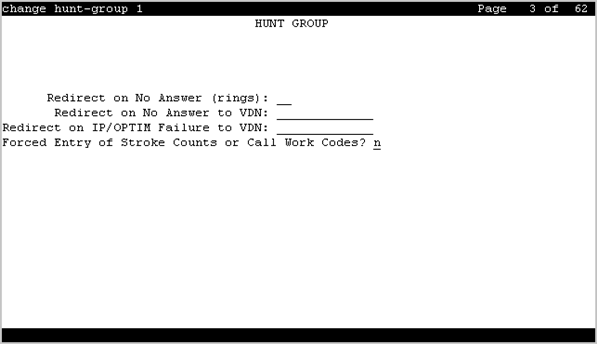
Forced Entry of Stroke Counts or Call Work Codes
Enables or disables the requirement that either a Stroke Count or Call Work Code must be entered for each call answered by an agent when in the Manual-In mode. Available only if ACD is enabled for the hunt group and if the hunt group does not have a Controlling Adjunct.
Interruptible Aux Deactivation Threshold
This field specifies the maximum level of service above which the system deactivates the Interruptible Aux feature.
Use the Interruptible Aux threshold and the Interruptible Aux Deactivation Threshold fields to maintain a buffer between the two levels of service that trigger the Interruptible Aux feature. The values of the Interruptible Aux threshold and the Interruptible Aux Deactivation Threshold fields must have a difference of one unit.
The valid entries for this field depend on the value of the Interruptible Aux threshold field:
If you set the value of the Interruptible Aux threshold field to calls-warning-threshold, the valid entries for the Interruptible Aux Deactivation Threshold field are from 0 to 998.
If you set the value of the Interruptible Aux threshold field to service-level-target, the valid entries for the Interruptible Aux Deactivation Threshold field are from 0 to 100.
If you set the value of the Interruptible Aux threshold field to time-warning-threshold, the valid entries for the Interruptible Aux Deactivation Threshold field are from 0 to 998.
If you set the value of the Interruptible Aux threshold field to none, the system does not display the Interruptible Aux Deactivation Threshold field.
Interruptible Aux Threshold
This field specifies the minimum level of service below which the system enables the Interruptible Aux feature. Use the Interruptible Aux feature to make the Expert Agent Selection (EAS) agents in the AUX work mode available to receive calls. This feature works only if the agents have an interruptible reason code.
Valid entry |
Usage |
|---|---|
service-level-target |
Use this option to enable the Interruptible Aux feature when the service level drops below the administered percentage of calls within the specified period. For example, if you set the Service Level Target (% in sec) field to 90% of calls in 30 seconds, the system enables the Interruptible Aux feature if the service drops to 89% of calls in 30 seconds. |
calls-warning-threshold |
Use this option to enable the Interruptible Aux feature when the number of calls in the queue for a hunt group exceeds the specified number of calls. For example, if you set the Calls Warning Threshold field to 20, the system enables the Interruptible Aux feature if the number of calls in the queue exceeds 20. |
time-warning-threshold |
Use this option to enable the Interruptible Aux feature when the oldest call is in the queue for longer than the specified number of seconds. For example, if you set the Time Warning Threshold field to 60 seconds, the system enables the Interruptible Aux feature if the oldest call is in the queue for more than 60 seconds. |
none |
Use this option if you do not want to administer the Interruptible Aux feature. |
Redirect on IP/OPTIM Failure to VDN
A blank in the field redirects the call back to the hunt group. VDN extension redirects to the specified VDN.
If Redirect on IP/OPTIM Failure to VDN is not assigned, the call is re-queued to the same skill at a high priority. If there are no queue slots available, the caller will hear a busy signal. If all fails, the caller receives ring back until the system receives a caller disconnect.
Redirect on No Answer (rings)
Available only if ACD is enabled for the hunt group.
Valid Entry |
Usage |
|---|---|
1 to 20 |
The maximum number of rings before a call redirects back to the split/skill, or to the administered VDN. |
blank |
Deactivates Redirect on No Answer. |
Redirect on No Answer to VDN
The extension number of the VDN used to redirect a Redirect On No Answer (RONA) call to a VDN instead of to the split/skill. The administered VDN must be on-premises and must be administered on the system. The VDN can specify a vector that routes to an off-premises VDN.
Direct Agent calls go to the agent’s coverage path if it is administered. If not, the calls go to a VDN.
Available only if ACD is enabled for the hunt group. Requires administration of the number of rings before a call will redirect.