

AVAYA DOCUMENTATION CENTER
Find answers to your technical questions and learn how to use our products
Avaya Aura® Communication Manager Screen Reference
Feature-related system parameters: page 14
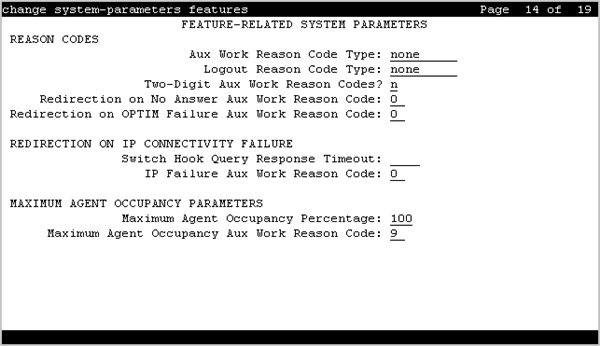
REASON CODES
Aux Work Reason Code Type
Valid Entry |
Usage |
|---|---|
none |
An agent does not enter a Reason Code when entering AUX work. |
requested |
An agent can enter a Reason Code when entering AUX mode but is not forced to do so. Available only if Reason Codes and EAS are enabled for the system. |
forced |
An agent is forced to enter a Reason Code when entering AUX mode. Available only if Reason Codes and EAS are enabled for the system. |
Logout Reason Code Type
Valid Entry |
Usage |
|---|---|
none |
An agent does not enter a Reason Code when logging out. |
requested |
An agent can enter a Reason Code when logging out but do not want to force the agent to do so. Available only if Reason Codes and EAS are enabled for the system. |
forced |
An agent is forced to enter a Reason Code when logging out. Available only if Reason Codes and EAS are enabled for the system. |
Redirection on No Answer Aux Work Reason Code
Redirection on No Answer (RONA) redirects a ringing ACD skill or direct agent call after an administered number of rings. When RONA is invoked for a call, the system places an agent in the Aux work mode, and the agent is unavailable to receive calls from other splits and skills. This field is used to define the Reason Code for reporting, instead of the default of 0, when the state of the agent is changed to Aux due to RONA.
Valid Entry |
Usage |
|---|---|
0 to 99 |
If the Two-Digit Aux Work Reason Code field is set to y. |
0 to 9 |
If the Two Digit Aux Work Reason Code field is set to n. |
ROOF Failure and Unreachable Aux Work Reason Code
This field provides redirection of calls back into queue or to the specified VDN. The agent is not aware that the line is in the Aux work mode during an IP connectivity failure. If connectivity is restored during the IP network TCP retry period, the lamp will indicate that the line is in the Aux work mode. The value in the field is used to define the Reason Code for reporting, instead of the default of 0, when the state of the agent is changed to Aux due to ROOF.
This field applies only to ACD agents using SIP hard or soft phones administered as Off-PBX Telephone Integration and Mobility (OPTIM) endpoints
Valid entry |
Usage |
|---|---|
0 to 99 |
If the Two-Digit Aux Work Reason Code field is set to y. |
0 to 9 |
If the Two Digit Aux Work Reason Code field is set to n. |
Two-Digit Aux Work Reason Codes
Enables or disables two-digit reason codes for agent state changes for AUX Work.
REDIRECTION ON IP CONNECTIVITY FAILURE
Auto-answer IP Failure AUX Reason Code
Valid Entry |
Usage |
|---|---|
0 to 99 |
The reason code assigned for auto-answer IP failure, as the reason the agent was put into AUX Work. |
Switch Hook Query Response Timeout
Valid Entry |
Usage |
|---|---|
500 to 5000 (msec) |
The time that call processing waits for a response from the switch hook query before Return on IP Connectivity Failure (ROIF) is triggered. |
blank |
ROIF is inactive. |
MAXIMUM AGENT OCCUPANCY PARAMETERS
The Maximum Agent Occupancy (MAO) threshold is a system-administered value that is applied across all administered agents and is based on the total percentage of agent time in call service. MAO data is derived from the same calculations that are used to derive Least Occupied Agent (LOA).
When an agent who exceeds the specified MAO threshold attempts to become available, he or she is automatically placed in AUX mode for the reason code administered for this purpose. When the occupancy for such pending agents drops below the MAO, they are released from AUX mode and made available.
Maximum Agent Occupancy AUX Reason Code
Valid Entry |
Usage |
|---|---|
0 to 99 |
A reason code value. Do not use reason code 0. Default is 9. |
Maximum Agent Occupancy Percentage
Valid Entry |
Usage |
|---|---|
0 to 100 |
The maximum percentage of time an agent can be taking calls. This time is based on Maximum Agent Occupancy (MAO) calculations. Default is 100. |
SIP Transfer VDN Counted-Calls Options field descriptions
Field title |
Field description |
|---|---|
Suppress Target VDN counted-calls? |
To suppress the counted-calls increment against a VDN which is the target of a SIP transfer, for example from AAEP. Valid entries are y and n. The default field option is n. |