

AVAYA DOCUMENTATION CENTER
Find answers to your technical questions and learn how to use our products
Avaya Aura® Communication Manager Screen Reference
Change Station Extension
Changes extensions on the switch from one extension to another all at once. Specifically:
All administration that was associated with the current extension is associated with the new extension.
Any administration references on the changing extension, such as references used in a vector, coverage, and so on, are now referenced to the new extension.
All references to the previous extension are removed from the system.
If an extension is changed that is also administered on an adjunct, the extension on the adjunct must also be changed to ensure proper functionality.
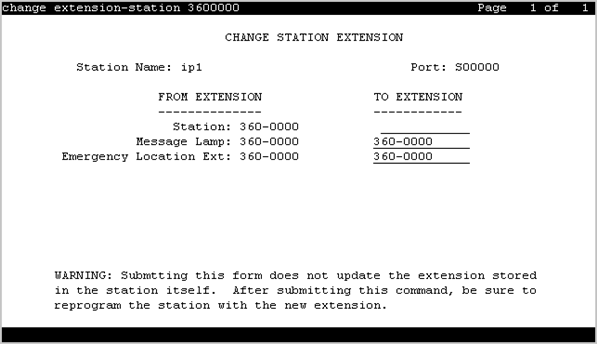
For fields that are changing, current information prior to the change displays under From Extension.
A forwarded extension administered as a button remains.
Exceptions
Station extensions cannot be changed if that station is administered as the emergency location extension for another station. For example, if station A is administered as the emergency location extension for station B, then:
First assign station B to a different emergency location extension.
First change station B. The system displays station A’s extension as the emergency location extension.
Example command: change extension-station n, where n is the extension assigned to a station.
Emergency Location Extension
The Station screen displays the new extension for the Emergency Location Ext. field. Up to sixteen numbers can be used to make up a valid extension number for the dial plan.
IP Parameter Emergency Location
The emergency location extension from the IP Address Mapping screen associated with the current extension.
Message Lamp
The new extension for the message lamp extension. Up to sixteen numbers can make up a valid extension number for the dial plan.
Station
The new extension. Up to seven numbers can make up a valid extension number for the dial plan.
Station Name
The name of the existing extension.