

AVAYA DOCUMENTATION CENTER
Find answers to your technical questions and learn how to use our products
Avaya Aura® Communication Manager Screen Reference
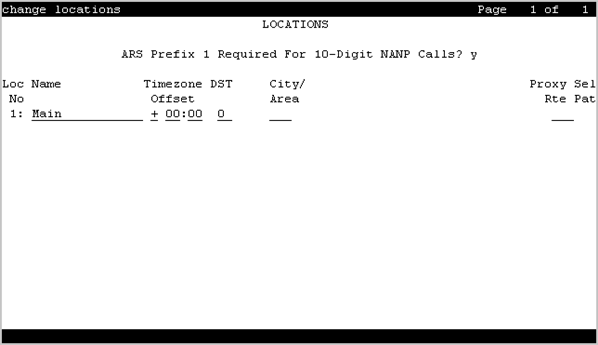
Locations
This screen provides daylight saving time displays. You can set the area code for each location and administer different location information for each location. If the Multiple Locations feature is enabled, you can administer up to 2000 location specifications, depending on the configuration of Communication Manager. Otherwise, information for Location 1 applies to all locations.
You can use the following command to modify the fields on this screen:
change locations
ARS FAC
The Feature Access Code (FAC) for accessing Automatic Route Selection (ARS). Any valid FAC format is acceptable, up to four digits. Characters * or # are permitted, but only in the first position. Many locations are expected to share the same access code.
ARS Prefix 1 Required for 10-Digit NANP Calls?
If enabled, a 1 must be dialed before all 10-digit NANP calls.
Attd FAC
The Feature Access Code (FAC) for connection to the attendant. Accepts up to two digits. Characters * or # are not permitted. Many locations are expected to share the same access code.
Available only if an Attendant Access Code has first been administered either for the Dial Plan or as a standard FAC.
Note:
Within a dial plan, FAC/DAC codes and extensions cannot both start with the same first digits. Either the FAC/DAC entries or the block of extensions must be changed to have a different first digit.
Disp Parm
The administered display parameters for the location.
Loc Parm
Required when administering multiple locations.
Valid Entry |
Usage |
|---|---|
1 to 50 blank |
The number of the corresponding Location Parameter set for this location. Default is blank. |
Loc Number
Valid Entry |
Usage |
|---|---|
1 to 2000 |
The location number. |
Name
A name you use for the location. Names are easier to remember than location numbers. Accepts up to 15 alphanumeric characters.
City/Area
The three-digit numbering plan area code for each location.
Prefix
Valid Entry |
Usage |
|---|---|
0 to 99999 |
Location prefix used with the Uniform Dialing Plan to identify the location of an originating call. All or part of the prefix is added to the front of the dialed string. |
Proxy Sel Rte Pat
Valid Entry |
Usage |
|---|---|
1 to 999 blank |
The routing pattern used to get to the proxy server. |
DST
Required for each administered location.
Valid Entry |
Usage |
|---|---|
0 |
No Daylight Saving. |
1 to 15 blank |
The number for the Daylight-Saving Rule applied to this location. |
Timezone Offset
Specifies how much time each location differs from the system time. Required for each administered location. Use +00:00 for the time zone offset for a single location media server.
Valid Entry |
Usage |
|---|---|
+ |
The time set on this location is a certain amount of time ahead of the system time. |
- |
The time set on this location is a certain amount of time behind the system time. |
Valid Entry |
Usage |
|---|---|
0 to 23 |
The number of hours difference between this location and system time. |
Valid Entry |
Usage |
|---|---|
0 to 59 |
The number of minutes difference between this location and system time. |