

AVAYA DOCUMENTATION CENTER
Find answers to your technical questions and learn how to use our products
Avaya Aura® Communication Manager Screen Reference
IP Services
Administers the connectivity for various adjuncts.
Note:
You cannot remove a service from this screen if that service has overrides defined on the Survivable Processor screen.
Example command: change ip-services
IP Services: page 1
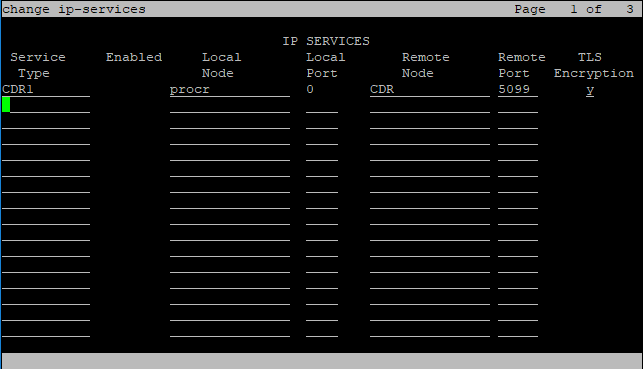
Enabled
Enables or disables this IP service. Available only with an IP Service Type of AESVCS or SAT.
Local Node
Valid Entry |
Usage |
|---|---|
procr |
The Communication Manager’s Processor Ethernet interface for adjunct connectivity. |
Local Port
The originating port number.
Valid Entry |
Usage |
|---|---|
5000 to 9999 |
5111 to 5117 for SAT applications. 8765 for AE Services. |
0 |
For client applications, defaults to 0. |
Remote Node
The server or switch at the far end of the link for SAT.
Valid Entry |
Usage |
|---|---|
IP node name |
A previously-administered node name used to provide added security for SAT. |
any |
Any available node. |
Remote Port
The port number of the destination.
Valid Entry |
Usage |
|---|---|
5000 to 64500 |
If this service is a client application, such as CDR or PMS. This value must match the port administered on the adjunct, Personal Computer, or terminal server that is at the remote end of this connection. |
0 |
Default for System Management applications. |
Service Type
The service provided.
Valid Entry |
Usage |
|---|---|
AESVCS |
AE Services. |
CDR1, CDR2 |
Either the primary or secondary CDR device connects over a TCP/IP link or TLS link. If you enter y for the TLS Encryption, then the primary or secondary CDR device connects over a TLS link. Else, the primary or secondary CDR device connects over a TCP/IP link. |
PMS |
Property Management System. |
PMS_JOURNAL |
The PMS journal printer connects over a TCP/IP link. |
PMS_LOG |
The PMS log printer connects over a TCP/IP link. |
SAT |
System administration terminal. |
SYS_PRINT |
The system printer connects over a TCP/IP link. |
TLS Encryption
Allows you to configure TLS encryption for CDR1 and CDR2 service types.
Valid Entry |
Usage |
|---|---|
Y |
Enables TLS encryption for CDR1 and CDR2 service types. |
N |
Disables TLS encryption. Entering n supports backward compatibility where TCP only is used. This is the default value. |
IP Services: page 3
Enables reliable protocol for TCP/IP links, and establishes other session-layer parameters. Available only if CDR1, CDR2, PMS_JOURNAL, or PMS_LOG is administered for the Service Type.
Connectivity Timer
Valid Entry |
Usage |
|---|---|
1 to 255 |
The amount of time in seconds that the link can be idle before Communication Manager sends a connectivity message to ensure the link is still up. |
Packet Resp Timer
Valid Entry |
Usage |
|---|---|
1 to 255 |
The number of seconds to wait from the time a packet is sent until a response (acknowledgement) is received from the far-end, before trying to resend the packet. |
Reliable Protocol
Enables or disables reliable protocol over this link. If enabled, uses reliable protocol if the adjunct on the far end of the link supports it.
Service Type
The service type for establishing parameters.
Valid Entry |
Usage |
|---|---|
CDR1, CDR2 |
Connects either the primary or secondary CDR device over a TCP/ IP link. |
PMS_JOURNAL |
Connects the PMS journal printer over a TCP/IP link. |
PMS_LOG |
Connects the PMS log printer over a TCP/IP link. |
Session Connect Message Cntr
Valid Entry |
Usage |
|---|---|
1 to 5 |
The number of times Communication Manager tries to establish a connection with the far-end adjunct. |
SPDU Cntr
Valid Entry |
Usage |
|---|---|
1 to 5 |
The number of times Communication Manager transmits a unit of protocol data before generating an error. |
IP Services: page 4
Creates symbolic name and password pairs for all AE Services servers that are allowed to connect to Communication Manager. Available only if the Service Type is AESVCS.
Enabled
Enables or disables the AE Services server.
Password
A password for future access. Accepts 12 to 16 alphanumeric characters and must contain at least one alpha character and one numeric character.
AE Services Server
A valid AE Services Server name. The name must match the AE Services server machine name. Each name must be unique.
Server ID
Valid Entry |
Usage |
|---|---|
1 to 16 |
The number assigned to this server. |
Status
Valid Entry |
Usage |
|---|---|
idle |
The AE Services server is connected to Communication Manager. |
in-use |
The AE Services server is disconnected to Communication Manager. |
blank |
No AE Server is administered. |