

AVAYA DOCUMENTATION CENTER
Find answers to your technical questions and learn how to use our products
Avaya Aura® Communication Manager Screen Reference
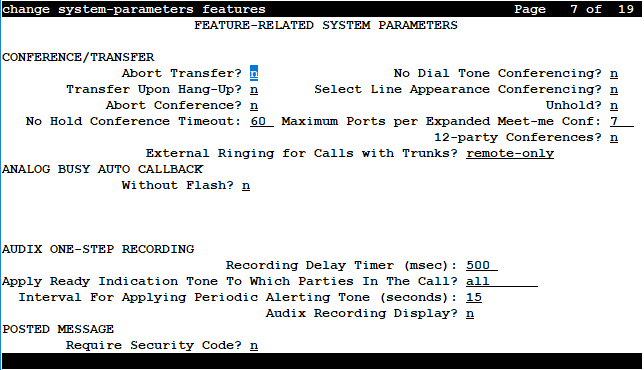
Feature-related system parameters: page 7
Important:
To enable 12-party conference, you must disable the DCS feature. DCS field is available in the change system-parameters customer-options page.
CONFERENCE/TRANSFER
12-party Conferences
If enabled, 12 parties can participate in ad-hoc and meet-me conferences.
If disabled, the maximum number of participants in the conference remains 6.
Important:
For 12 parties to participate in a call, you must configure the following fields in page 6 of the Feature-related system parameters screen:
Public Network Trunks on conference call
Conference parties without Public Network Trunks
Conference parties with Public Network Trunks
For more information on the valid entries for these fields, see the Feature-related system parameters: page 6 section.
Abort Conference
DCP, hybrid, IP, wireless, or ISDN-BRI telephone users can abort the conference operation when they are disconnected. If enabled, this field changes a call placed on soft-hold in the conference-pending status to hard-held status if the user disconnects.
Abort Transfer
If enabled, stops the transfer operation whenever users press a non-idle call appearance button in the middle of the transfer operation, or when they disconnect. If the system is configured to transfer calls upon disconnecting the call, users can press the Transfer button, dial the complete transfer-to number, and disconnect to transfer the call. Users must select another non-idle call appearance to abort the transfer. Requires DCP, Hybrid, IP, ISDN-BRI or wireless telephones.
External Ringing for Calls with Trunks
Specifies ringing behavior on external trunk calls that are transferred or conferenced by stations or attendants, or extended by the attendant to an on-switch extension.
Valid Entry |
Usage |
|---|---|
all-calls |
All external trunk calls that are transferred or conferenced (either locally or remotely) receive external ringing. |
local-only |
External trunk calls that are transferred or conferenced locally receive external ringing. |
none |
External ringing does not apply to external trunk calls that are transferred or conferenced. |
remote-only |
External trunk calls that are transferred or conferenced remotely receive external ringing. This is the default value. |
Maximum Ports per Expanded Meet-me Conf
Available only if ports are administered for the Expanded Meet-me Conference feature.
Valid Entry |
Usage |
|---|---|
3 to 300 |
The maximum number of conferees in an Expanded Meet-me Conference. This is a system-wide limit (that is, not administrable on a per Expanded-Meet-me VDN basis). |
No Dial Tone Conferencing
If enabled, eliminates dial tone while setting up a conference when another line is on hold or is alerting.
No Hold Conference Timeout
Valid Entry |
Usage |
|---|---|
20 to 120 |
The number of seconds No Hold Conference call setup times out. The system Answer Supervision timer should be set to a value less than this. |
Select Line Appearance Conferencing
User can use the line appearance rather than the Conference button to include a call in a conference. If a user is on a call, and another line is on hold or an incoming call alerts on another line, the user can press the Conference button to bridge the calls together. Using the select line appearance capability, the user can press a line appearance button to complete a conference instead of pressing the Conference button a second time.
Enabling this field activates Select Line Appearance Conferencing.
Transfer Upon Hang-Up
With this feature, users can transfer a call by pressing the Transfer button, dialing the required extension, and then disconnecting the active call.
Users using the Call Park FAC can park a call without pressing the Transfer button a second time.
Note:
Communication Manager Release 6.2 and earlier supported this feature on H.323 and DCP stations. Communication Manager Release 6.3.6 extends this support to 96x1 SIP stations. However, for SIP stations, this field works only when the Team button feature is enabled.
Unhold
With unhold, the user can press the hold button on a telephone to release a hold (if no other line appearance is on hold or alerting). This does not apply to BRI telephones or attendant consoles.
Enabling this field activates this unhold capability.
ANALOG BUSY AUTO CALLBACK
If the Analog Busy Auto Callback Without Flash (ACB) feature is enabled, when a caller places a call through an analog station, and the called station is busy and has no coverage path or forwarding, then an announcement plays, announcing that the station is busy and prompting the caller to enter 1 for ACB or 2 to cover to a voice mail hunt group extension.
Announcement
The extension of the announcement that plays for the Analog Busy Auto Callback Without Flash feature. This field cannot be left blank. Available only if Auto Callback Without Flash is enabled.
Voice Mail Hunt Group Ext
A voice mail hunt group extension where the call is forwarded if the user enters 2 at the ACB announcement prompt. Available only if Auto Callback Without Flash is enabled.
Without Flash
If enabled, provides automatic callback for analog stations without flashing the hook. It is applied only when the called station is busy and has no other coverage path or call forwarding. The caller can enable the automatic callback without flashing the hook or entering the feature access code.
AUDIX ONE-STEP RECORDING
On stations administered with this feature button, users can activate and deactivate the recording of active calls to their voice messaging system with the press of one button.
Apply Ready Indication Tone To Which Parties In The Call
Use this field to administer who hears the ready indication tone.
Valid entry |
Usage |
|---|---|
all |
All parties in the call hear the tone. The default value is all. |
initiator |
Only the initiator hears the tone. The initiator is the user who activates the Audix one-step recording feature. |
none |
None of the parties in the call hear the tone. |
Note:
When the Apply Ready Indication Tone To Which Parties In The Call field is set to initiator, all parties in the call hear the ready indication tone. When the Apply Ready Indication Tone To Which Parties In The Call field is set to all and the Interval For Applying Periodic Alerting Tone (seconds) field is set to 0, the parties in the call do not hear the ready indication tone and the alerting tone.
Interval For Applying Periodic Alerting Tone (seconds)
Available only if all parties on a call hear the voice messaging recording ready tone.
Valid Entry |
Usage |
|---|---|
0 to 60 |
The number of seconds between alerting tones. The default value is a 15 second interval. Zero disables the tone. |
Recording Delay Timer (msecs)
Valid Entry |
Usage |
|---|---|
0 to 4000 in increments of 100 |
The delay interval before starting a voice messaging recording. |