

AVAYA DOCUMENTATION CENTER
Find answers to your technical questions and learn how to use our products
Avaya Aura® Communication Manager Screen Reference
Feature-related system parameters: page 18
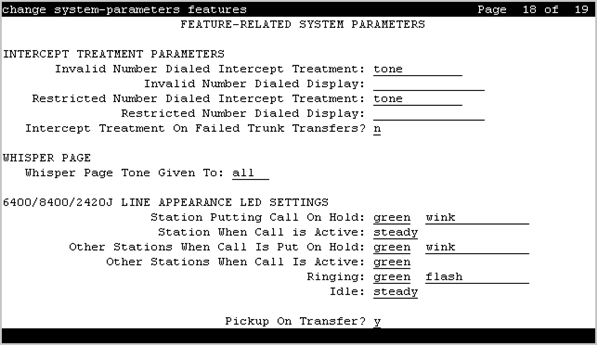
INTERCEPT TREATMENT PARAMETERS
Intercept Treatment on Failed Trunk Transfers
Valid Entry |
Usage |
|---|---|
y |
Provides intercept treatment to calls failing trunk transfers. |
n |
Drops calls failing trunk transfers. |
Invalid Number Dialed Display
Used to display a name in either Latin or Asian characters for an invalid number calling in. This field supports both a NAME1 and a NAME2 value. A NAME1 value directs the system to use the table of names that contains Latin characters that can be displayed. A value of NAME2 directs the system to use the UTF-8 table of names that contains non-ASCII characters suitable for Asian language names. Accepts up to 15 alphanumeric characters.
Note:
The system displays the message administered for the Invalid Number Dialed Display field on the telephone only if the Invalid Number Dialed Intercept Treatment field is set to announcement.
Invalid Number Dialed Intercept Treatment
The type of intercept treatment the end-user hears after dialing an invalid number.
Valid Entry |
Usage |
|---|---|
announcement |
Provides a recorded announcement when the end-user dials an invalid number. You select and record the message. Requires entering the extension number for the announcement. |
tone |
Provides intercept tone when the end-user dials an invalid number. This is the default. |
Restricted Number Dialed Display
The string of alphanumeric characters assigned for calls that are denied because of COS, COR, or FRL restrictions. This field supports both a NAME1 and a NAME2 value. A NAME1 value directs the system to use the table of names that contains Latin characters. A value of NAME2 directs the system to use the UTF-8 table of names that contains non-ASCII characters suitable for Asian language names. Accepts up to 15 alphanumeric characters.
Note:
The system displays the message administered for the Restricted Number Dialed Display field on the telephone only if the Restricted Number Dialed Intercept Treatment field is set to announcement.
Restricted Number Dialed Intercept Treatment
The type of intercept treatment the caller hears after dialing a number restricted from them due to COS, COR, or FRL restrictions.
Valid Entry |
Usage |
|---|---|
tone |
Provides intercept tone. This is the default. |
announcement |
Provides a recorded announcement. You select and record the message. Requires entering the extension number for the announcement. |
WHISPER PAGE
Whisper Page Tone Given To
Determines who should hear a Whisper Page beep tone.
Valid Entry |
Usage |
|---|---|
all |
All parties hear the whisper page beep tone. |
paged |
The whisper page feature sends a beep tone only to the paging and the paged party. |
6400/8400/2420J LINE APPEARANCE LED SETTINGS
Warning:
The following fields change only the LED operation for 84xx and 64xx model telephones. When the LED operation is changed using any of these fields, then IP Agent and IP Softphone using a station type of 84xx or 64xx does not work. For station types other than 84xx or 64xx, a change to the LEDs using these fields does not affect either IP Agent or IP Softphone.
Note:
The system generates a warning if the default values of the LED Settings field are changed. The warning message states
WARNING: Avaya Softphone will not operate correctly if this value is changedThis warning message displays for Avaya Communication Manager Release 3.1 or later.
Display Information With Bridged Call
Controls whether or not name and number for a bridged call are displayed on the telephone of the called party. This field does not control the content of the display.
Idle
Note:
This field applies only to 8400 and 6400 series telephones. The 2400 series telephone uses icons rather then LEDs.
Valid Entry |
Usage |
|---|---|
steady off |
The LED flash rate for an idle station. Default is steady. The correct value for the Japanese environment is off. |
Other Stations When Call Is Active
Controls a DCP bridged appearance LED for those non-active parties with a bridged appearance that is active.
Note:
This field applies only to 8400 and 6400 series telephones. The 2400 series telephone uses icons rather then LEDs.
Valid Entry |
Usage |
|---|---|
green red |
The LED color. Default is green. Red is the correct value in the Japanese environment. |
Other Stations When Call Is Put On-Hold
Controls LED options for the other stations with a Bridged Appearance that have been placed on hold, but the user of this station has not pressed the hold button.
Note:
This field is for a DCP bridged appearance LED color and flash rate when a call on a bridged appearance is put on hold by another party on the DCP bridged appearance. Additionally, this field only applies to 8400 and 6400 series telephones. The 2400 series telephone uses icons rather then LEDs. Correct operation in the Japanese environment requires the administrator to select the values red and flash for this field.
Valid Entry |
Usage |
|---|---|
green red |
The color of the LED. Default is green. |
off wink inverse-wink flash flutter broken-flutter steady |
The flash rate for the LED. Default is wink. |
Pickup on Transfer
Valid Entry |
Usage |
|---|---|
y |
A station with a bridged appearance can pick up a call on hold because of a transfer. |
n |
Another station with bridged appearances cannot pick up a call on hold because of a transfer. |
Ringing
Controls the LED color and flash rate while a call is ringing.
Note:
This field only applies to 8400 and 6400 series telephones. The 2400 series telephone uses icons rather then LEDs. Correct operation in the Japanese environment requires the administrator to select the values red and wink for this field.
Valid Entry |
Usage |
|---|---|
green red |
The LED color. Default is green. |
off wink inverse-wink flash flutter broken-flutter steady |
The flash rate. Default is flash. |
Station Putting Call On-Hold
Controls the LED color and flash rate on the 8400 and 6400 series telephones for a call held on a Primary or Bridged Appearance.
Valid Entry |
Usage |
|---|---|
green red |
The color of the LED. The LED for the color not selected is turned OFF. Default is green. |
off wink inverse-wink flash flutter broken-flutter steady |
The flash rate for a call on hold. Default is wink. |
Station When Call is Active
Controls the red LED on the 8400 and 6400 series telephones, for a station active on a call.
Valid Entry |
Usage |
|---|---|
steady |
Communication Manager controls the red LED. This is the default. |
off |
The red LED is always OFF. |