

AVAYA DOCUMENTATION CENTER
Find answers to your technical questions and learn how to use our products
Avaya Aura® Call Center Elite Feature Reference
Example of multisite BSR with limited trunking
Multisite BSR applications must balance improvements in wait times and agent utilization with the cost of interflows and the availability of inter-server trunking for status polls and interflows.
The following example shows an application used for balancing agent workload across the network while still limiting tie trunk usage.
BSR example of Application Plan
BEST SERVICE ROUTING APPLICATION PLAN

Number: 10   Name: International       Maximum Suppression Time: 60   Lock? y

Num Location Name    Switch Node           Status Poll    VDN   Interflow VDN  Net Redir

1 Kansas City   1111   919131234015        919131234115          n
2 New York      1112   912121234015        912121234115          n
3 Montreal      1113   915141234015        915141234115          n
3 London        1114   90114411234015      90114411234115        n
___ ______________      ____  ____   __________  __      ____________          n
___ ______________      ____  ____   __________  __      ____________          n
___ ______________      ____  ____   __________  __      ____________          n
___ ______________      ____  ____   __________  __      ____________          n
___ ______________      ____  ____   __________  __      ____________          n
___ ______________      ____  ____   __________  __      ____________          n
___ ______________      ____  ____   __________  __      ____________          n
___ ______________      ____  ____   __________  __      ____________          n
___ ______________      ____  ____   __________  __      ____________          n
___ ______________      ____  ____   __________  __      ____________          n
___ ______________      ____  ____   __________  __      ____________          n
The following VDN example shows the VDN screen for VDN 51110, the VDN used in the BSR Application Plan example. In the example, the entry in the BSR Application field links the VDN to BSR Application Plan 10. Also note the EAD-MIA entry in the BSR Available Agent Strategy field.
If vector 100 uses BSR commands, calls are not automatically delivered to the first resource found with an available agent. In each consider sequence, when the queue-to best or check best step executes, one of the following happens:
Condition |
Action |
|---|---|
No skill has an available agent |
The call queues to the skill with the lowest adjusted EWT. |
One skill has an available agent |
The call is delivered to that skill. |
More than two skills have available agents |
The call is delivered to the skill with the most expert agent, which is the agent with the lowest skill level. |
More than two skills have available agents with the same skill level |
The call is delivered to the skills that has the most idle agent. |
Note that the Allow VDN Override field is set to n. If a second VDN and vector are used to process the call, the EAD-MIA strategy and the application plan specified for VDN 51110 is used.
BSR example of primary VDN
change vdn xxxxx                                                  page 1 of 3
        VECTOR DIRECTORY NUMBER

                            Extension: 51110
                                 Name: Multisite BSR
                        Vector Number: 100
                  Attendant Vectoring? n
                   Meet-me Conference? n
                   Allow VDN Override? n
                                  COR: 59
                                   TN: 1
                             Measured: none
       Acceptable Service Level (sec): 20
              Service Objective (sec):
        VDN of Origin Annc. Extension: 1001
                            1st Skill:
                            2nd Skill:
                            3rd Skill:
change vdn xxxxx                                                 page 2 of 3
        VECTOR DIRECTORY NUMBER

                           Audix Name:
                Messaging Server Name:
                   Return Destination:
               VDN Timed ACW Interval:
                      BSR Application: 15
         BSR Available Agent Strategy: UCD-MIA
             Observe on Agent Answer?: n
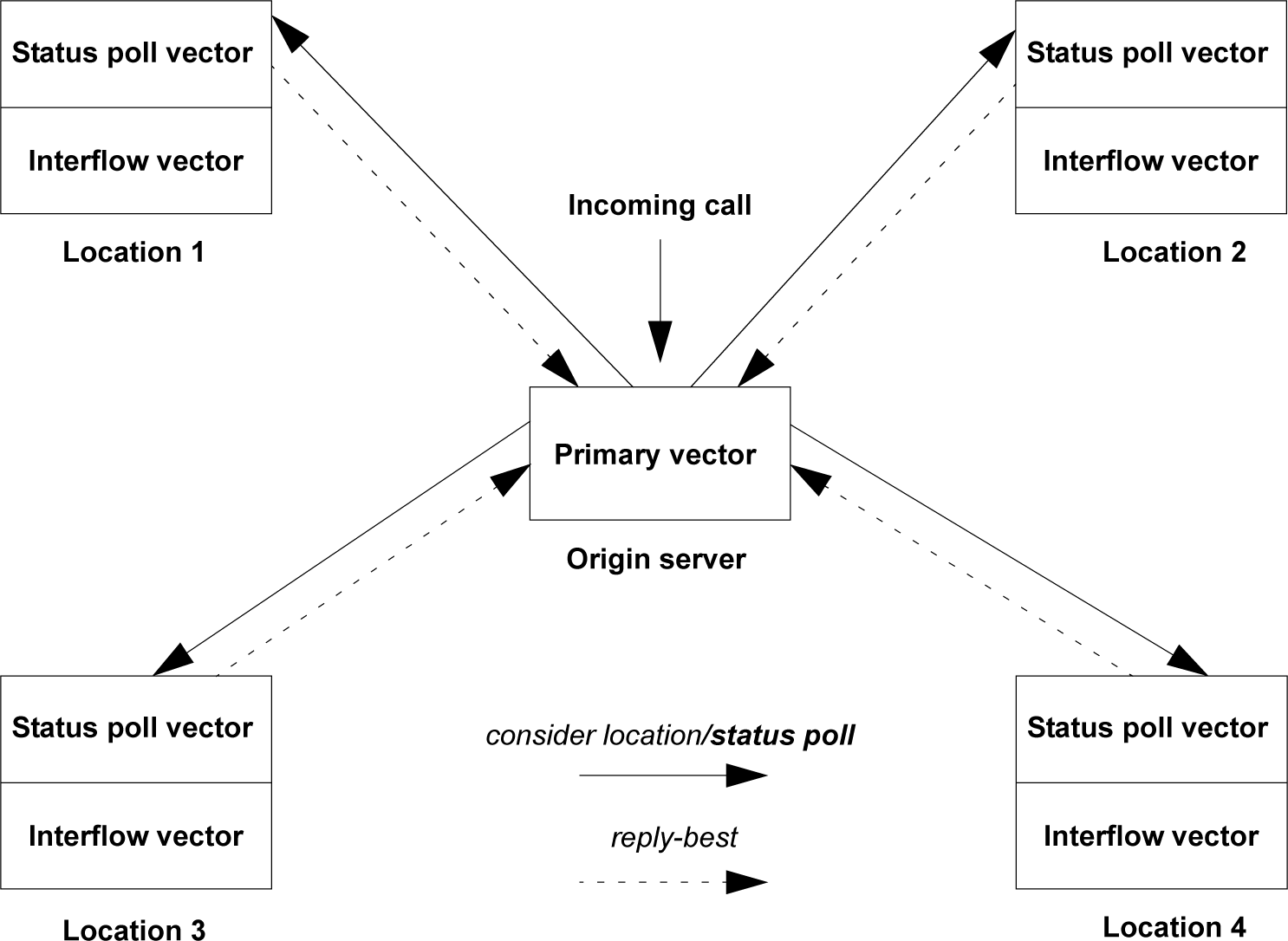
The overall application is represented in the following figure. Application plan 10 on the origin server identifies the remote servers and provides the digit strings to dial into the VDNs for both the status poll vector and the interflow vector on each server.
Each consider location command in the primary vector places a status poll call to its specified location. The status poll vector at that location executes a series of consider skill commands and returns data on the best resource to the origin server through a reply-best command.
The following example shows the primary vector for this application. The first consider series in the primary vector tests two local skills. If either skill has an available agent, step 4 jumps to step 9 and the call queues locally. No remote locations are polled. If no agents are available in either local skill, steps 5 to 8 test four remote locations. In general, do not use other commands between the consider steps. The use of the goto step is one of the few exceptions to the rule.
If the best remote location’s adjusted EWT can reduce the call’s current adjusted EWT, step 9 interflows the call to the location. In the vector, a local available agent is always favored over a remote available agent. The call is always directed to the most idle and skilled agent , irrespective of the location that services the call
Multisite BSR example
1. wait time 0 secs hearing ringback
2. consider skill 1 pri m   adjust-by  0
3. consider skill 2 pri m   adjust-by 20
4. goto step 9 if expected-wait for best = 0
5. consider location 1      adjust-by 30
6. consider location 2      adjust-by 30
7. consider location 3      adjust-by 50
8. consider location 4      adjust-by 50
9. queue-to best
10. announcement 1001
11. wait time 60 secs hearing music
12. goto step 10 if unconditionally
In the primary vector, note that user adjustments are entered for local skill 2 as well as for all the remote locations. The user adjustments indicate the administrator’s preferences regarding both local and remote resources. If neither local resource has an available agent, the EWT is greater than 0.