

AVAYA DOCUMENTATION CENTER
Find answers to your technical questions and learn how to use our products
Avaya Aura® Call Center Elite Feature Reference
VuStats display interactions and modifications for IP telephones
If you are using Communication Manager and a 4610, 4620, 4621, 4622, 9620, 9630, or 9650 type IP telephone:
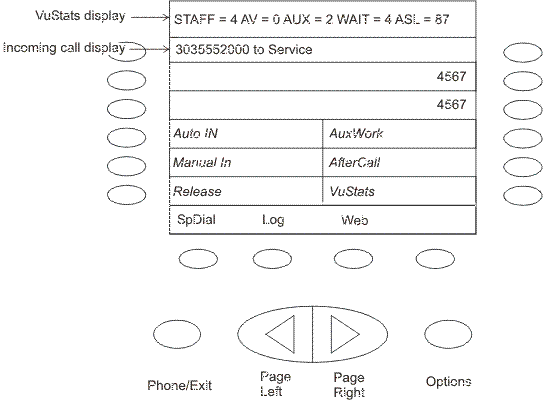
Incoming calls are displayed on the incoming call display line (second from top), and the top information display line continues to display the VuStats after a slight flicker.
For outgoing calls, the top VuStats display line is suspended when the agent originates an outgoing call. The digits dialed are echoed on the associated incoming call display line. When the call is being made, the VuStats appear again on the top line after a slight flicker.
Other single-display-line sets including the 2400 series function in the similar way like the 4xxx and 9xxx phones.
The VuStats and incoming call information displays on these types of telephones are depicted in the following diagram of a 4622 telephone display.
With certain VuStats formats, the VuStats display line cannot be viewed during agent login or logout, during any other Feature Access Code operation, or during an off- and on-hook sequence (such as a misdialed number). In these cases, the VuStats display line is restored on the next successful received or placed call or when the agent presses the VuStats button. As is normal with single-display-line sets, deactivate VuStats to see the Caller-Info (collected digits) display.