

AVAYA DOCUMENTATION CENTER
Find answers to your technical questions and learn how to use our products
Administering Avaya Aura® System Manager
Restoring the primary System Manager server
Before you begin
Create the snapshot of the primary and secondary System Manager servers.
Note:Delete the snapshot after the data is successfully restored.
Log on to the System Manager web console of the primary server.
About this task
You can restore the data when the secondary System Manager server is active or in the standby mode. However, for minimum system nonfunctional time during data restoration or an emergency or both, you can restore the data when the secondary System Manager server is active.
Note:
It is recommended to first deactivate secondary System Manager server and then start the Restore Data operation. If the Geo Data Restore operation is performed using Secondary Data while Secondary is in active state, then there could be data loss or inconsistency if changes are made on the secondary System Manager server while the Geo Data Restore operation is in progress.
If you choose to retain the primary System Manager database as part of Geo Data Restore then this note does not apply to you.
Important:
After you restore the system with the secondary System Manager data, if you want to revert to the primary System Manager data, you can restore to the primary System Manager data using the procedure in Step 4. However, you must restore to the primary System Manager data, before you enable the Geographic Redundancy replication. After you enable the Geographic Redundancy replication, you cannot restore to the primary System Manager server data.
Procedure
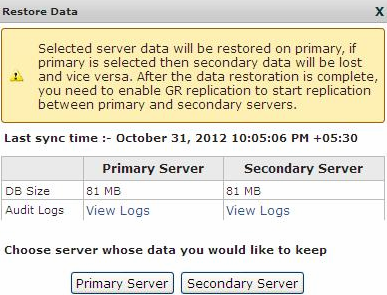
- On the Restore GR dialog box, select a server whose data you want to retain:
Primary Server
The system keeps the primary System Manager server data. The data on the secondary System Manager server is lost.
Select the secondary System Manager server if the secondary System Manager server data changes significantly during the interval between activation and deactivation and the administrator wants to retain those changes even after restoring the data using Restore Data.
Secondary Server
The system restores the data from the secondary server on the primary System Manager server. the System Manager web console is unavailable for some time. The time that the system takes to restore depends on the network speed and the size of the data that the system must restore.
After the system recovery, select the secondary System Manager server if the secondary System Manager server data changes significantly during the interval between the system recovery and the deactivation and if you want to retain the changes from the secondary System Manager server after restoring the data by using Restore Data.
System Manager displays the Restore Status dialog box.
System Manager displays the restore operation status and the status of the primary and the secondary System Manager server.
Important:After you restore the data, all changes that you make on the secondary System Manager server that is active will not be available on the primary System Manager server.
Next Steps
Verify the data and deactivate the secondary System Manager server if the server is active during the restoration process.
Enable the Geographic Redundancy replication to synchronize the primary and secondary System Manager servers.