

AVAYA DOCUMENTATION CENTER
Find answers to your technical questions and learn how to use our products
Administering Avaya Aura® System Manager
Product Initiated Registration overview
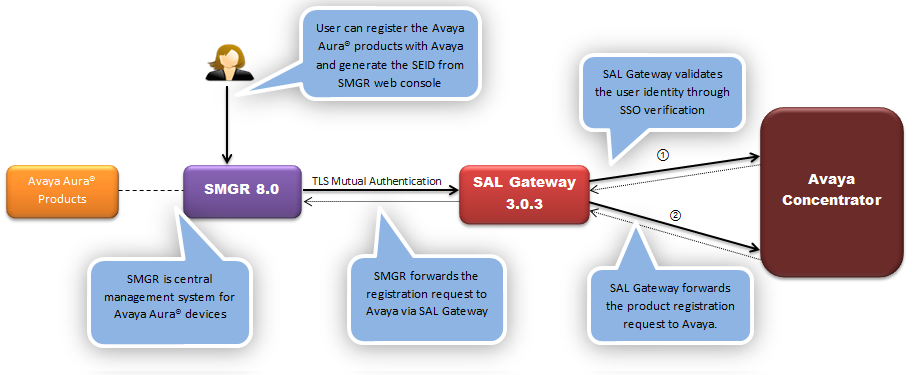
With System Manager Release 8.0, you can register the Avaya Aura® products from the System Manager web console to make the products serviceability ready.
You can use the Manage Elements page of System Manager to configure the SAL gateway and register the product. After the product is registered, the system generates an SEID and you can view the registration status in the Reg.Status column on the Manage Elements page.
The following diagram depicts the product registration with System Manager and SAL Gateway:
For information about the:
SAL gateway and the Product Initiated Registration feature, see Administering Avaya Diagnostic Server SAL Gateway on the Avaya Support website.
Products that support the Product Initiated Registration feature through the System Manager web console, see Secure Access Link Supported Products on the Avaya Support website.