

AVAYA DOCUMENTATION CENTER
Find answers to your technical questions and learn how to use our products
Administering Avaya Aura® System Manager
Solution Deployment Manager
Solution Deployment Manager simplifies and automates the deployment and upgrade process.
With Solution Deployment Manager, you can deploy the following applications:
System Manager
Session Manager
Branch Session Manager
Communication Manager
Application Enablement Services
Avaya WebLM
Avaya Diagnostic Server (Secure Access Link)
Avaya Session Border Controller Release 8.0 and later
Avaya Breeze® platform Release 3.3 and later
Avaya Aura® Media Server
For the latest and most accurate information about other Avaya product compatibility information, go to on the Avaya Support website.
Note:
When an application is deployed on a KVM host, Solution Deployment Manager does not support that application.
With Solution Deployment Manager, you can migrate, upgrade, and update the following applications:
Hardware-based Session Manager
System Platform-based Communication Manager
Duplex CM Main / Survivable Core with Communication Manager
Simplex CM Main / Survivable Core with Communication Manager, Communication Manager Messaging, and Utility Services
Simplex Survivable Remote with Communication Manager, Branch Session Manager, and Utility Services
Embedded CM Main with Communication Manager, Communication Manager Messaging, and Utility Services
Embedded Survivable Remote with Communication Manager, Branch Session Manager, and Utility Services
System Platform-based Branch Session Manager
Simplex Survivable Remote with Communication Manager, Branch Session Manager, and Utility Services
Embedded Survivable Remote with Communication Manager, Branch Session Manager, and Utility Services
Session Manager Release 7.1.3.x and later
Communication Manager Release 7.x and later
Branch Session Manager Release 7.x and later
Application Enablement Services Release 7.x and later
Avaya Breeze® platform Release 3.3 and later
System Manager Release 7.1.3.x and later (using SDM client only)
WebLM Release 7.x and later
Note:
You must manually migrate the Services virtual machine that is part of the template.
The centralized deployment and upgrade process provides better support to customers who want to upgrade their systems to Avaya Aura® Release 10.2.x. The process reduces the upgrade time and error rate.
Solution Deployment Manager dashboard
You can access the Solution Deployment Manager dashboard from the System Manager web console or by installing the Solution Deployment Manager client.
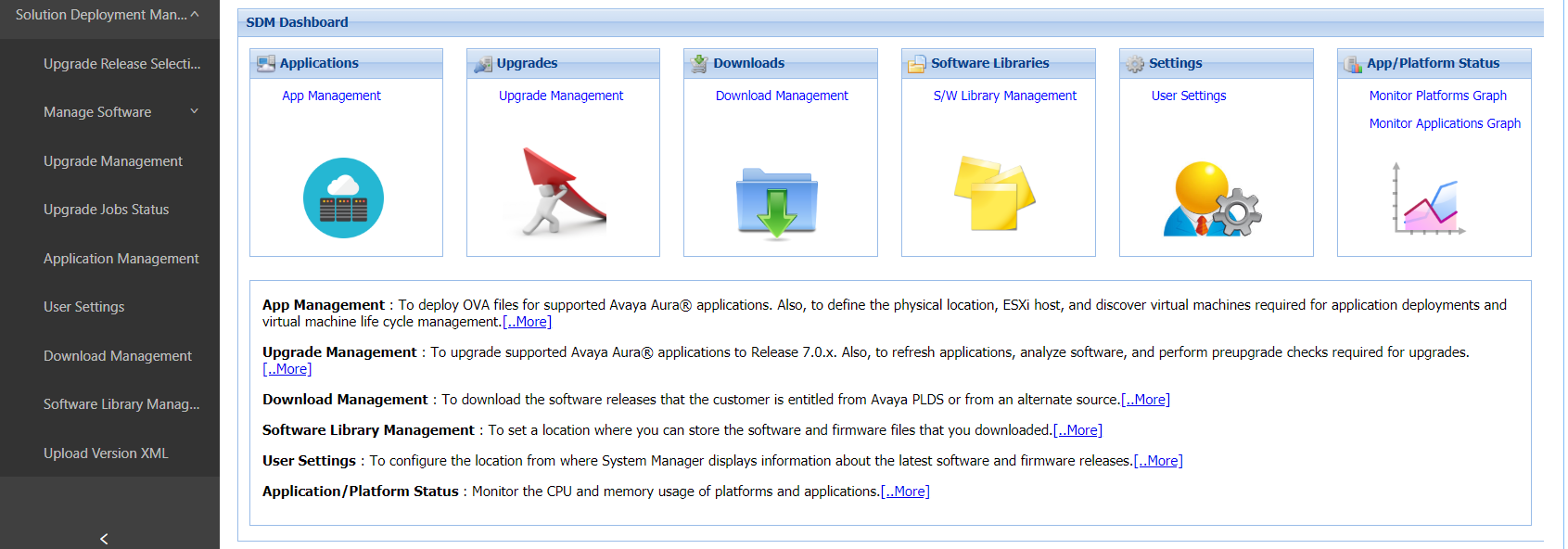
Solution Deployment Manager capabilities
With Solution Deployment Manager, you can perform deployment and upgrade-related tasks by using the following links:
Upgrade Release Setting: To select Release 7.x Onwards or 6.3.8 as the target upgrade. Release 7.x Onwards is the default upgrade target.
Manage Software: To analyze, download, and upgrade the IP Office, Unified Communications Module, and IP Office Application Server firmware. Also, you can view the status of the firmware upgrade process.
Application Management: To deploy OVA files for the supported Avaya Aura® application.
Configure Remote Syslog Profile.
Generate the Appliance Virtualization Platform Release 8.x or earlier Kickstart file.
-
Generate the platform Kickstart file for the following Appliance Virtualization Platform or Avaya Solutions Platform platforms:
Appliance Virtualization Platform 8.0.x
Appliance Virtualization Platform 8.1.x
Avaya Solutions Platform S8300 (Avaya-Supplied ESXi 7.0) Release 5.1
Upgrade Management: To upgrade Avaya Aura® applications to Release 10.2.x.
User Settings: To configure the location from where System Manager displays information about the latest software and firmware releases.
Download Management: To download the OVA files and firmware to which the customer is entitled. The download source can be the Avaya PLDS or an alternate source.
Software Library Management: To configure the local or remote software library for storing the downloaded software and firmware files.
Upload Version XML: To save the version.xml file to System Manager. You require the application-specific version.xml file to perform upgrades.