AVAYA DOCUMENTATION CENTER
Find answers to your technical questions and learn how to use our products
Administering Avaya Aura® System Manager
G430 Branch Gateway and G450 Branch Gateway multistep upgrade overview
Direct upgrade of G430 Branch Gateway and G450 Branch Gateway is not supported for certain versions. You must upgrade the gateway through specific intermediate versions. The following table displays the supported upgrade path of G430 Branch Gateway and G450 Branch Gateway:
Upgrade/Downgrade |
To version |
|||||
|---|---|---|---|---|---|---|
From version |
<= 36.xx |
37.xx |
38.18 to 38.20.x |
38.21.0 |
39.5.0 and later |
40.xx |
<= 36.xx |
Direct Upgrade |
Direct Upgrade |
Upgrade via 37.xx |
Upgrade via 37.xx |
Upgrade via 37.xx and 38.21.0 |
Upgrade via 37.xx and 38.21.0 |
<= 37. xx |
Direct Downgrade |
Direct Upgrade |
Direct Upgrade |
Direct Upgrade |
Upgrade via 38.21.0 |
Upgrade via 38.21.0 |
38.18 – 38.20.x |
Direct Downgrade |
Direct Downgrade |
Direct Upgrade |
Direct Upgrade |
Upgrade via 38.21.0 |
Upgrade via 38.21.0 |
39.5.0 |
Direct Downgrade |
Direct Downgrade |
Direct Downgrade |
Direct Downgrade |
Direct Upgrade |
Direct Upgrade |
40.xx |
Direct Downgrade |
Direct Downgrade |
Direct Downgrade |
Direct Downgrade |
Direct Downgrade |
Direct Upgrade |
For example, if G430 Branch Gateway is currently on version 36.8.0 and must be upgraded to 39.5.0, then first upgrade the gateway to 37.xx of version such as 37.38.0 or 37.41.0. Then upgrade to 38.21.0, and then to 39.5.0. Therefore, the upgrade path is 36.8.0 > 37.xx > 38.21.0 > 39.5.0.
Solution Deployment Manager supports this multistep upgrade and updates it automatically based on the current version of the gateway and the selected Upgrade to version. But Solution Deployment Manager requires that you download the intermediate versions for the upgrade path in the same software library where the selected Upgrade to version is present. Solution Deployment Manager then automatically upgrades the gateway through the intermediate versions and up to the selected Upgrade to version.
If you perform a gateway upgrade through Solution Deployment Manager, the system displays an error message. This message is irrespective of the availability of the required intermediate version in the selected software library (Upgrade Source) on the Upgrade Configuration page.
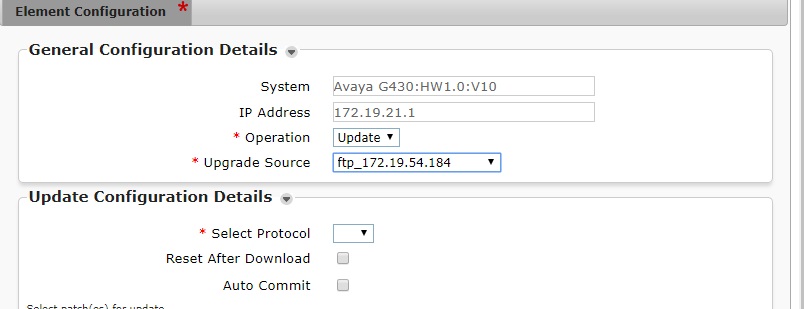
The system displays the following error message when intermediate versions are unavailable in the selected Upgrade Source or Software Library:
Page contains error(s) - Software Version(s) <Version_numbers> of Media Gateway must also be downloaded and present in the selected software library, <Software_Library_Name> for the selected upgrade path. Upgrading from <Older_GatewayVersion> to <Later_GatewayVersion> is a multi-step upgrade. Please see the Administering System Manager guide for more details.
If all required intermediate versions are present in the selected Upgrade Source software library, you can save the upgrade configuration and schedule the upgrade on the Upgrade Configuration page.
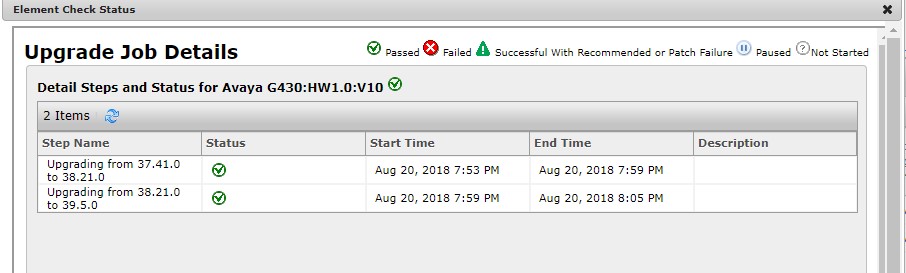
For viewing the multistep upgrades progress, you can click the Upgrade Status icon on the Upgrade Management page. To view Job Status and Upgrade Path steps with intermediate upgrades, if any, and their progress, click the Upgrade Status icon.