

AVAYA DOCUMENTATION CENTER
Find answers to your technical questions and learn how to use our products
Administering Avaya IP Office using Manager
Time Profile
You can manually override a time profile. The override settings allow you to mix timed and manual settings.
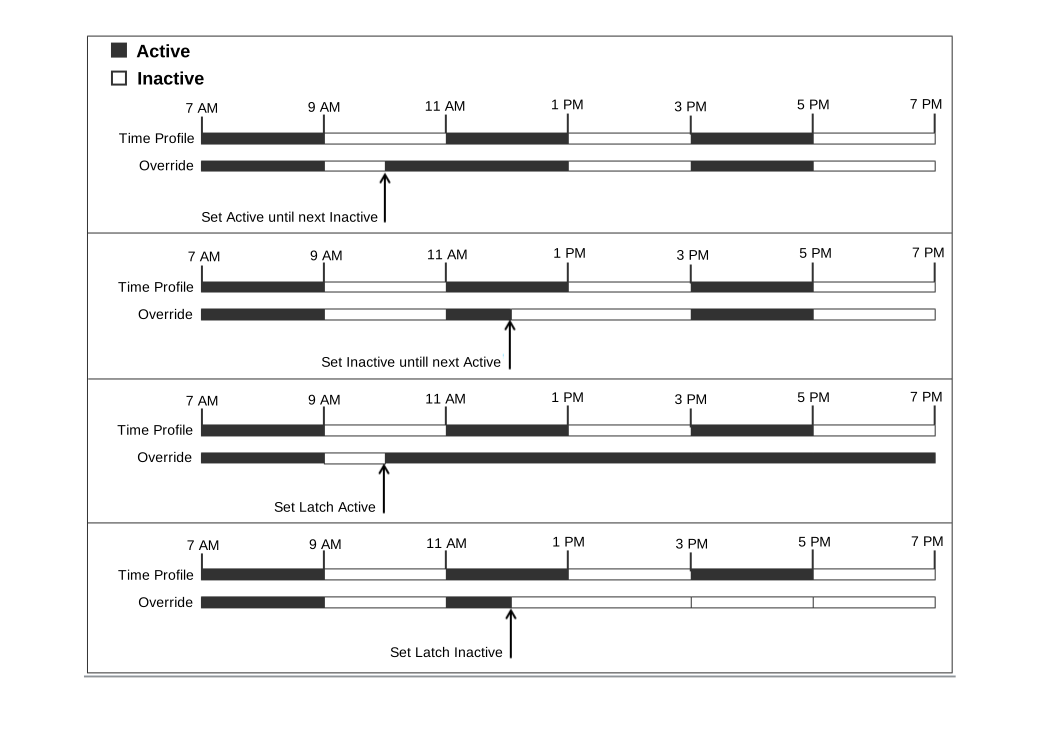
The button indicator will show the Time Profile state and pressing the button will present a menu with five options and an indication of the current state. The menu options are listed below.
Menu Option |
Description |
|---|---|
Timed Operation |
No override. The time profile operates as configured. |
Active Until Next Timed Inactive |
Use for time profiles with multiple intervals. Select to make the current timed interval active until the next inactive interval. |
Inactive Until Next Timed Active |
Use for time profiles with multiple intervals. Select to make the current active timed interval inactive until the next active interval. |
Latch Active |
Set the time profile to active. Timed inactive periods are overridden and remain active. |
Latch Inactive |
Set the time profile to inactive. Timed active periods are overridden and remain inactive. |
Details
Action: Emulation | Time Profile
Action Data: Time profile name.
Default Label: TP or Time Profile
Toggles: No.
Status Indication:
Status
1400, 1600,
9608, 9611, J100
9621, 9641
On
Green
Green On
 Green
GreenOff
Off
Off
 Grey
GreyUser Admin: No
Phone Support: Note that support for particular phone models is also dependent on the system software level.
9400 Series, 9500 Series, 9600 Series, and J100 Series.
1400 Series and 1600 Series.