

AVAYA DOCUMENTATION CENTER
Find answers to your technical questions and learn how to use our products
Administering Avaya IP Office using Manager
Line Appearance Buttons
Line appearance buttons allow specific individual line to be used when making calls or answered when they have an incoming call. It also allows users to bridge into calls on a particular line.
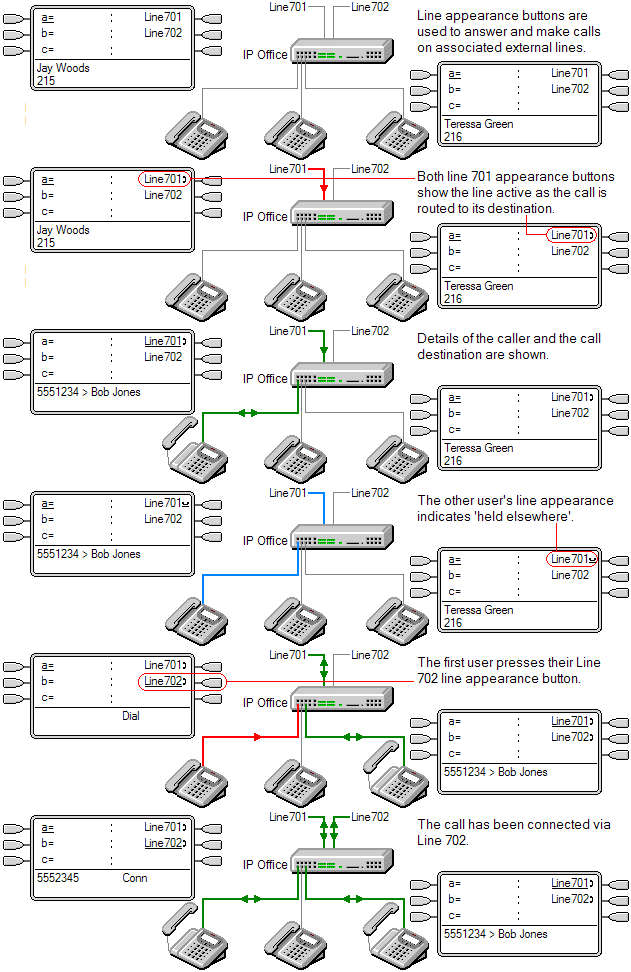
Incoming call routing is still used to determine the destination of all incoming calls. Line appearance buttons allow a call on a specific line to alert the button user as well as the intended call destination. When these are one and the same, the call will only alert on the line appearance but can still receive call coverage.
When alerting on suitable phones, details of the caller and the call destination are shown during the initial alert.
Individual line appearance ID numbers to be assigned to selected lines on a system. Line appearance buttons are only supported for analog, E1 PRI, T1, T1 PRI, and BRI PSTN trunks; they are not supported for other trunks including E1R2, QSIG and IP trunks.
Line appearance buttons are not supported for lines on remote systems in a multi-site network.
Using Line Appearances for Outgoing Calls
In order to use a line appearance to make outgoing calls, changes to the normal external dialing short codes are required. For full details see Outgoing Line Programming.
Private Lines
Special behavior is applied to calls where the user has both a line appearance for the line involved and is also the Incoming Call Route destination of that call. Such calls will alert only on the Line Appearance button and not on any other buttons. These calls will also not follow any forwarding.