

AVAYA DOCUMENTATION CENTER
Find answers to your technical questions and learn how to use our products
Administering Avaya IP Office using Manager
Ringing Line Preference
Ringing Line Preference determines the user's currently selected button as the button which has been alerting the longest. Selected button indication is applied to that button and if the user goes off-hook, for example by lifting their handset, the alerting call on that button is answered.
Ringing Line Preference includes calls alerting on call appearance, line appearance, bridged appearance and call coverage buttons.
Ringing Line Preference overrides Idle Line Preference.
By default Ringing Line Preference is on for all users.
Ringing Line Preference Order When a user's longest waiting call alerts on several of the user's appearance buttons and Ringing Line Preference is set for the user, the order used for current selected button assignment is;
Call appearance.
Bridged appearance.
Call coverage.
Line appearance.
Example:
A user has a call to a covered user alerting initially on a line appearance button. Ringing Line Preference assigns current selected button status to the line appearance. When the same call also begins to alert on the call coverage appearance button, current selected button status switches to the call coverage appearance button.
Ring Delay and Ringing Line Preference
Appearance buttons can be set to Delayed Ring or No Ring. These buttons still alert visually but do not give an audible ring or tone. Ringing line preference is still applied to alerting buttons even if set to Delayed Ring or No Ring.
Delayed Ring Preference
For users with Ringing Line Preference selected, their Delayed Ring Preference setting sets whether ringing line preference is used or ignores buttons that are visually alerting but have Delayed Ring or No Ring set. The default is off, ie. ignore ring delay.
Ringing Line Preference Example 1
In this example, both Ring Line Preference and Idle Line Preference have been set for the user. They also have Ringing Line Preference on and Auto Hold is on. Answer Pre-Select is off.
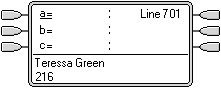 |
Phone Idle The phone is idle. The current selected button has been determined by Idle Line Preference as the first available idle call appearance button. This is shown by the _ underscore next to that button. |
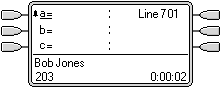 |
First Call Alerting A call for the user arrives. It alerts on the first available call appearance button. Ringing Line Preference uses this as the currently selected button as it is the only alerting call. |
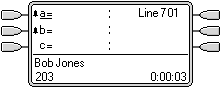 |
Second Call Alerting Another call for the user arrives. It alerts on the next available call appearance button. As the first call has been alerting longer, under Ringing Line Preference it retains the currently select button status. |
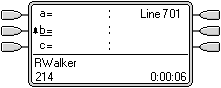 |
The First Call Abandons The first caller disconnects. Ringing Line Preference changes the currently selected button status to the second call appearance button. |
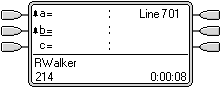 |
Another Call Arrives Another call arrives. It alerts as the first free call appearance button. However the call at the second call appearance has been alerting longer and so under Ringing Line Preference retain the currently selected button status. |
Ringing Line Preference Example 2
In this example, the user has both Ring Line Preference and Idle Line Preference programmed. They also have Ringing Line Preference on and Auto Hold is on. Answer Pre-Select is off.
|
|
First Call to User A call for the user arrives. It alerts on the first available call appearance button. Ringing Line Preference uses this as the currently selected button as it is the only alerting call. |
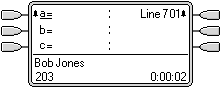 |
Call on Line 601 The user's Line Appearance is alerting due to an incoming call on the associated line. Details of the call and its destination are shown. Ringing Line Preference keeps the currently selected button status on the call appearance button as this has been alerting longest. |
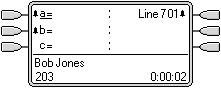 |
Second Call to User A second call to the user arrives and alerts on the second call appearance button. Ringing Line Preference keeps the currently selected button status on the call appearance button as this has been alerting longest. |
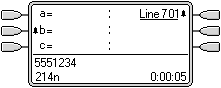 |
The First Caller Abandons The first call to the user disconnects. Ringing Line Preference passes the currently selected button status to the Line Appearance button as this has been alerting longest. |